Ask a support bot your refund window, get “14 days” when it’s really 30, and you didn’t deflect a ticket. You made an angry one.
That’s the trouble with most support AI. It answers with full confidence and has no clue you rewrote that policy last week or so.
RAG works differently. And that is where custom RAG AI development services earn their keep, shaping the build around your data, rules, and channels instead of a template.
Before the model replies, it pulls up your actual help docs and answers from those, not from whatever it vaguely remembers. As per one of the latest 2026 tests, it was observed that hallucination-related complaints dropped from 0.34% to 0.11% once the answers they started getting were correct.
So how do you build one that holds up? That’s the rest of this.
Why Chatbots and Raw LLMs Fail at Support
Old rule-based bots break the second a customer asks something nobody scripted. They match keywords, not meaning, so “where’s my stuff” and “order status” can lead to two different dead ends. A Gartner survey indicates that traditional self-service resolves just 14% of issues fully. The rest spill over to a human, usually after the customer’s patience is gone.
Raw LLMs have the reverse problem. They understand almost anything you throw at them, which feels great until one invents a return policy or quotes a price from two years back. Three things keep tripping them up in support:
- They fill gaps with confident guesses instead of saying “I don’t know.”
- They’re stuck at their training date, so a policy you changed last week doesn’t exist to them.
- They’ve never seen your business. Your SKUs, your refund rules, your voice: none of it lives in a general model.
On their own, neither one belongs in front of paying customers. RAG is what closes that gap.
| Approach | Good at | Where it breaks |
| Rule-based chatbot | Cheap, predictable for set FAQs | Rigid; anything off-script fails |
| Fine-tuned LLM | Picks up your tone and domain | Costly to retrain, still hallucinates, goes stale |
| RAG | Accurate, current, fast to update | Only as good as the knowledge base behind it |
Why Support Teams are Moving to RAG
Beyond accuracy, RAG changes both the economics and the day-to-day of running support. Here’s what teams actually get out of it.
1. Far fewer made-up answers (fewer hallucinations)
Because every reply is tied back to your real documents, the model has much less room to invent things. That’s the whole point, and it’s what makes the output safe to put in front of customers instead of only internal staff.
2. Information that stays current
There’s no retraining to schedule. Update a document and the system uses the new version on the very next question. Launch a product Monday morning, add its page, and by the afternoon the AI can answer questions about it.
3. Faster, More Useful Replies
The system fetches the exact passage it needs, so answers land quicker and hit the mark more often. AI-native support platforms now resolve most of the issues on first contact, and that’s where customer satisfaction actually moves.
4. Lower cost than fine-tuning
You don’t pay to retrain a model every time your docs change. You point RAG at your knowledge base, and it works. And because there’s no big retraining cycle, the payback usually shows up early.
5. One system, every channel
The same setup can run more than one thing. Your chat widget, agent suggestions, email replies, and help center can all pull from it. You set up the knowledge base once, and every channel uses the same one.
How a RAG Support System Works
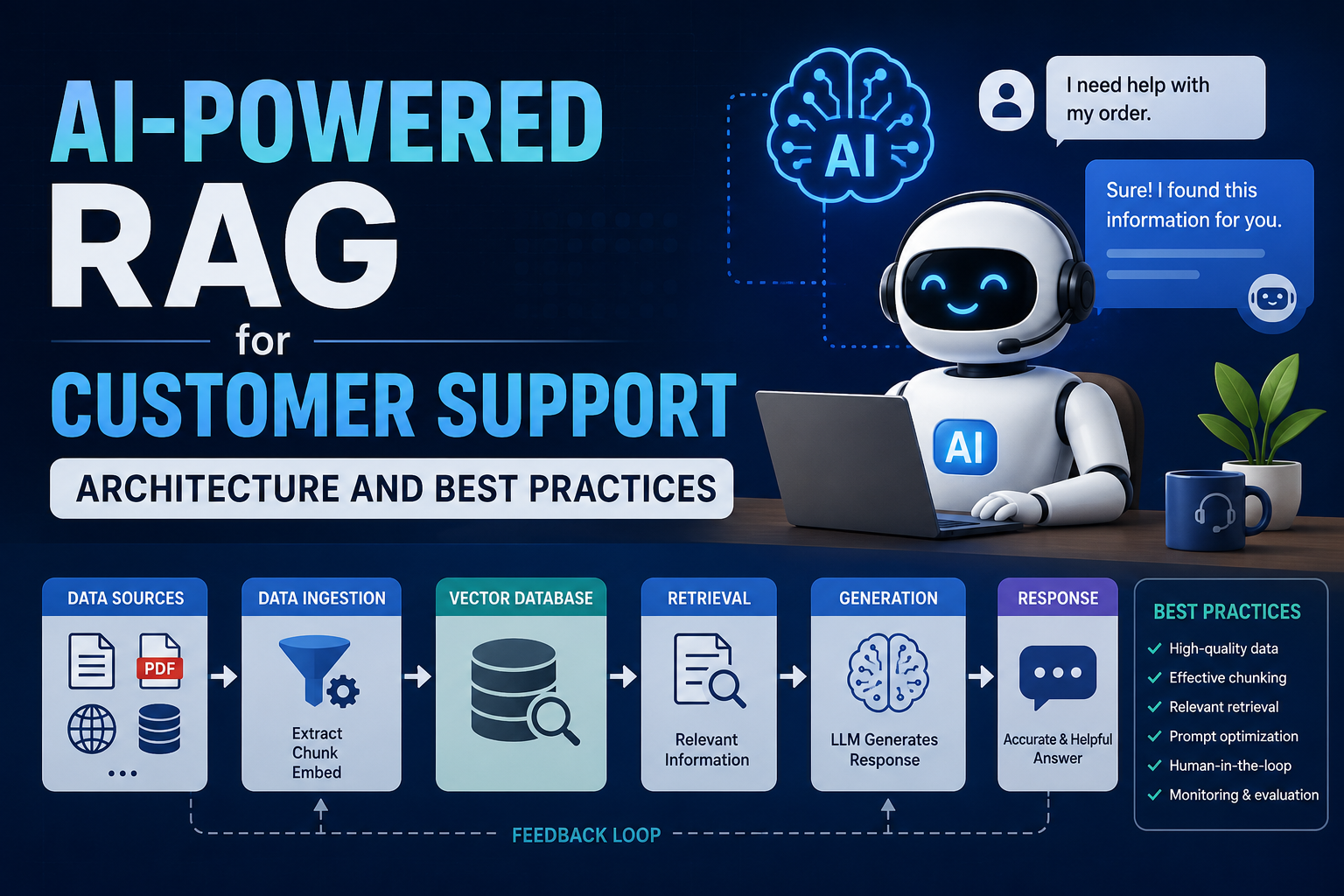
A RAG system has four parts. Here’s what each one does.
The Knowledge Base
All of the answers come from the knowledge base. Articles, FAQs, product manuals, and old tickets that were solved well. The system can only be as accurate as what you put here. If a document is wrong or missing, the answer will be too.
Chunking and Embedding
Long documents are hard to search, so the system cuts them into small pieces. Each piece is turned into a set of numbers that stands for its meaning. That’s called an embedding. The pieces get saved in a vector database, which can search by meaning instead of exact words. Suppose a customer types money back and still finds your “refund” page. This part runs before any customer shows up, and again whenever your docs change.
Retrieval and Reranking
When a question comes in, the system looks through that database for the closest pieces. A good setup also catches exact matches like an order number or error code, so nothing slips through. Then a step called reranking drops the weak matches and keeps only the few pieces that really answer the question.
Generation and Action
Now the model writes the reply. It reads the question and the pieces that were pulled, then answers from them instead of guessing. Some systems go further and do the task too, like looking up an order or starting a refund. That’s the gap between a bot that explains your return policy and one that actually handles the return.
How far do you need to go? Simple vs. Agentic RAG
Simple RAG answers questions. The customer asks, the system pulls the right document, writes a reply, done. This covers most of what hits a support queue. Where is my order, how do I reset my password, what’s your return window. If your tickets are mostly questions with answers that already live in your docs, this is all you need.
Agentic RAG performs the entire task. Rather than simply replying to a query, it takes the necessary steps. It looks out for the order in your system, checks if it qualifies for a refund, and issues it. This turns bots from “how to return an item” to actually processing the return.
The catch is cost and speed. An agentic system makes several passes instead of one, so it’s slower and runs up a bigger bill per answer. Most teams cap it at a few steps per question and only turn it on for the tasks worth automating. It starts with a simple query and works on your question, then takes action, saving the real time of the agent.
Also, as per a Gartner report, agentic AI will be able to handle around 80% of common service issues by 2029. This gives a clear direction, and that is teams getting there are the ones that are implementing RAG into their business practices.
Building a RAG System for Customer Support: Best Practices
The gap between a RAG system customers trust, and one they learn to avoid usually comes down to a handful of choices. Here are the best practices to be followed:
1. Start with Clean Source Data
Your answers will only be good if the documents uploaded by you are correct. Ensure there is no content duplication, outdated pages are fixed, and everything is latest. This habit of adding clean and clear data ensures more accuracy than the model upgrade.
2. Use Hybrid Search and Reranking
Meaning-based search alone can miss an exact order number or error code. Pair it with keyword search so both get caught, then add a reranker to keep only the strongest matches. It’s the cheapest way to get a real jump in answer quality.
3. Keep the Knowledge Base Fresh
Support docs change all the time. If a customer opens a dispute and your system still runs on last night’s data, it hands them a stale answer at the worst possible moment. Set updates to flow in automatically as docs change, instead of once a day.
4. Protect Data with Permissions
A support agent shouldn’t see another customer’s records, and neither should your AI. Therefore, it becomes vital to grant role-based access control that only pulls information about what the user is allowed to see. If there is something sensitive, ensure you mask personal details before they reach the model.
5. Match your Brand Voice
Even if the answer is accurate, but the tone seems a bit off, agents will rewrite it. So the time you saved is gone. In this case, to match your brand voice, feed the model with your voice guidelines so that it looks like replies are coming from your team, not bots. Customers can clearly tell the difference between the bots and humans.
6. Build an Easy Human Handoff
A bot can definitely not get everything right. If a customer is stuck at a dead end, eventually give up. Therefore, AI should be clearly instructed when to back out the bot and pull in an actual person in the conversation. The handoff should feel smooth when this process happens.
Build it In-House or Bring in a Partner.
A well-designed RAG system doesn’t just answer customer questions, it delivers accurate, up-to-date responses grounded in your business knowledge while reducing support costs and improving customer satisfaction. The key is choosing the right architecture, maintaining a clean knowledge base, and continuously optimizing retrieval quality.
If you’re planning to implement a production-ready RAG solution, Signity Solutions can help. Our team specializes in custom RAG AI development services, helping organizations build secure, scalable, and enterprise-grade AI assistants tailored to their data, workflows, and compliance requirements. Whether you’re modernizing customer support, building internal knowledge assistants, or deploying AI across multiple channels, we can help you turn RAG into measurable business value.