
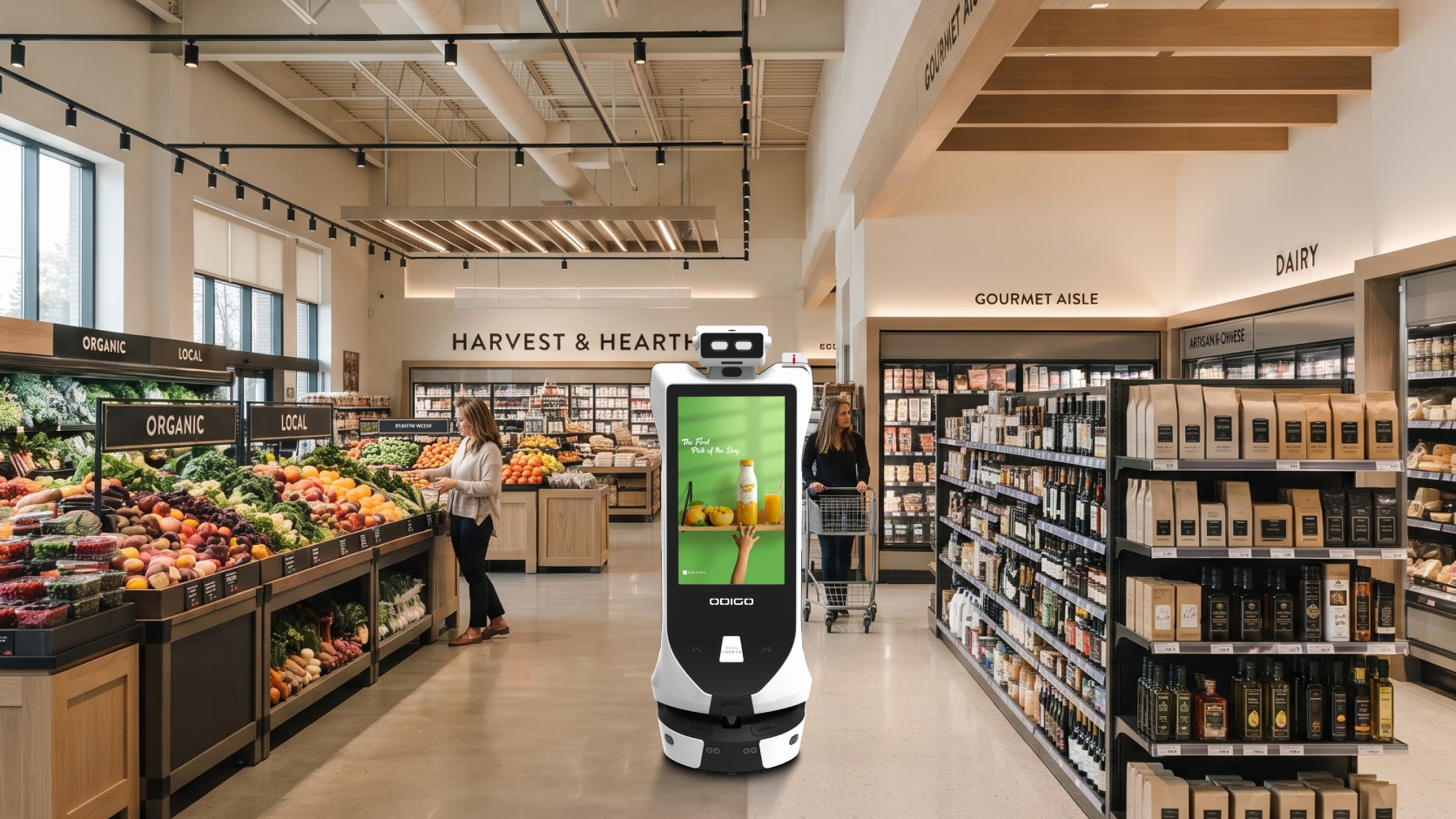
A Grocery Store Robot is a robotic system designed to perform or support specific tasks inside a grocery store, such as helping shoppers find products, navigating aisles, checking shelf conditions, cleaning floors, moving goods, or delivering digital promotions. Many systems are mobile and use mapping, sensors, software, and autonomous navigation to work around shoppers, carts, displays, and employees.
That distinction matters in the United States, where the physical grocery store remains important but shoppers increasingly expect digital convenience. FMI’s 2026 U.S. Grocery Shopper Trends research reports that 54% of shoppers always shop in-store at their primary store, while 71% use digital technology during grocery shopping. It also found that 69% want an easy in-store experience and 69% want to find aisles or departments easily.
For retailers, the opportunity is to use robotics where it can remove friction without making the store experience more complicated.
A customer-facing Grocery Store Robot can provide another interaction point between the shopper and the store. A mobile Advertising Robot Odigo can also support approved promotional content in shopper areas rather than relying only on fixed screens.
Key Takeaways
- A Grocery Store Robot should solve a defined store problem.
- Different systems support shelf intelligence, cleaning, transport, navigation, customer assistance, and advertising.
- A Robot Assistant can help shoppers search, navigate, discover promotions, and request human help.
- Odigo is most relevant on the customer-facing side of grocery automation, where assistance, wayfinding, engagement, and mobile advertising meet.
- Kody Robots can be evaluated around how effectively Odigo fits the shopper journey and existing store operations.
What Is a Grocery Store Robot?
A Grocery Store Robot is a robotic system used inside a grocery environment to automate or support a defined customer-facing or operational workflow. Depending on its design, it may navigate autonomously, collect data, interact with shoppers, complete repetitive physical tasks, or alert employees.
A floor-care robot has different hardware from a shopper-assistance unit, while a shelf-monitoring machine uses different sensors and software from a robot built for wayfinding.
What Do Grocery Store Robots Do?
Shelf Scanning and Inventory Support
Some robotic systems move through aisles and collect information about shelf conditions. They may help identify areas that need review, such as empty shelf positions, shelf-label issues, or merchandising exceptions, depending on the system and available store data.
The useful workflow is:
Observe → Identify Exception → Prioritize → Employee Action
A robot creates more value when the information reaches the right employee or store system quickly enough to trigger action.
Spill Detection and Floor Care
Floor conditions change throughout the day. Some robots support scheduled floor cleaning, while others may identify conditions that require attention.
The robot handles planned repetition. Employees remain responsible for urgent spills, unusual hazards, difficult areas, and safety decisions.
Product Discovery and Customer Assistance
A shopper may know what they want but not where to find it. A Grocery Store Robot can provide another way to search for a product, department, service point, or promotion.
Internal Transport
Transport-focused systems can support repetitive movement between approved areas when routes, payloads, loading procedures, and safety requirements are clearly defined.
This is a different job from customer assistance and should be evaluated separately.
Grocery Automation at a Glance
| Robot type | Main job | Who benefits | Typical use |
|---|---|---|---|
| Shelf intelligence | Observe shelf conditions | Inventory teams | Flagging areas for review |
| Floor care | Support cleaning routes | Operations and shoppers | Repeating scheduled cleaning |
| Transport | Move approved goods | Store operations | Internal movement |
| Customer assistance | Search, directions, information | Shoppers and associates | Helping a shopper reach a department |
| Advertising and engagement | Deliver campaign content | Retailers, brands and shoppers | Promoting an offer in an approved zone |
The table shows why choosing a Grocery Store Robot starts with the workflow rather than the machine.
How Does a Grocery Store Robot Work?
At a high level, a mobile Grocery Store Robot needs to understand where it is, sense what is around it, process a request or task, take action, and respond safely when the environment changes.
The exact technology varies, but the operating logic can be understood in five steps.
Step 1: Mapping the Store
A mobile robot needs a representation of the environment. A map may define aisles, departments, customer zones, restricted areas, charging locations, and approved routes.
Depending on the system, technologies such as LiDAR, depth cameras, and other sensors can help estimate position and detect obstacles.
This matters because grocery stores constantly change. Customers move unpredictably, carts stop in aisles, temporary displays appear, and employees replenish shelves.
Autonomous Robots therefore need both a map and real-time perception of the environment.
Step 2: Receiving or Collecting Information
The second step depends on the job.
A shelf-focused robot may collect visual data. A cleaning system may follow a predefined route. A customer-facing system may receive a shopper request through a touchscreen, voice interface, or another input method.
For Odigo, the interaction can begin with customer intent. A shopper may search for a product, select a destination, explore information, or engage with promotional content.
The robot should use reliable store information rather than invent prices, availability, or promotion terms.
Step 3: Processing the Request
Software determines what happens next.
For shelf-oriented robotics, that may mean comparing observations with approved store data. For a customer-facing robot, it may mean matching a request with a known destination on the store map.
A useful model is:
Input → Interpretation → Decision → Action
AI can support classification, search, navigation, or other defined functions, but it should operate within clear boundaries.
Step 4: Acting or Escalating
The robot then completes the assigned action.
A Grocery Store Robot may navigate to a destination, follow a cleaning route, display information, move an approved load, or generate an alert.
For customer wayfinding, the journey can be:
Ask → Select Destination → Calculate Route → Follow → Arrive
If the request cannot be completed confidently, the system should move toward human assistance.
Step 5: Reporting, Repeating, and Charging
Robotic operations are repetitive by design.
A system may complete tasks, record activity, return to a charging point, and become available again. Retailers can then review usage, requested destinations, route interruptions, campaign engagement, or human-assistance requests depending on the system.
How Does Odigo Fit Into Grocery Store Robotics?
Odigo is most relevant where a grocery store needs a mobile layer between digital information and the shopper.
An AI Robot Assistant Odigo can be positioned around product and destination search, guided wayfinding, customer interaction, promotional engagement, and human handoff based on the use cases already defined for the system.
A shopper can begin with a search, select where they want to go, and follow the robot through approved store areas toward the destination.
That creates a different experience from a fixed kiosk because the information point can move with the shopper.
Why Is Wayfinding a Strong Grocery Use Case?
FMI’s 2026 research shows that 69% of grocery shoppers value being able to find aisles or departments easily. That makes navigation a practical customer-experience issue.
A Grocery Store Robot can support wayfinding when maps and destination data are maintained accurately.
The purpose is not to impress shoppers with robotics. It is to reduce the time and effort needed to reach the right product area, department, service counter, or promotion.
How Can Odigo Support In-Store Advertising?
Odigo can support approved promotional content on its screen while operating in selected store areas. Possible uses include featured products, seasonal campaigns, new launches, brand activations, store offers, and QR-based engagement.
This gives retailers another media surface without replacing existing signs, displays, or digital screens.
Can Store Robotics Improve Store Intelligence?
Robotics can generate operational signals as well as complete tasks.
Customer-facing systems may show aggregated patterns around requested destinations, searches, promotion engagement, or assistance demand. Operational systems may create data around task completion, route interruptions, exceptions, or uptime.
McKinsey’s 2026 North American grocery research notes that retailers are increasingly embedding AI and digital tools into customer and operational workflows.
A Robotics Solution for Grocery Store operations should therefore connect robotic activity with decisions rather than simply collecting more dashboard data.
What Are the Benefits?
A customer does not always need a full service interaction. Sometimes they simply need to know where something is.
Robotics can support these routine requests while employees focus on exceptions, judgment, merchandising, complaints, and complex questions. It can also repeat defined tasks consistently and create another interface between the physical and digital shopping journey.
FMI’s 2026 research describes grocery shopping as increasingly connected across physical stores and digital tools, reinforcing the importance of reducing friction between the two.
What Are the Limits and Common Concerns?
Robotics should be evaluated realistically. Employees remain essential for judgment, safety, customer relationships, complaints, merchandising, and unexpected situations.
Store layout also matters: narrow aisles, heavy cart traffic, temporary displays, poor connectivity, and changing merchandising can affect performance.
Privacy requires clear rules when systems use cameras, sensors, or interaction data.
These are important considerations for Robots for Grocery Store environments.
What Should Retailers Check Before Deployment?
Before retailers Buy Robots for Grocery Store operations, they should define the job first.
Then review:
- Store layout and aisle conditions
- Operating and restricted zones
- Customer traffic
- Mapping requirements
- Network connectivity
- Charging location
- Staff responsibilities
- Human handoff
- Content or product-data updates
- Maintenance and support
- Success metrics
A useful framework is:
Problem → Workflow → Robot Role → Human Role → Data → KPI
The right Grocery Store Robot is not necessarily the machine with the longest feature list. It is the one that fits the workflow the retailer needs to improve.
Why Consider Kody Robots for Grocery Retail?
At the BOFU stage, retailers need to decide whether customer-facing robotics fits the real store journey.
As a Robotics company in India, Kody Robots can be considered by grocery retailers evaluating mobile shopper assistance.
Kody Robots can position Odigo around search, guidance, wayfinding, promotional engagement, and access to human support.
The strongest case for Kody Robots is focused. Odigo does not need to replace purpose-built shelf-scanning, cleaning, transport, or stocking systems. Its role can remain close to the shopper.
Retailers evaluating Kody Robots should consider how Odigo fits store maps, operating areas, traffic, campaign workflows, charging, and staff handoffs.
Kody Robots can also be evaluated around whether one customer-facing platform can support assistance and mobile promotion without making the shopping experience more complicated.
That gives Kody Robots a clear role inside a wider grocery technology strategy.
Frequently Asked Questions – Grocery Store Robot
What Is a Grocery Store Robot?
A Grocery Store Robot is a robotic system designed to support a defined grocery-store workflow, such as customer assistance, navigation, shelf monitoring, cleaning, transport, advertising, or another repeatable task.
How Do Grocery Store Robots Work?
They typically combine mapping, sensors, software, task logic, and autonomous or semi-autonomous movement. The exact workflow depends on the robot’s purpose.
What Is a Grocery Robot Used For?
A Grocery Robot may support product finding, navigation, shelf observation, floor care, transport, promotional engagement, or employee alerts depending on its design.
Will Grocery Store Robots Replace Workers?
No. Robots are better suited to repeatable and structured work. Employees remain essential for customer relationships, safety, judgment, merchandising, complaints, and exceptions.
How Much Does a Grocery Store Robot Cost?
There is no universal price. Cost depends on robot type, hardware, software, deployment scale, integration, support, maintenance, and the workflow being automated.
Are Autonomous Systems Safe Around Shoppers?
Autonomous Robots can operate in customer environments when appropriate navigation, obstacle detection, operating zones, safety processes, and human oversight are in place.
Conclusion
A Grocery Store Robot is best understood as a purpose-built system for improving one part of the grocery environment.
Some robotic systems support shelf intelligence, cleaning, or transport. Customer-facing systems can help shoppers search, navigate, engage with promotions, and reach employees.
Odigo gives Kody Robots a focused role in that customer-facing layer.
The opportunity is not to make every grocery task robotic. It is to identify where automation genuinely reduces friction.
When the right robot is matched with the right workflow, retail automation becomes less about futuristic technology and more about making the physical store easier for shoppers and employees to use.
Sources
- FMI – U.S. Grocery Shopper Trends 2026: The Evolving Physical Store
Used for current U.S. shopper behavior, including in-store shopping, digital technology use, and the importance of easy aisle and department finding. - FMI – Digital Engagement Is Transforming Grocery Shopping (2026)
Used for the broader shift toward connected physical and digital grocery journeys. - McKinsey & Company – The State of Grocery in North America (2026)
Used for current grocery-industry trends around AI, digital tools, customer workflows, operational workflows, and data-supported decision-making.