
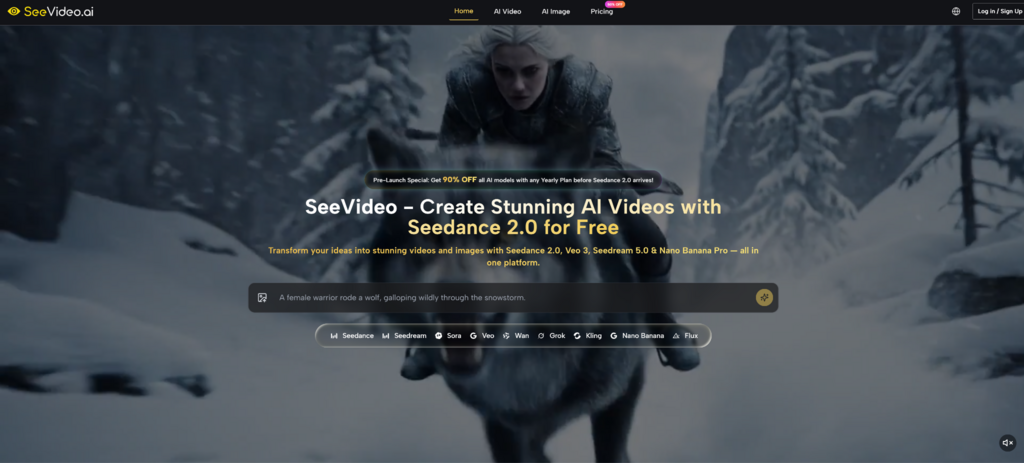
The latest wave of AI video tools has made one thing clear: the difference between a forgettable clip and a usable creative asset often begins before generation. It begins with the prompt. That is why Seedance 2.0 is more interesting when viewed through a director’s workflow than through a simple feature checklist. A model may support text, image, and audio-based generation, but the user still needs to guide subject, motion, lighting, scene logic, and camera behavior with intention.
Most people approach AI video as if it were a magic search box. They type a broad idea, wait for a result, and then blame the model when the clip feels generic. In practice, better AI video creation is closer to giving instructions to a small production team. The prompt needs to describe what the viewer sees, how the camera moves, how the subject behaves, what mood the lighting creates, and what should remain stable from beginning to end.

That is where SeeVideo becomes useful as a practical creative environment. It brings Seedance 2.0 into a broader platform that also includes other video and image models, giving creators more flexibility when a project needs testing, comparison, or revision. But the strongest results still depend on a disciplined workflow. This review looks at SeeVideo from a prompt-engineering angle: how creators can use it more effectively, where Seedance fits, and why the best practice is not “write more,” but “direct more clearly.”
The Best Prompt Starts Like A Shot Brief
A strong AI video prompt should not sound like a vague wish. It should sound like a compact shot brief. Instead of writing “make a beautiful cinematic product video,” a more useful prompt defines the subject, setting, camera path, lighting, movement, mood, and output purpose.
For example, a practical product prompt might describe a glass perfume bottle on a marble surface, soft morning light through a window, slow push-in camera movement, subtle reflections, shallow depth of field, and a calm luxury mood. That gives the model visual structure. It also gives the user a clearer way to judge the result.
SeeVideo’s platform positioning supports this approach because Seedance 2.0 is presented for text, image, and audio-to-video creation, with multi-scene capability as a highlighted strength. But multi-scene work does not mean a creator should overload one prompt with too many unrelated ideas. The best practice is to keep each scene legible and intentional.
Camera Instructions Change The Entire Result
One of the biggest mistakes in AI video prompting is forgetting the camera. A static subject with no camera direction can easily feel like a moving poster. Camera language gives the clip a sense of authorship.
Movement Should Match The Story Goal
A slow push-in can make a product feel premium. A handheld follow shot can make a lifestyle moment feel candid. A wide establishing pan can make a scene feel cinematic. The point is not to add camera movement randomly, but to use it as part of the message. From a practical user perspective, Seedance-related workflows are more convincing when the prompt treats the camera as an active storytelling tool.
Reference Inputs Should Reduce Ambiguity
Text prompts are powerful, but they also leave room for interpretation. Image references can reduce that ambiguity, especially when a creator needs a specific product shape, character look, brand direction, or visual style. SeeVideo’s official positioning includes image-to-video generation through Seedance 2.0, and its broader platform also includes image creation models that can support visual preparation before motion generation.
The best practice is to treat the reference image as a foundation, not as a guarantee of perfect frame-by-frame preservation. A product photo, character portrait, or lifestyle image can guide composition and identity, but complex movement may still introduce changes. The creator should review the generated video carefully, especially when brand accuracy matters.
Reference Quality Affects Motion Stability
A noisy, blurry, crowded, or visually confusing image can make generation harder. A clean reference usually gives the model a stronger starting point.
Simple Visual Sources Are Easier To Control
For product videos, a clear object with good lighting and minimal background clutter is easier to animate than a busy image full of competing details. For character-based videos, a clean pose and readable face help the system understand identity and structure. The user should simplify the starting image before expecting the model to create stable motion.
Official Workflow For Better Seedance Results
The official creation path is simple, but using it well requires creative discipline. The process can be understood in three practical steps: provide the input, generate the video, then review the output against the real use case.
Step One Defines The Visual Assignment
The user begins with a text prompt, reference image, or audio input depending on the selected generation path.
The Assignment Should Be Specific
A strong assignment includes subject, action, scene, lighting, camera movement, and intended mood. If the project needs a product demo, the prompt should say what the product does visually. If it needs a social clip, the prompt should describe the hook moment. If it needs atmosphere, the prompt should explain texture, pace, and framing.
Step Two Generates A Focused Motion Draft
After the input is provided, the platform generates the video through the chosen model workflow. Seedance 2.0 is positioned for multi-scene video, text-to-video, image-to-video, and audio-supported creation.
Focused Drafts Beat Overloaded Prompts
The best practical approach is to create focused drafts first. A short, clear scene is easier to evaluate than a prompt that tries to include product reveal, character acting, weather changes, camera rotation, background transformation, and text overlay all at once. Complex creative ideas can be built through smaller controlled tests.

Step Three Reviews For Practical Usability
Once the video is generated, the user should review it based on the intended channel and task.
A Good Clip Must Fit The Brief
A result can look visually attractive and still fail the assignment. The product may be unclear, the motion may distract from the message, or the style may feel wrong for the brand. The useful question is not simply “does it look good?” The useful question is “would I actually use this in the project?”
How Seedance Supports Directed Creation
Seedance 2.0 is especially relevant when the user wants motion that feels more planned than random. The model is presented as supporting multi-modal inputs and giving creators control over performance, lighting, shadow, and camera movement. Inside SeeVideo, that makes it useful for creators who think like directors rather than prompt gamblers.
The second link between platform and best practice is model comparison. A user can begin with Seedance 2.0 AI Video for a multi-scene or audio-supported concept, then compare other model paths when the project needs a different strength. This is useful because not every creative problem should be forced through the same model.
For example, a social video may need speed and strong visual rhythm. A product scene may need object clarity. A cinematic short may need atmosphere and motion coherence. A reference-based character clip may need stability more than dramatic camera movement. SeeVideo’s platform structure helps users think in those categories.
Best Practice Comparison For Common Mistakes
The table below summarizes how a creator can improve results by changing the working method rather than simply blaming the model.
| Common Mistake | Better Practice | Why It Helps |
| Writing a vague prompt | Use a compact shot brief | Gives the model clearer visual direction |
| Ignoring camera movement | Describe push-in, pan, tracking, or static framing | Makes the clip feel intentionally directed |
| Overloading one scene | Test one focused idea first | Reduces confusion and visual instability |
| Using messy references | Start with clean images or clear subjects | Improves subject readability and control |
| Expecting perfect first results | Review and regenerate selectively | Treats AI video as an iterative workflow |
| Judging only beauty | Judge fit for the actual project | Keeps the output commercially useful |
Where The Workflow Still Has Limits
Even with good prompting, AI video generation is not fully predictable. Complex scenes may need multiple attempts. Subject consistency can vary, especially when there are several people, detailed objects, or dramatic movement. Fine details such as hands, small logos, product edges, reflections, and background text should be checked before any commercial use.
Text in video also deserves caution. Some AI video systems can generate text overlays, but best practice is to keep words simple, avoid rare symbols, and review accuracy carefully. For serious advertising or brand work, final typography may still be better handled in editing software after generation.
Another limitation is that multi-scene generation increases creative ambition but also increases the need for planning. A two-scene idea should have a clear relationship between scenes. If scene one is a product close-up and scene two is a lifestyle reveal, the prompt should make that transition logical. Otherwise, the result may feel visually impressive but narratively loose.
The Creator Still Needs Editorial Judgment
The strongest use of SeeVideo is not blind automation. It is assisted direction. The platform can accelerate visual testing, but the creator still decides what is usable.
Human Review Turns Output Into Content
A generated clip becomes content only after someone checks whether it fits the message, audience, brand, and channel. This is especially important for product visuals, client work, and paid advertising, where small errors can reduce trust.

Who Should Use This Prompt First Approach
SeeVideo is best suited for creators willing to think clearly before generating. Social media managers can use it to test hooks and motion styles. E-commerce sellers can explore product presentation. YouTubers can build visual support shots. Agencies can develop campaign directions faster before investing in heavier production.
It is less suitable for users who expect one vague prompt to create a finished campaign asset. That expectation misses the real nature of AI video. The better mindset is to direct, test, review, and refine.
Seen from that angle, SeeVideo’s value is practical. It gives creators access to Seedance 2.0 and other model options, but its real strength appears when the user brings a clear visual brief. The model can generate the motion, but the direction still begins with the person writing the prompt.