

Supporting personal student hardware allows universities to expand access to essential coursework while reducing costly investments in physical computer labs.
Your students arrive on campus expecting seamless access to academic software on the personal laptops they carry everywhere. When your department relies on physical computer rooms, learners face arbitrary scheduling limits and crowded facilities.
Meeting modern academic expectations means taking computing directly to your students. By building a flexible delivery strategy, you supply specialized coursework software to student laptops without friction or location barriers.

Image source: https://www.pexels.com/photo/woman-in-pink-sweater-holding-gray-laptop-6609460/
Why Must You Build Modern Mobile Campus Frameworks?
Campus activity continuously shifts toward individual mobility instead of stationary desktop stations. Establishing a formal BYOD strategy grants every student equal opportunity to run required academic software on their personal machines. Removing physical location barriers frees your technical team from managing restrictive computer room schedules.
Students gain complete freedom to study inside dorm rooms, libraries, or nearby coffee shops without losing connectivity to coursework. Your department moves from maintaining physical hardware to orchestrating seamless software delivery across campus grounds.
How Do You Bridge Operating System Gaps Across Diverse Hardware?
Students carry an unpredictable mix of Windows, Mac, and Chromebook laptops into lecture halls. Research from EDUCAUSE highlights that 96% of college students rely on personal laptops to complete their academic work. Meeting that overwhelming demand requires your systems to handle varied operating systems without friction or mandatory hardware upgrades.
Decoupling software applications from local host operating systems resolves cross-platform friction immediately. Centralized delivery systems stream full application interfaces directly to student screens. A budget Chromebook user runs heavy statistics packages or engineering platforms just as smoothly as a peer on a high-end workstation.
Unifying Cross-Platform Student Experiences
Standardizing application access across different operating systems levels the academic playing field. Implementing streamlined architectural choices allows your team to support any personal laptop configuration without expanding support tickets.
-
Package applications centrally: Deliver coursework software through lightweight application containers rather than complex local installations.
-
Standardize web access: Stream demanding computational workloads through responsive web portals that function identically across all browser platforms.
-
Automate driver configuration: Provide self-service portals with pre-configured drivers so personal devices connect to university printers effortlessly.
What Does Zero-Trust Security Require on Unmanaged Student Hardware?
Permitting unmanaged student devices onto campus networks introduces distinct cybersecurity considerations. Installing intrusive management profiles on private hardware creates friction with students who value personal privacy. Legacy perimeter defenses prove insufficient when hundreds of unmanaged endpoints join local Wi-Fi networks daily.
Deploying a zero-trust architecture resolves network vulnerability issues by inspecting every connection attempt individually. A report from Campus Technology notes that higher education IT teams managing unmanaged student hardware prioritize zero-trust identity verification, centralized application checks, and layered security controls to thwart automated credential theft. Context-aware security checks restrict access to sensitive administrative directories while keeping academic software fully accessible.
How Can You Protect Campus Data Without Invading Student Privacy?
Respecting student boundaries remains just as important as shielding institutional servers. College students reject invasive IT software that scans their private folders or monitors their personal browsing habits. Enforcing heavy-handed management tools on personal property damages trust between your administration and your student body.
Application-level controls give you a balanced path forward. By isolating academic workflows within secure application containers, you keep institutional data separated from personal files. Students retain complete autonomy over their personal systems, while your department retains absolute control over academic intellectual property.
Lowering Capital Expenditure Through Student Compute Power
Maintaining physical computer labs consumes significant operational capital through frequent desktop replacement cycles, licensing costs, and high power consumption. Purchasing rows of high-performance desktop towers every few years strains institutional resources that could fund student success programs.
Repurposing underused computer labs generates immediate financial and spatial benefits across campus. Reclaiming dedicated computer room footprints allows facilities teams to create collaborative study lounges, group work stations, or flexible seminar rooms. Cutting the size of physical computer fleets reduces institutional electricity bills while directing technology funding toward student-centered services.
Formulate Sustainable Device Policies for Your Institution
Crafting clear device policies prevents confusion across your campus community. Your documentation must outline baseline hardware expectations for incoming students while providing clear avenues for those needing technical assistance. Establishing realistic standards upfront helps students choose equipment that comfortably handles their academic major.
You must partner with financial aid offices to provide loaner laptops or emergency hardware subsidies for low-income learners. A successful device strategy bridges digital divides rather than widening them. When you combine flexible software delivery with targeted hardware support, every student receives equal opportunity to excel.
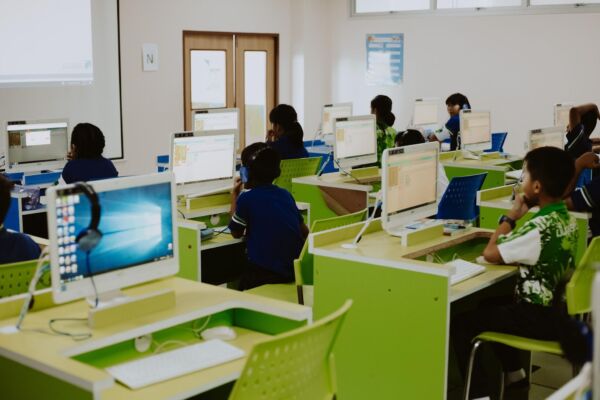
Image source: https://www.pexels.com/photo/students-using-computers-10638069/
Your institution moves forward when you embrace student laptops as primary academic tools. Formulating a comprehensive integration policy balances digital convenience with uncompromising network defense. When you secure application access and eliminate platform boundaries, you build a resilient computing environment that serves your campus community for years to come.