
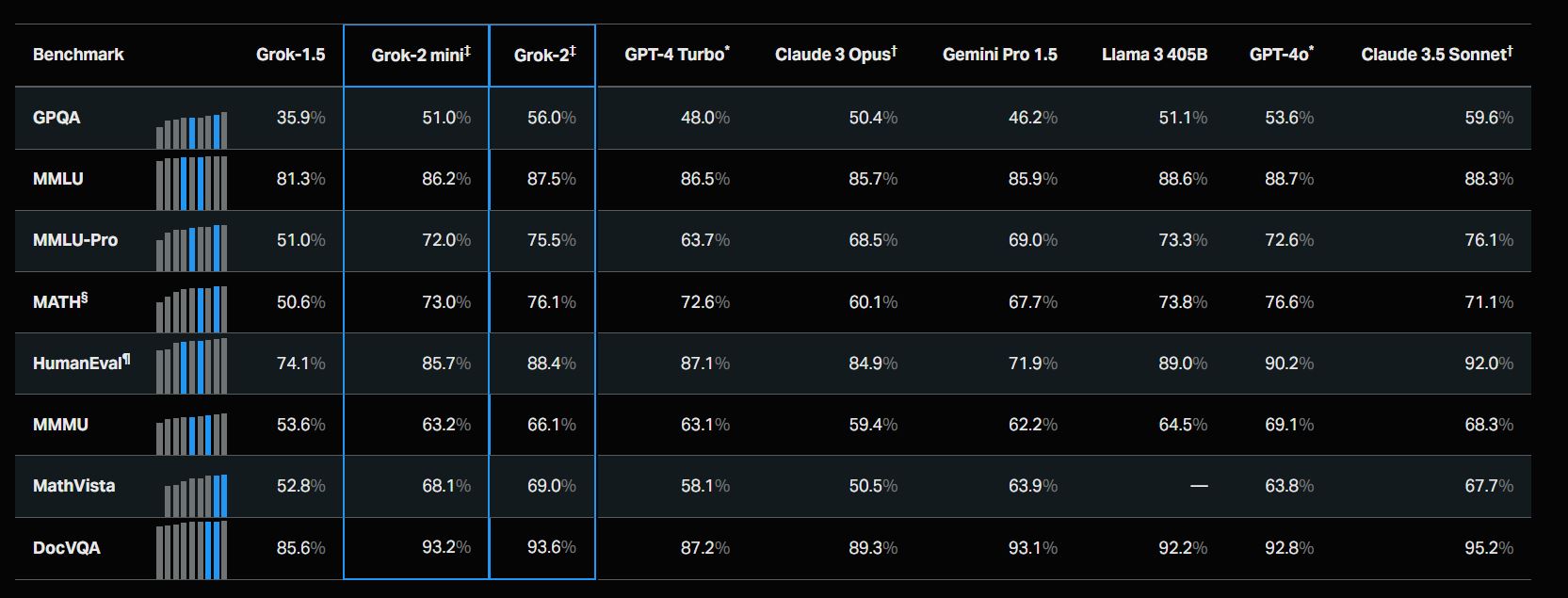
Every model release now comes with a chart showing it beating the previous leader on some named benchmark, and after enough of these charts, they stop meaning much on their own. A model that tops a coding benchmark by two points might still be the wrong choice for a support chatbot, and a model that wins on a reasoning leaderboard might cost four times as much to run in production as one that scores nearly as well. Benchmarks measure something real, but they measure it in a lab, on a fixed task set, under conditions that rarely match what a specific product actually needs.
Choosing a model API for a real product means weighing a longer list of factors that benchmark charts don’t capture, and getting familiar with what’s actually available matters more than it sounds — spending twenty minutes in an AI model gallery comparing specs side by side usually reveals more about fit than another round of leaderboard research would. Here are the factors worth working through before a benchmark score gets to be the deciding vote.
What the Model Actually Needs to Do Well
The starting point isn’t which model scores highest overall, it’s what the specific task looks like day to day. A model built and tuned for long agentic coding runs is optimized for a very different failure mode than one built for quick customer support replies — one is judged on whether it can stay coherent across dozens of tool calls without losing the thread, the other on whether it responds fast and cheaply enough to handle high volume without frustrating anyone. Matching the model’s actual design intent to the task at hand filters out a large share of otherwise-impressive options before price or speed ever enters the conversation.
What a Wrong Answer Actually Costs
Some tasks tolerate an occasional bad output with no real consequence — a suggested caption that gets edited, a draft summary a human reviews before it goes anywhere. Others don’t: a support bot that gives a wrong refund policy, a coding agent that ships a subtle bug into a pull request, a structured extraction pipeline that silently returns a malformed field into a downstream system. The tasks in the second category justify paying for a stronger, more expensive model even when a cheaper one scores only slightly worse on paper, because the cost of an error dwarfs the savings from a cheaper token rate. The tasks in the first category usually don’t, and defaulting to the expensive model there is just wasted budget.
How the Bill Actually Adds Up at Real Volume
Per-token pricing looks abstract until it’s multiplied by actual usage, and that multiplication is where most cost surprises come from. A model that’s twice as expensive per token isn’t twice as expensive to run if it also tends to produce shorter, more efficient responses — and conversely, a cheap model that requires longer prompts or more retries to get a usable answer can end up costing more in practice than its list price suggests. The only reliable way to compare cost is to run a representative sample of real requests through each candidate model and look at the actual invoice, not the advertised rate per million tokens.
Whether the Context Window Matches the Job
A model with a large context window solves a specific problem — feeding in a full codebase, a lengthy document set, or an extended conversation history without chunking it into pieces — and that capacity is wasted on tasks that never approach it. A support chatbot answering short questions doesn’t need a million-token window any more than a delivery van needs to haul cargo it never carries. The context window matters enormously for RAG systems and long-document analysis and barely at all for short, stateless requests, so it’s worth checking against actual usage patterns rather than treating a bigger number as automatically better.
How the Model Behaves Under Load
A model that performs beautifully in a demo can behave very differently once real traffic hits it — slower response times during peak hours, inconsistent latency, or degraded output quality under load that never shows up in a benchmark run against a handful of test prompts. This is one of the reasons an account that lets several models share a single balance is worth having even for teams with a clear favorite: it makes it painless to compare how two candidates actually perform once real users are hitting them, rather than trusting a one-time evaluation.
What Happens When the Model Needs to Be Swapped
Every model gets replaced eventually, whether because a better one ships, because pricing changes, or because a provider deprecates an older version. Products that hard-code a single provider’s specific API quirks into their backend end up treating every model swap as its own migration project, complete with its own testing cycle and its own risk of subtle behavioral regressions slipping through. Products built against a consistent, provider-agnostic request format treat a model swap as changing a single string and rerunning an existing test suite. This difference barely matters on day one and matters enormously eighteen months in, once the model landscape has moved on twice and the backend either moved with it easily or didn’t.
Whether the Model You Need Today Is Still the One You’ll Need Tomorrow
It’s worth building in room to change your mind, because the model that looks like the obvious choice today is measured against a landscape that shifts every few months. This is where evaluating candidates side by side inside GPTProto’s AI model gallery pays off in a way that reading individual spec sheets doesn’t — being able to compare an everyday production model against a pricier flagship without leaving the same dashboard makes it obvious where the gap between them is actually worth paying for and where it isn’t. gpt-5.6-terra, for instance, occupies the middle tier of OpenAI’s current lineup specifically for this reason: it’s built for the bulk of everyday production work — coding help, document analysis, structured data pulls — and performs close enough to the flagship model in the same family that most teams find the extra cost of the top tier isn’t justified except on the genuinely hard requests. Seeing that kind of tradeoff laid out clearly, rather than inferred from separate pricing pages on separate sites, is what actually shortens the decision.
How Much the Choice Locks You In
The last factor is the one that’s easiest to ignore in the moment and the most expensive to have ignored later: how hard would it be to leave. A model chosen through a proprietary SDK, non-standard authentication, or a request format unique to one provider creates switching costs that compound with every feature built on top of it. A model reachable through a standard, OpenAI-compatible schema keeps that door open — a team can commit to a model today with confidence that reconsidering the decision next year won’t mean rewriting the integration from scratch.
Letting the Task Set the Priorities
None of these eight factors outranks the others in every situation — the right weighting depends entirely on what’s actually being built. A prototype optimizes differently than a production support system, and a research tool optimizes differently than a customer-facing agent handling real transactions. What benchmark scores can’t tell you is which of these factors matters most for your specific task, and that’s a judgment call worth making deliberately rather than defaulting to whichever model currently sits at the top of a leaderboard that was never measuring your use case in the first place.