
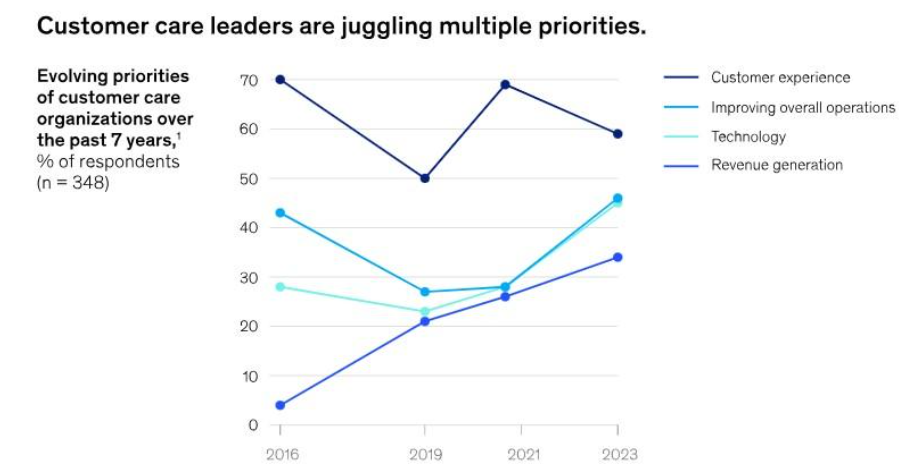
Customer service can make or break your business. It’s no wonder improving customer experience (CX) is a top priority for most business leaders.
Image via McKinsey
However, answering the same questions repeatedly, manually sorting support tickets, and managing a never-ending email queue can be exhausting.
But what if I told you there’s a way to make your customer support team’s life easier while keeping your customers smiling? That’s right—automation.
In this post, I’ll share why automation matters in modern businesses and a simple step-by-step guide on how to automate your customer service desk for maximum productivity.
Why Automate Your Customer Service Desk?
Before we learn how to automate your customer service desk, let’s discuss why you should even bother automating your customer service.
Well, here’s the thing: 89% of customers value the experience as much as the product or service you provide!
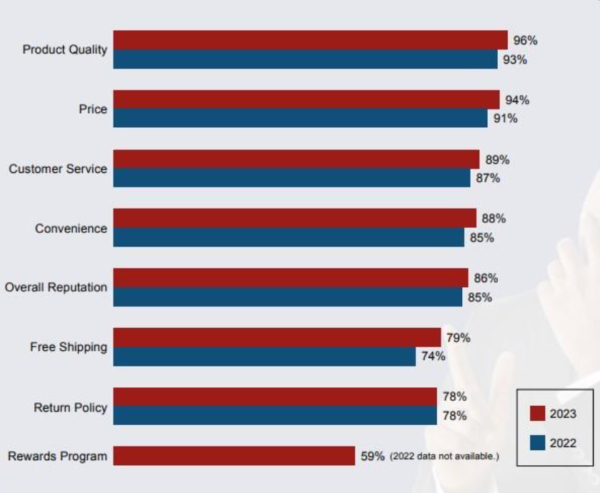
Image via Shep Hyken
That’s a tall order if you’re doing everything manually.
Here’s what you stand to gain by adopting automation in customer service:
- Faster response times
- Cost savings
- Improved accuracy
- Scalability
- Better customer retention
- Improved personalized interactions that drive conversions and increase sales
- A jovial customer service team
Key Areas of Automation in Customer Service
Automation isn’t a one-size-fits-all solution. To get the most out of it, identify the areas where it can make the biggest impact.
Some key areas include:
- Ticket management
- Chatbots for FAQs
- Email responses and CRM integrations
- Social media management
- Appointment scheduling
- Feedback collection
- Order tracking
- Knowledge base updates
- Customer onboarding
- Billing and payment reminders
Focusing on these areas can help create a more efficient and customer-friendly service desk.
How to Automate Your Customer Service Desk
Alright, now for the fun part: I’ll break down how to automate your customer service desk in seven easy-to-implement steps.
1. Identify Repetitive Tasks
Your customer support team spends 60% of their time per week on routine tasks—discussing work, searching for files, and managing various tasks.
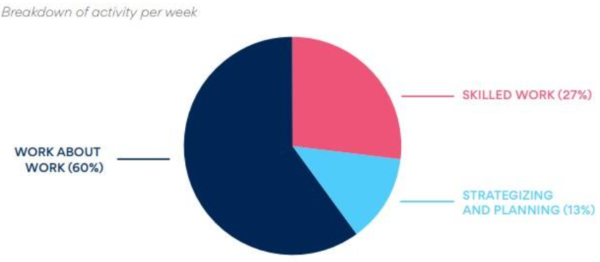
Image via Asana
That’s why the first step in learning how to automate your customer service desk is identifying the time-consuming tasks. Questions like “How do I reset my password?” or “What’s my order status?” are prime candidates for automation.
Identifying these repetitive tasks allows your team to focus on more complex issues. List these tasks and prioritize them based on how often they occur.
2. Choose the Right Service Desk Software
Once you know how to automate your customer service desk and what to automate, the next step is picking the right customer service desk software. Tools like Zendesk, Freshdesk, Help Scout, or HubSpot can help automate the process.
Look for features like ticketing systems, AI chatbots, and integrations with your existing tools. The goal is to find software that’s easy to use and scales with your business.
Don’t overcomplicate it—choose a platform that suits your budget and needs, budget and needs, whether you’re running an online business startup or an established empire. The right software plays a huge role when learning how to automate your customer service desk effectively.
3. Integrate AI with Human Support
AI is a game-changer when learning how to automate your customer service desk, boosting efficiency and enhancing your team’s performance.
In fact, 72% of businesses have adopted AI for at least one business function to do exactly that!
Image via McKinsey
You can integrate AI in the following areas:
- Chatbots for quick answers
- Smart response suggestions
- Multilingual support
- Sentiment analysis
- Quality assurance
- Training and feedback
- Voice assistants for call center support
- Appointment scheduling
- Omnichannel support
For example, chatbots can resolve up to 80% of routine questions. The key is finding the right balance between AI and human support to ensure quick yet personalized responses. The one advantage of AI is that customers get 24/7 support!
4. Optimize Your Self-Service Options
What is the most important aspect of delivering exceptional customer service?
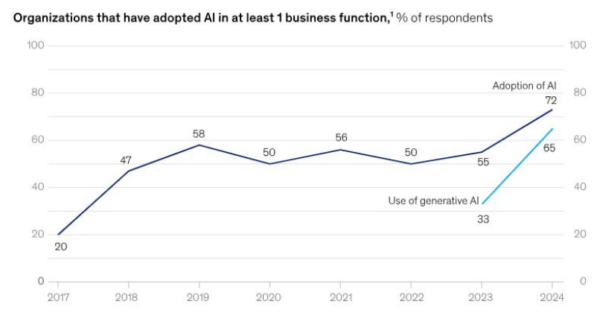
Image via SuperOffice
Empowering customers is one of the easiest ways to meet these expectations and automate your customer service desk.
Some areas to achieve this include:
- A robust knowledge base with articles, videos, and step-by-step guides for common issues
- A well-structured searchable FAQ section
- Chatbots
- Community forums for peer support
- AI-powered virtual assistants
- Automated password reset and account recovery
- Mobile self-service apps
- Self-scheduling
Sixty-seven percent of customers prefer self-service over speaking to a representative. By offering more self-service options, you can reduce ticket volume and make life easier for your team.
5. Automate Ticket Routing
Nothing slows down customer service like sending tickets to the wrong person.
Automating ticket routing helps to direct tickets to the right team based on the issue type, urgency, or expertise. For example, it can help you direct billing questions to your finance team and technical issues to the IT department.
Fortunately, modern service desk software includes this feature.
This step is crucial in learning how to automate your customer service desk efficiently, as it reduces response times and keeps things organized.
6. Monitor and Analyze Performance
Automation isn’t a “set it and forget it” deal. You need to continuously monitor its performance, especially as your business scales,
Use analytics tools to track metrics like response times and customer satisfaction to spot improvement areas. Additionally, as Forrester illustrates, check whether the automation tools boost business success, productivity, and CX and instill a customer-focused culture in your business.
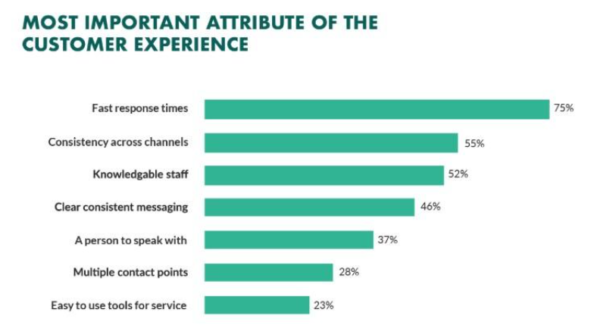
Image via Forrester
If the results are as satisfactory as expected and your automation tools are to blame, experts offering front-end development services can refine them.
Regularly reviewing performance is key to mastering how to automate your customer service desk successfully.
7. Train Your Team
Finally, don’t forget about your team when learning how to automate your customer service desk! Automation tools are only as good as the people using them.
So, ensure your team knows how to work with the new systems by providing training sessions and resources to help them adapt. Also, providing the latest tech in customer service will help them serve tech-savvy customers, especially Gen Zs and Gen Alpha.
Your team can deliver even better customer service when confident with the tools. After all, the goal of learning how to automate your customer service desk is to make life easier for everyone involved.
Final Thoughts
Customers demand efficient service, while support teams want the best tools to provide that service. That’s why it’s important to understand how to automate your customer service desk.
By the end of the day, customer desk service automation keeps you competitive and keeps your customers happy. And if tech isn’t your thing, you can hire experts to help set things up just right.
So, what are you waiting for? Start automating today and let productivity—and customer satisfaction—soar.