
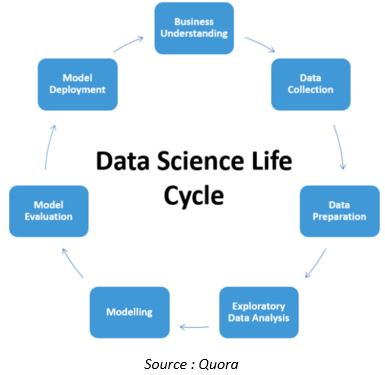
In modern analytics environments, data science teams often spend more time on documentation and reporting than on experimentation or insight generation. Automating these repetitive tasks can transform productivity. With a strategic n8n integration, teams can automate end-to-end documentation and reporting workflows, saving time, improving accuracy, and ensuring consistency across projects.
Why Automate Data Science Documentation and Reporting
The Problem: Manual, Time-Consuming Processes
Imagine Alice, a data scientist managing multiple predictive models. Each week, she prepares reports, updates documentation, and shares findings with stakeholders. Tasks like exporting data, formatting tables, and writing performance summaries consume hours.
Similarly, Bob, an analytics engineer, spends half his day merging data from APIs, dashboards, and Excel sheets for weekly updates. Despite his diligence, errors still creep in, such as missed metrics, inconsistent formatting, or outdated data.
The Benefits of Automation
Automating documentation and reporting offers measurable gains:
- Consistency: Every report follows the same structure and branding.
- Speed: Reports and documentation are generated instantly.
- Accuracy: Reduced risk of human error or outdated numbers.
- Efficiency: Data teams reclaim valuable time for model optimization and insight generation.
Understanding n8n for Data Science Teams
What is n8n?
n8n is an open-source workflow automation platform that connects APIs, applications, and databases without heavy coding. Using a visual interface, users can automate multi-step workflows that involve data extraction, transformation, and reporting ideal for data science and analytics operations.
Why n8n Works for Documentation and Reporting
- Integrates with popular tools like SQL databases, Google Sheets, Slack and CRMs.
- Automates conditional logic and data transformations.
- Generates structured outputs in Markdown, HTML, or PDFs.
- Supports scheduling (cron jobs) and event-based triggers.
- Provides workflow monitoring and version control.
This flexibility makes n8n a perfect choice for teams seeking scalable automation across reporting and documentation pipelines.
Step-by-Step Framework for Automation
Phase 1: Identify Documentation and Reporting Workflows
Step 1 – List Deliverables
Identify what needs documentation and reporting:
- Model training summaries
- Weekly and monthly performance reports
- Stakeholder updates and KPIs
Step 2 – Map the Process
Document how data currently flows from sources to reporting tools and identify where manual work occurs.
Step 3 – Define Automation Goals
For example:
- “Reduce report generation time by 80 %.”
- “Auto-generate documentation when a new model version is deployed.”
Phase 2: Design the n8n Workflow
Step 4 – Break Workflows into Nodes
Each workflow contains:
- Triggers: Scheduled or event-based.
- Data Extraction: From APIs, CSVs, databases or CRMs.
- Data Transformation: Cleaning, calculations, summarisation.
- Output Generation: Markdown, Google Doc or PDF.
- Delivery: Send via email, Slack or HubSpot.
Step 5 – Apply Conditional Logic
Example: If model accuracy drops below a threshold, automatically tag the report and notify the data lead.
Step 6 – Schedule Triggers
- Use time-based triggers for reports (e.g., every Monday).
- Use event-based triggers for documentation (e.g., new model deployment).
Phase 3: Build, Test, and Deploy
Step 7 – Create and Test Workflows
Start small and automate one weekly report first. Validate accuracy, test conditions and measure time saved.
Step 8 – Monitor and Validate
Set up internal alerts for workflow failures. Review reports with stakeholders to ensure expectations align.
Step 9 – Scale to Multiple Teams
Once proven, duplicate and adapt workflows for other departments, datasets or KPIs.
Phase 4: Maintain and Evolve
Step 10 – Version Control
Document all n8n workflows and changes within a shared repository.
Step 11 – Build Dashboards
Use generated outputs as data sources for real-time dashboards, enhancing transparency and decision-making.
Step 12 – Continuous Improvement
Review workflows quarterly to adjust for new tools, APIs or stakeholder requirements.
Real-Life Scenarios
Scenario 1: Churn Prediction Reporting
A telecom data science team ran weekly churn model reports manually. After automating with n8n integration:
- n8n pulled results from the SQL database.
- Generated a Markdown summary of model accuracy, precision, recall, and AUC.
- Exported as PDF and sent via email to leadership.
Outcome: Report generation time dropped from 5 hours to 20 minutes.
Scenario 2: Data Quality Documentation
An analytics engineer used n8n to monitor data-pipeline health:
- n8n extracted table metrics daily.
- Logged anomalies in a Google Sheet.
- Generated a summary report every Friday.
Outcome: Early error detection improved data reliability by 35 %.
Best Practices for Automated Reporting
- Use standardised templates for reports and documentation.
- Apply version control to workflows like you would for code.
- Keep modular workflows for reuse across teams.
- Include error handling to catch issues automatically.
- Review with stakeholders for continuous feedback.
- Document your automation process to simplify future audits.
Conclusion
Automation isn’t just about saving time; it’s about elevating quality, accuracy and team performance. By leveraging n8n, data science teams can document, report and distribute insights without repetitive manual effort.
At Mpire Solutions, we help organisations design and implement these intelligent automations, connecting systems like HubSpot and n8n to deliver measurable results. Whether your goal is to streamline model documentation or improve stakeholder reporting, automation is the path to higher-value data operations.
FAQs
Q1: Can n8n automate both documentation and reporting simultaneously?
Yes, You can trigger parallel workflows to create model documentation and generate reports within the same automation.
Q2: What kind of outputs can n8n generate for documentation?
n8n can produce Markdown, HTML, Google Docs or PDF outputs depending on how your workflow is configured.
Q3: How do I monitor failed automations?
Use built-in logging and alert nodes within n8n to notify your team via email or Slack when a workflow fails.
Q4: Can n8n integrate with HubSpot or CRMs for data reporting?
Yes, n8n connects directly with HubSpot through its CRM API, enabling automated data sharing and reporting between both systems.
Q5: What’s the best starting point for teams new to automation?
Start small with a single recurring task like a weekly performance reporting test, optimise and then expand to documentation and other analytics processes.