

Visual content demand has been growing a lot now. In fact, brands now publish an average of 9.5 social posts daily to remain competitive.
Even at that, 89% of consumers still actively demand more high-quality visuals from brands they follow. That’s why 51% of marketers have used technology, like AI visual content creation tools, to improve their content strategy and produce more impressive visuals faster.
So, in this guide, you’ll see how these AI visual content creation tools can simply your workflows and when you should use them. You’ll also see how to choose the right tools for what you need. Let’s get started.
Why You Should Use AI Visual Content Creation Tools
AI visual content creation tools can help you keep up with increasing visual demand. But, on top of that, they help you move faster, scale your output, and reduce issues across your content creation workflow. So, let’s look at why you should use these tools if you aren’t already.
Speed And Efficiency
The truth is: AI visual content creation tools can help you with those repetitive tasks that take time. So, you don’t need to manually edit, resize, format, or export your visuals. This way, you respond faster to trends, launches, and campaigns with templates like this:

Image via Adobe Express
Even more, these tools come with features that ensure your workflow doesn’t get disrupted. For instance, you can use smart resizing to tailor your visuals to every platform. You can even use auto-layouts to adjust designs in real time and instant previews to reduce revisions.
| Using AI visual content creation tools to automate routine tasks can significantly speed up your production without reducing quality |
Cost Reduction And Scale
You can use AI visual content creation tools to produce more without increasing your spend. So, even if you need to hire a personal assistant, it doesn’t necessarily have to be an additional designer. This way, you can use your existing human resources and still get more output.
Even if you’re a small business or solo creator, these tools also give you access to professional-quality visuals. You don’t have to pay for specialized talents or agencies to get visuals.
|
AI visual content creation tools can help you reduce production expenses and stay within your marketing budget. |
Broad Accessibility For All Skill Levels
You can still get polished visuals even if you’re not a designer. That’s because you can use simple prompts and guided interfaces with AI visual content creation tools. This helps you generate graphics, videos, and layouts without any prior design experience.
This accessibility even changes how your whole team works. Everyone can contribute visually and collaborate better. Plus, you don’t get any bottlenecks in production just because a single skill set is missing from the team.
| AI visual content creation tools help creators of all experience levels to produce professional-looking content. |
Core Capabilities Of AI Visual Content Creation Tools
The good thing about AI visual content creation tools is that you can do more than just generate images. You can use them to support your entire visual workflow. So, let’s see these tools’ capabilities that make them effective.
Ideation And Concept Generation
When you’re short on ideas, you can actually use AI tools for visual content creation. You can use simple prompts to explore different visual styles, layouts, and concepts. This way, you already have options and don’t have to start from a blank canvas.
On top of that, you can use text-to-image AI models to test your creative directions before committing time or budget. This lets you brainstorm faster with far fewer risks than going straight into designing. Take these outputs from Canva, for instance:
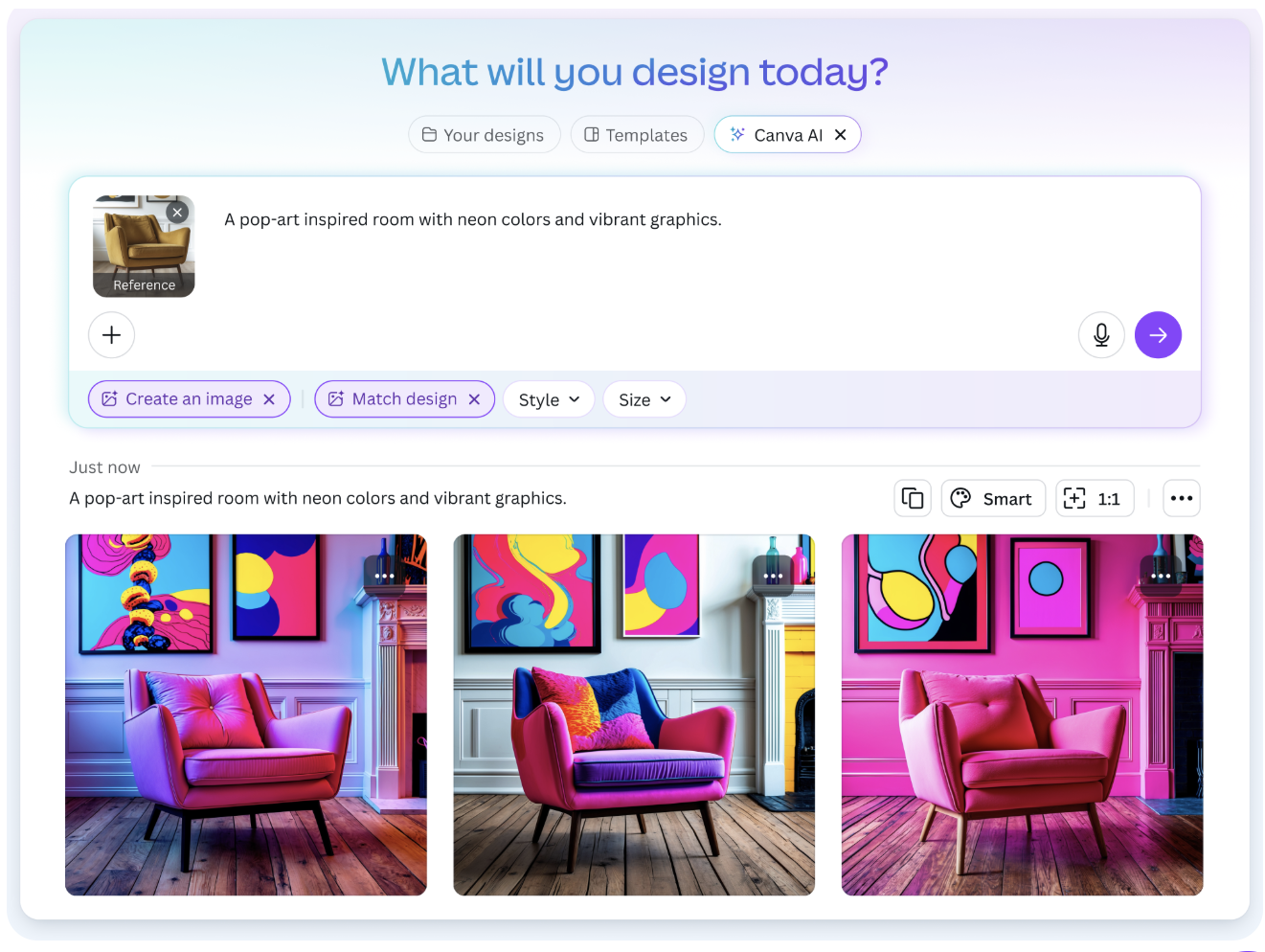
Image via Canva
| AI visual content creation tools help you explore different creative ideas and concepts before getting into design. |
Automated Editing And Visual Improvements
You can use AI visual content creation tools to automatically remove backgrounds, adjust lighting, crop images, and correct colors. This lets you make improvements quickly and consistently.
That’s not all! You can also use it to improve your entire workflow. For instance, you can use auto-caption, scene detection, and format optimization. This way, your visuals can fit different platforms without having to rework them every time.
| AI visual content creation tools help you automate your editing and remove tedious steps in your workflow. |
Personalization And Audience Targeting
AI visual content creation tools help you tailor your assets to specific audiences. You can generate different versions of the same asset for multiple platforms, regions, and demographics. This way, you don’t need to rebuild designs from scratch.
Even better, this personalization helps you increase engagement and the relevance of your visuals. Your content starts feeling intentional and not generic.
| AI visual content creation tools let you personalize your assets so they resonate better with specific target audiences. |
When to Use AI Visual Content Creation Tools
You can use AI visual content creation tools when you’re prioritizing speed, consistency, and scale over manual perfection. But here are some areas you can use them to get the best results:
- Social media design workflows: When you’re publishing daily or across multiple platforms, you can use AI visual content creation tools to resize, adapt, and refresh your visuals quickly. For instance, you can use Adobe Express banner design to quickly create an asset for your X ad campaign.
- Video creation and repurposing: You can use these tools to turn your long-form videos into short clips, add captions, and optimize formats without manually editing them.
- Marketing campaigns: These AI visual content creation tools let you generate multiple creative variations for testing, launches, and promotions without having to rebuild assets.
- E-commerce product visuals: You can use these tools to enhance images, adjust backgrounds, and create consistent product visuals at scale.
| You can use AI visual content creation tools when you need fast, repeatable visuals across multiple channels. |
How To Choose Your AI Visual Content Creation Tools
The right AI visual content creation tools depend on how well they fit your workflow. This is because not every tool works for the same goals. Regardless, let’s see some key criteria to focus on when choosing your AI visual content creation tools.
- Ease of use: Check for AI visual content creation tools that let you generate and edit visuals without a steep learning curve. Also, look out for clean interfaces and guided workflows.
-
- Output quality: Your visuals from these AI visual content creation tools should look polished and consistent across platforms. So, ensure it enhances your work instead of diluting it.
- Customization and control: Your choice of AI visual content creation tools should let you refine the results you get and adjust styles. They should also allow you maintain brand consistency in these results.
- Pricing and scalability: The AI visual content creation tools you pick should scale with your needs. So, avoid tools that lock essential features unless you subscribe to expensive plans.
| To choose the best AI visual content creation tools, prioritize fit, quality, and how well they scale. |
FAQs
- How do AI visual content creation tools improve workflow speed?
They help you automate editing, resizing, and formatting so you can move from concept to publish-ready visuals much faster.
- Are AI visual content creation tools safe for brand consistency?
Yes, when you guide the inputs and templates, AI tools can help you scale your visuals while maintaining consistent style and messaging.
- Can AI visual content creation tools work without cloud access?
Some tools run locally using modern multimodal models. This way, you have faster processing and better data control.
Conclusion
So you see?! AI visual content creation tools can help you streamline production and reduce costs. Plus, they make visual creation accessible across your team, whether they have design experience or not.
So, if you produce visuals regularly, look out for the criteria we mentioned. You can always try out and combine multiple tools to find the one that fits your goal.
| AI visual content creation tools help make your visual production faster, more scalable, and more creative. |