
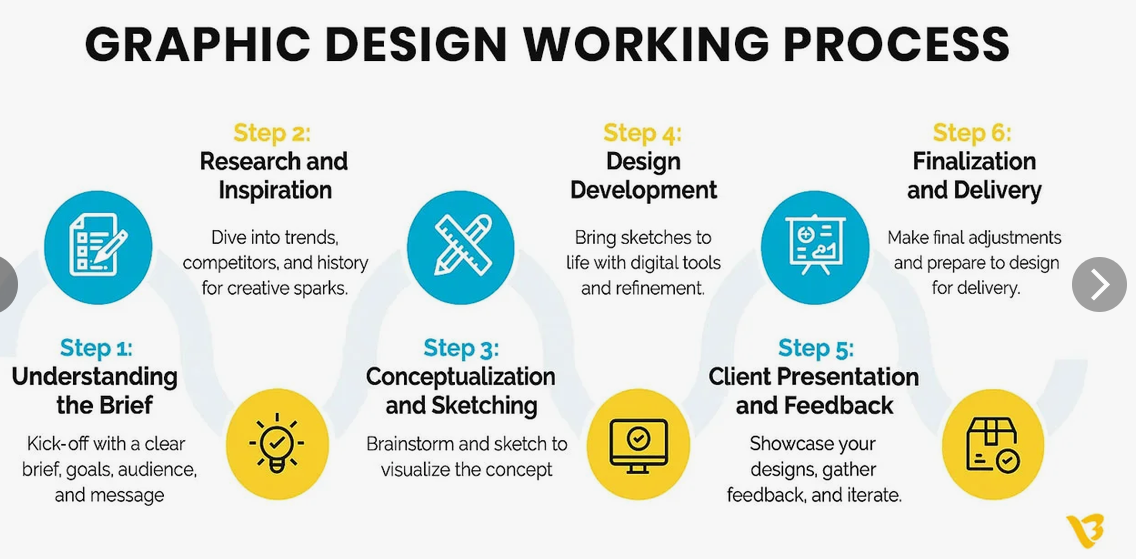
Graphic design used to move slowly by nature. A designer sketched ideas, waited for feedback, revised, waited again, and repeated that cycle until a client signed off. That pace made sense when every step required manual work. It doesn’t make as much sense now. AI tools have changed how designers move from idea to finished product, cutting out repetitive steps without cutting out the designer’s judgment. Business owners who understand this shift can set better expectations, spot inflated timelines, and get more value from every design project. This isn’t about AI replacing designers. It’s about knowing what parts of the process have gotten faster, what still takes real skill, and how that affects what you should expect to pay and wait for.
The Old Workflow and Why It Was Slow
Traditional design work involved a lot of manual repetition. Resizing images for ten different platforms. Testing five font pairings by hand. Building multiple color variations one at a time. None of these steps required much creative thinking, but they all took real hours.
Clients often waited days just to see a second draft, not because the designer lacked skill, but because production work ate up most of the time. Feedback cycles stretched projects from a few days into a few weeks. That slow pace became normal, so nobody questioned it.
Where AI Fits Into the Process Now
AI tools now handle a lot of that repetitive production work. A designer can generate several layout variations in minutes instead of hours. Color palettes can be tested and adjusted automatically based on contrast and accessibility standards. Image backgrounds can be removed or replaced instantly instead of through manual editing.
This doesn’t replace the creative decisions. A designer still chooses which direction fits the brand, which layout feels right for the audience, and which details need a human touch. What changes is how much time gets freed up for those decisions instead of getting lost in production tasks.
Faster First Drafts
One of the biggest shifts is how quickly a first draft comes together. AI tools can generate multiple starting concepts based on a brief, giving the designer something to react to and refine instead of starting from a blank page. This matters because a blank page is often where the most time gets lost.
Instead of spending a full day building three options from scratch, a designer can generate a wider range of directions in an hour, then spend the rest of their time improving the strongest one. Clients see options sooner, which shortens the whole project timeline.
Fewer Rounds of Manual Revisions
Feedback used to mean waiting for a full new version of a file. Now, some changes happen almost instantly. Adjusting a color, swapping a font, or resizing an element for a different platform can happen in the same meeting instead of requiring a new round the next day.
This changes the rhythm of a project. Instead of a few large revision rounds spread over weeks, teams can make small adjustments continuously. That reduces the back-and-forth that used to slow projects down the most.
Where Human Judgment Still Matters
AI speeds up production, but it doesn’t replace the parts of design that require real understanding of a brand and its audience. A few things still need a person:
- Deciding what a brand should feel like, not just look like
- Catching design choices that are technically fine but don’t fit the business
- Making sure a logo or design system holds up across every use case
- Balancing creative risk with what the audience will actually respond to
- Knowing when a fast AI-generated option isn’t good enough to use as-is
This is especially true for something like a professionally designed logo, where small details, spacing, scalability, how it looks in black and white, need a trained eye. AI can generate dozens of logo concepts quickly, but choosing the right one, then refining it into something that works everywhere a business needs it, still depends on human skill.
What This Means for Project Timelines
Faster tools should mean faster timelines, but only when used well. A project that used to take four weeks might now take two, without cutting corners on quality. If a designer or agency isn’t using any of these tools, ask why. There may be a good reason tied to the complexity of the project, but often it just means the process hasn’t updated.
On the other hand, be cautious of anyone promising an extremely fast turnaround with no explanation of how. Speed without a clear process usually means skipped steps, not smart tools.
What This Means for Cost
Faster production can lower costs on certain tasks, especially ones that used to require a lot of manual labor, like resizing assets for multiple platforms or generating several initial concepts. That savings should show up somewhere, either in a lower price or more time spent on strategy and refinement instead of repetitive tasks.
It’s worth asking directly what parts of a quote reflect AI-assisted work and what parts reflect manual design time. A clear answer tells you the designer understands their own process. A vague one is worth questioning.
Common Misunderstandings About AI in Design
A few misunderstandings come up often with business owners looking at AI-assisted design:
- Assuming AI-generated work is automatically lower quality
- Assuming a faster process means less effort went into it
- Assuming AI can replace strategy and brand understanding
- Assuming every designer using AI tools is cutting corners
- Assuming the opposite, that AI alone can produce a finished, usable brand identity
The truth sits in the middle. AI handles production speed. People still handle direction, judgment, and quality control. Projects that use both well tend to move faster without losing quality. Projects that rely only on AI, with no human review, often look generic or miss the mark on brand fit.
Questions Worth Asking Before Starting a Project
A short list of questions can clear up a lot before you commit to a project:
- Which parts of this process use AI tools, and which are done manually?
- How many initial concepts will I see, and how quickly?
- How do revisions work, and how fast can changes happen?
- Will the final files work across every platform I need, print, web, social?
- Who reviews the AI-generated work before it reaches me?
These questions help you understand not just the timeline, but the actual quality control behind the project.
How Business Owners Can Prepare
You don’t need to understand the technical side of these tools to benefit from them. What helps most is being clear about your goals before the project starts. Know your audience. Know where the design needs to work, business cards, websites, packaging, social media. Know your timeline and your budget.
With that clarity, a designer using AI tools well can move through the early stages faster, giving you more time to focus on the decisions that actually shape your brand.
Final Thoughts
AI hasn’t replaced graphic design, it’s removed a lot of the slow, repetitive work that used to eat up most of a project’s timeline. That leaves more room for the parts that actually require skill and judgment, like brand strategy and final quality control. Business owners who understand this can set realistic expectations, avoid overpaying for basic production work, and get better results in less time.