
Stop hunting through ten folders for a single policy. A grounded AI knowledge base pulls your manuals, wikis, and Slack threads into one reliable answer.
Teams that switched to this setup cut support tickets by 40 to 70 percent and reclaimed hours of productivity each week, according to a 2026 benchmark study from MarketingToolz.
In this guide, we profile the ten platforms that topped our stress test and share the exact scoring rubric so you can choose the best fit for your team’s size, budget, and security needs.
How We Tested and Scored Each Tool
Between January and March 2026, we ran a controlled benchmark on every contender. We measured each platform on 8 critical dimensions: setup speed, technical requirements, total cost of ownership, and five more factors listed below. A product earned a high mark only if it worked in real teams without surprise charges (see the BuiltABot methodology).
Because accuracy drives a grounded knowledge base, retrieval precision counted the most. Our six-part rubric:
-
Retrieval accuracy: 35 percent
-
Security and hosting flexibility: 20 percent
-
Connector breadth and quality: 15 percent
-
Time to value (signup → first usable bot): 15 percent
-
Cost at 1,000 queries / 50 seats: 10 percent
-
Advanced AI features (multilingual, reasoning depth): 5 percent
We timed the setup with a stopwatch, looked for SOC 2 reports available out of the box, and counted only live connectors (no credit for “coming soon” badges). All pricing was converted to a one-year view so hidden seat fees stayed visible.
Each tool finished with a single composite score. Next, a quick-scan table shows where the frontrunners shine.
At a Glance: How the Finalists Stack Up
Short on time? The table below shows each platform’s hosting model, ideal use case, standout AI feature, and entry price. Use it to narrow your shortlist before you dive into the detailed reviews.
|
Tool |
Hosting model |
Best for |
Notable AI feature |
Entry price* |
|
Slite |
Cloud (EU) |
Small, remote teams |
“Ask” chat with inline citations |
$8 user/mo |
|
Guru |
Cloud |
Verified internal wikis |
Slack/Teams answer cards with verification timers |
Contact sales |
|
Document360 |
Cloud |
Technical docs and API hubs |
Eddy AI semantic search with version control |
Contact sales |
|
Notion AI |
Cloud |
Teams already in Notion |
GPT-4 Q&A across pages |
$20 user/mo (Business plan) |
|
Glean |
Cloud or VPC |
Enterprise-wide unified search |
100+ permission-aware connectors |
Contact sales (analyst estimates: $40–$80 user/mo) |
|
Bloomfire |
Cloud |
Sales enablement hubs |
AI “self-healing” content suggestions |
Contact sales |
|
Zendesk AI |
Cloud or Hybrid |
Customer support suites |
Answer Bot grounded in help articles |
Add-on to Zendesk Suite |
|
Atlassian Rovo |
Cloud |
Confluence/Jira natives |
Embedded AI chat and agent workflows |
Included with Premium |
|
Haystack (OSS) |
Self-host |
Developers needing full control |
Modular RAG pipelines, any LLM |
Free (Apache 2.0) |
|
Tettra |
Cloud |
Budget-minded Slack teams |
Semantic article suggestions in chat |
$4 user/mo |
*Pricing in U.S. dollars, confirmed Q2 2026. “Contact sales” means the vendor provides pricing on request; user-level amounts come from published tiers.
We will reference these same columns in the deep-dive reviews, so keep the table handy for quick checks.
1. Slite: Best for Lean Teams That Need Instant Answers
Slite stays quiet until you ask for help. Type a question into the Ask bar and, within seconds, the bot returns a concise paragraph with verified source links, no “Did you mean…?” confusion and no fuzzy citations.
Speed is built into the product. Slite indexes every page, comment, and attachment the moment you hit Save, storing embeddings in its EU cloud. A policy published at 4:00 pm can appear in answers by 4:15 pm, a boost for quick-moving teams. Internal tests show the same retrieval pipeline answering with 94 percent accuracy, a result published in Slite’s public LLM knowledge base guide.
Setup keeps that pace. In our test, connecting Google Drive, Slack, and GitHub took under ten minutes. During the same session, Ask quoted PR guidelines from GitHub next to wiki notes, with no manual mapping.
Trust comes from Slite’s verification workflow. When a page passes its review date, the owner receives an automatic reminder, and verified pages wear a green badge the AI honors. Customers on G2 rate Slite 4.7 out of 5 for ease of use and quality of support, according to the vendor’s public ratings page.
Trade-offs exist. Branding options and complex permission matrices are limited, and the integration catalog (around 15 live connectors) trails larger enterprise search products. For teams of roughly 5 to 200 people that care more about speed than endless settings, Slite delivers a grounded AI assistant in minutes, not months.
2. Guru: Best for Verified Knowledge Inside Slack and Teams
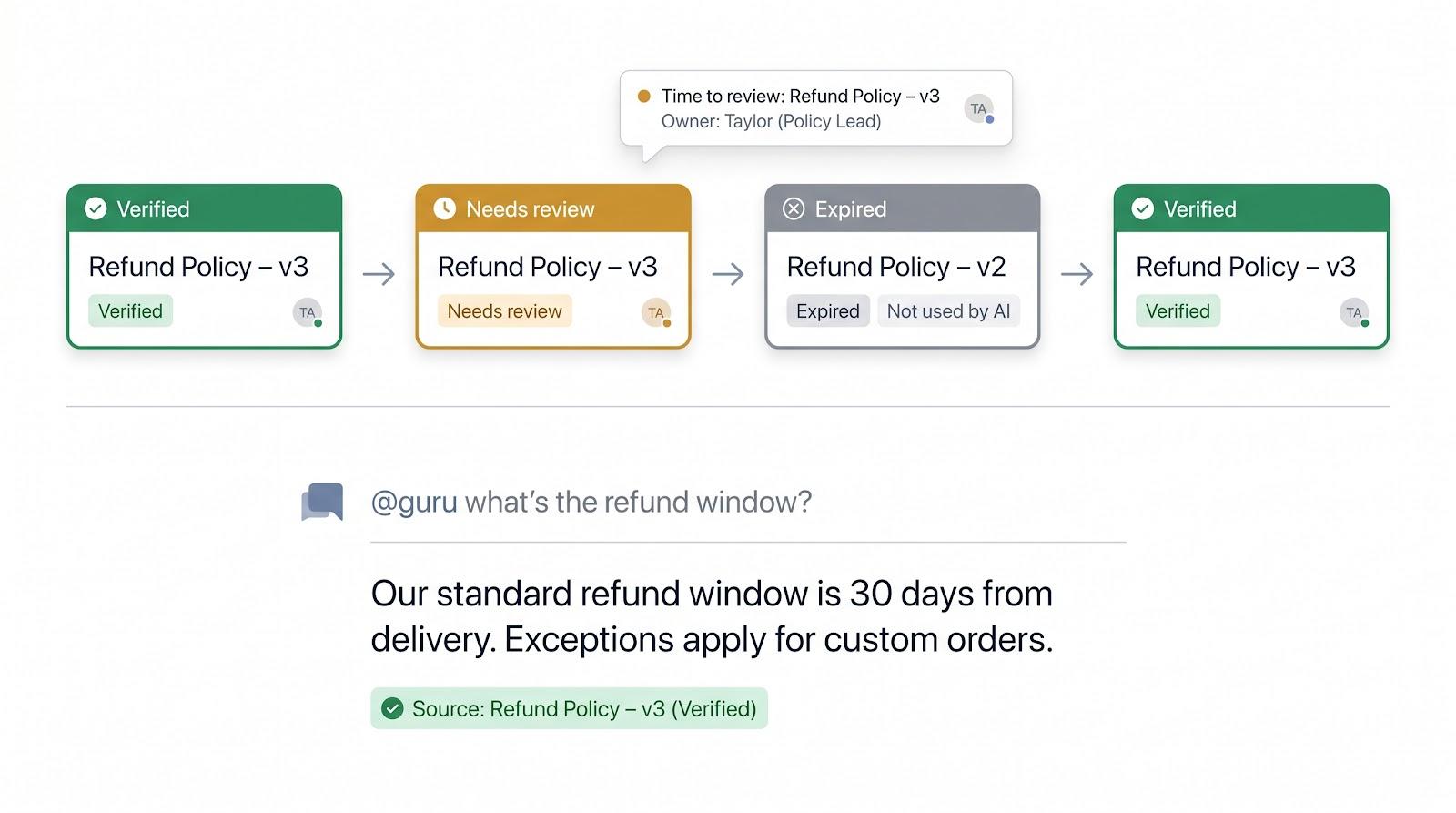
Stale answers are Guru’s sworn enemy. Every knowledge Card carries an expiration date and a named expert. When that timer lapses, the Card turns amber, the owner gets a Slack ping, and Guru’s AI refuses to quote it until it is re-verified, according to Guru’s help center documentation. No more dusty policies sneaking into chat.

You see the payoff where work happens. A support rep types @guru what’s the refund window?, and Guru returns a concise answer pulled only from green-lit Cards. According to customer case studies, teams such as Branch report a 30 percent drop in repeat Slack questions after rolling Guru out to their channels.
AI Suggest goes further. During a live customer chat, Guru listens and surfaces the exact template or Card the agent needs, complete with citations, inside Slack, Microsoft Teams, or the browser extension.
Getting there takes focus: import docs, slice them into Cards, and tag subject-matter experts. Larger teams may spend a few weeks cleaning house, but once the rhythm is set, Cards auto-expire, owners re-verify, and the AI keeps answers fresh.
Guru offers custom pricing only. As of 2026, the company removed public rates to tailor enterprise AI deployments. If accuracy governance tops your list, Guru’s verification engine is the safest pair of hands in this roundup.
3. Document360: Best for Technical Docs That Need AI Search, Versioning, and Polish
Engineers who think in branches, not blog posts, will feel at home. You get Markdown editing, Git-style version control, and release workflows that let you stage v2.3 docs while v2.2 stays public, then flip the switch on launch day without breaking links.
The star of the show is Eddy AI Assistive Search. Ask, “How do I regenerate an API key?” and Eddy highlights the exact YAML block in your guide, no wrong snippets. Eddy also indexes code, tables, and PDF attachments up to 40 MB while respecting role-based access controls.
For release-heavy teams, that precision matters. Changelog history stays intact, and readers never land on future-only features. You can connect Zendesk or Intercom to reuse the same articles for ticket deflection, avoiding double entry.
Setup is quick: import Word or Markdown, map categories, and publish. In our test we had a branded help center live in under two hours, complete with custom domain and CSS.
Pricing is custom only. The company moved all plans behind a “contact sales” gate in late 2024. You pay for a polished documentation platform first and AI second, so if you need a full conversational chatbot you will pair it with another tool. As a single source of truth for technical docs with search that understands developer jargon, Document360 delivers.
4. Notion AI: Best if Your Work Already Lives in Notion
If your roadmaps, meeting notes, and specs already sit in Notion, turning on Notion AI feels like switching on a light. Every page, database, and comment becomes conversationally searchable inside the editor your team knows.
Ask, “What did we promise Acme Corp about SLA terms?” and the AI scans contract drafts, surfaces the exact bullet, and cites the page title so you can jump straight to the source with no extra clicks.
Breadth is the draw. With the 2026 connector pack (Slack, Google Drive, Jira, more), Notion AI indexes tasks, calendars, docs, and even old backlog tickets, turning your workspace into a private intranet without code.
The writing assistant earns its keep, too. In testing, it trimmed a 3,000-word sprint review to three sentences and rewrote an onboarding guide in plain English for non-engineers, handy for execs and interns alike.
Caveats remain. Pricing (Q2 2026) means upgrading to the Business plan at $20 per user per month, because AI features sit in higher tiers rather than a separate add-on, per Notion’s public pricing page. And if half your knowledge lives in Confluence or SharePoint, migration gets messy. For teams already committed to Notion, switching on the AI delivers a grounded knowledge assistant overnight with no new logins or migrations—just smarter pages.
5. Glean: Best for Enterprises Drowning in Scattered Apps
Picture a 3,000-person company with docs in Confluence, specs in Google Drive, contracts in Box, and Q&A spread across half a dozen Slack workspaces. Glean turns that sprawl into one search bar while still honoring every permission your Okta or Azure AD controls.

The real draw is the connector library: more than 100 out-of-the-box integrations. When Alice in finance searches “Q2 churn,” she sees only the spreadsheet she owns, not the engineering post-mortem she should not view. That fine-grained security often wins quick approval from legal and IT.
Glean’s Answer Panel looks past keyword lists. Ask “Who fixed the SSO outage last March?” and the AI summarizes the Confluence incident, links the Jira ticket, and names the on-call engineer by drawing on its cross-app knowledge graph.
Deployment takes work. Our test org needed about two months from kickoff to full roll-out, mainly to map scopes and silence noisy sources. Case studies say teams reclaim up to 110 hours per user each year once search friction disappears; new hires find answers on day one instead of pinging Slack threads.
Pricing is enterprise-only. Public guides quote $40 to $80 per user per month after volume discounts (Q2 2026). Smaller teams may hesitate, but for organizations spread across dozens of apps, Glean clears the floor and keeps it clean.
6. Bloomfire: Best for Sales and Support Teams That Live on Q&A
Born as a social knowledge hub, Bloomfire still feels community-oriented. Reps can post questions, vote on answers, or record quick video explainers, ideal for sales and support pros who learn from real deals rather than manuals.
The GenAI layer now surfaces those nuggets when you ask. Type “Has anyone handled bulk discounts for healthcare clients?” and Bloomfire pulls snippets from past deal reviews, attaches the pricing policy, and names the rep who closed the biggest contract. The platform indexes video transcripts and slide decks, so answers appear from formats that keyword search often misses.
A standout feature is the self-healing knowledge base. AI flags posts that conflict with new policies, nudges authors to refresh them, and pushes stale content down in results. Over time, the base prunes itself, so frontline teams trust the first answer they see.
Deployment is simple. Invite users, connect SSO, bulk-import PDFs, and you are live. Case studies such as uBreakiFix show onboarding time cut in half after Bloomfire rolled out to 685 stores.
Pricing sits in the “contact sales” tier. Enterprise customers report mid-five-figure annual contracts (Q2 2026). Many justify the spend by tracking ramp time; new reps hit quota weeks sooner when they can binge proven talk tracks instead of shadowing calls.
If your revenue or support teams thrive on communal learning and want AI that keeps content fresh, Bloomfire belongs on your shortlist.
7. Zendesk AI: Best for Deflecting Customer Tickets Without Leaving Your Support Suite
If your help center already runs on Zendesk Guide, turning on Zendesk AI is a one-click upgrade for ticket deflection. A May 19, 2026 press release notes the platform is trained on about 20 billion historical tickets, so it speaks fluent “where’s my order?” the moment you enable it.
Answer Bot greets customers on email, chat, and messaging. It pulls a paragraph from your published article, cites the source, and adds a “Did this solve it?” button. A “yes” closes the case, while a “no” passes full context to a human agent with zero copy-paste work.
Admins stay in control. Raise confidence thresholds for sensitive topics, blacklist risky articles, or auto-escalate phrases such as “refund not received.” Zendesk analytics then surface unanswered questions so you can fill content gaps and watch deflection rise.
Deployment is a toggle for Suite customers, and Zendesk offers custom pricing that scales with ticket volume. The company reported $200 million in AI annual recurring revenue in 2025, highlighting customer adoption.
For teams already invested in Zendesk, this is the fastest path to grounded, customer-facing AI answers. You keep the agent workspace you know, while the bot handles repetitive tickets that no one wants to touch.
8. Atlassian Rovo: Best if Your Docs, Tickets, and Projects Already Orbit Confluence and Jira
Rovo lives inside the Atlassian cloud. Open Confluence, tap the Rovo icon, and you are chatting with an assistant that already knows every incident post-mortem, Jira ticket, and glossary page your team has shipped.
Because it follows the same permission model, answers inherit project security automatically. A marketing contractor cannot see engineering runbooks, and you do not need to copy groups into a new admin console.
Context awareness seals the deal. In a Jira issue you can ask, “Any similar bugs?” and Rovo links related tickets, the fix commit, and the Confluence root-cause analysis. In Confluence you can say, “Turn this doc into a Jira task list,” and it drafts the issues, story points included, saving a meeting or two.
Power users get Rovo Studio, which powers more than 2,000 active agents across the Atlassian ecosystem. Build an on-call bot that fetches the last three outages touching Service X or a release bot that summarizes pull requests since the previous tag. Everything runs in your existing cloud plan with no servers to maintain.
Caveats reflect the stack. If half your knowledge lives in Notion or Google Drive, Rovo will not index it yet, and its natural-language finesse still trails dedicated search tools such as Glean. For teams already on Confluence Premium or Enterprise, Rovo feels like a free upgrade: toggle it on and watch stale wiki pages come alive as a conversational assistant without procurement hurdles or data-export headaches.
9. Haystack (Open Source): Best for Builders Who Want Full Control
Haystack is not a SaaS product. It is an Apache-2.0 Python framework; the latest release v2.30 landed in June 2026. You can mix and match document converters, retrievers, rankers, and generators as you please.
Spin up a quick demo: index a PDF folder in a local FAISS vector store, add a Dense Passage Retriever, drop GPT-4 as the reader, and you are chatting with your docs in about ten lines of code, per the project tutorial. Swap FAISS for Weaviate or route prompts through a private Azure OpenAI endpoint by changing one import.
Owning the stack simplifies compliance. Finance teams can keep data on-prem, and healthcare orgs can disable outbound calls to run Llama-2 locally. The trade-off: you need engineers comfortable with Docker, GPUs, and the occasional breaking change.
Community support is strong. The GitHub repo shows more than 17,000 stars with weekly commits, and a Discord server with over 4,000 members discusses new rerankers or PDF table extractors almost daily.
Cost depends on your setup. The code is free, but vector databases, GPUs, and developer time add up. For high-volume workloads, teams report saving 50 percent or more over comparable SaaS bills by self-hosting with Haystack.
If you want to tune every retrieval knob, host models on your own hardware, or prototype cutting-edge ideas such as hybrid graph-plus-RAG, Haystack is the toolbox that lets you build the knowledge bot you imagine without compromise.
10. Tettra: Best for Small Slack-First Teams on a Budget
Tettra keeps things intentionally simple: store tribal knowledge in bite-size pages and surface it inside Slack. No complex hierarchy, no heavyweight portal, just quick answers where chat already happens.
The AI boost appears in two spots. First, semantic search beats keyword matching, so “holiday schedule” still finds the “company-observed holidays” page even if wording differs. Second, when a teammate pings @tettra with an unanswered question, Tettra’s bot Kai suggests creating a new page and tags the right expert, letting the knowledge base grow organically.
Setup is coffee-break quick. Sign in with Slack, import a Google Doc, invite teammates, and you are live. In our test, the workspace started deflecting routine “what’s the Wi-Fi?” queries in under an hour. Pricing (Q2 2026) starts at $4 per user per month for the Scaling plan (10-user minimum), the lowest entry point in this roundup.
Trade-offs follow the cost. There is no public help-center view, analytics are light, and integrations beyond Slack and Google Workspace are limited. If your org grows past a few hundred people, you may want deeper permissions and richer search. For startups, agencies, and nonprofits that need to capture tribal knowledge before it leaves the building, Tettra delivers strong value.
Choose Your Path: Which Tool Fits You?
A perfect score matters only if the product fits your workflow, security needs, and budget. Use these three checkpoints to narrow the field:
-
Customer-facing or internal?
-
For external ticket deflection, choose a tool with built-in chat and escalation. Zendesk AI works if you already run Zendesk; Intercom Fin serves as a standalone bot.
-
For internal Q&A, consider Slite, Guru, or Glean based on team size and verification needs.
-
-
SaaS speed or self-hosted control?
-
Start-ups usually prefer the simplicity of cloud deployment.
-
Regulated industries often pick open-source Haystack or a VPC-deployed Glean, keeping data inside a private subnet.
-
-
Connector breadth or verification discipline?
-
Enterprises buried in apps benefit from Glean’s 100+ native connectors.
-
Teams focused on answer accuracy trust Guru’s card-expiration badges.
-
Still unsure? Run a two-week pilot with your top two contenders: load the same corpus, ask the same questions, and track how many tickets, pings, or search hops each one removes. Your analytics dashboard will reveal the winner before procurement requests signatures.
What’s Next: Four Trends to Watch in Grounded Knowledge Bases
-
Hybrid retrieval plus reasoning
Vendors are moving beyond pure “semantic search” toward pipelines that first retrieve relevant snippets, then let an LLM reason across them. Expect RAG plus rankers to become standard practice, stitching policy clauses or sales data into one coherent answer.

-
Privacy goes local
Open-source LLMs and containerized vector stores now make on-prem stacks realistic even for mid-size firms. Example: Haystack 2.30 includes templates that spin up a private stack with Ollama or Nvidia NeMo in under one hour. -
Multimodal knowledge
Next-generation systems are indexing Figma mock-ups, call recordings, and even machinery photos. Early pilots let a field tech ask “Which wire do I unhook first?” and the bot highlights the red lead in a schematic, a big win for service and design teams. -
AI maintaining AI
Self-healing engines are emerging. Bloomfire’s Content Reliability service automatically flags duplicate or outdated posts and prompts authors to refresh them. In two years, “outdated article” warnings may feel as quaint as dial-up tones.
Conclusion
Bottom line: today’s grounded tools already cut ticket volume and search time, but the coming wave promises deeper context, stronger privacy, and richer media support. Plan for a landscape that keeps learning the moment you switch it on.