
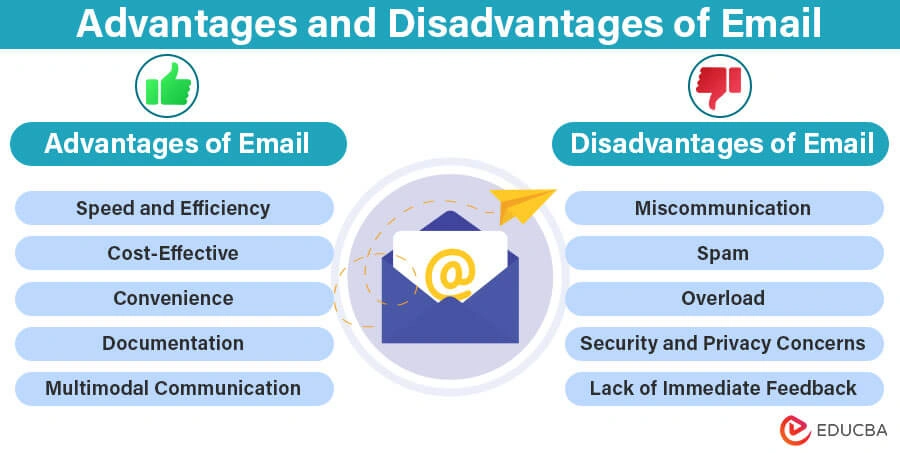
Email marketing tools generate a remarkable 3500% return on investment — that’s $36 for every dollar spent on campaigns. Email remains the life-blood of effective marketing strategies in the digital world, even as new communication channels emerge.
The numbers tell an impressive story. Statista reports that people send and receive about 360 billion emails daily in 2024. These numbers will likely exceed 400 billion by 2027. Businesses need to pick the right email marketing platform to succeed. The good news is that many providers give away free email marketing tools, so companies can start without spending much money upfront.
My team and I tested more than 60 email marketing apps to create this piece about the top email marketing tools and the best email marketing software for 2025. These platforms are a great way to get exactly what your business needs. MailerLite works well for advanced marketers, while Brevo packs all-in-one marketing and sales features. On top of that, many of these platforms come with generous free plans that never expire. This helps businesses build strong email strategies without overspending.
Why Choosing the Right Email Marketing Tool Matters
Picking the right email marketing platform is more than just finding a tool to send bulk messages. Standard business email services like Outlook or G Suite don’t provide the specialized features needed to run marketing campaigns effectively.
Professional email marketing tools give you major advantages over standard email accounts. They prevent account suspension risks that pop up when sending over 500 emails daily from regular accounts. These platforms also boost your deliverability rates, so marketing messages don’t land in spam folders or disappear completely.
Great email marketing software comes with key features that help campaigns succeed:
- Measurable results – See immediate metrics like opens, clicks, bounces, forwards, and social shares
- Advanced segmentation – Reach specific audiences based on their behavior and priorities
- Responsive design – Build emails that look great on all devices – crucial since over half of emails are read on mobile
- Time-saving automation – Launch triggered campaigns based on user actions for quick follow-ups
- GDPR compliance – Handle opt-ins and unsubscribes correctly to meet legal requirements
Research shows personalized emails get 6x higher transaction rates than generic messages. Smart targeting through segmented and triggered campaigns generates 77% of email marketing returns. These numbers show why targeted messaging makes such a difference.
Your email marketing platform should work smoothly with other business tools. Connecting it with CRM software lets companies track how email campaigns affect business opportunities and deals. This creates a complete picture of customer interactions across all channels.
Small businesses don’t need to worry about costs. Many providers have free starter plans or affordable packages that grow with your business. The real value comes from automated time savings and better results through targeted messaging.
Building loyal customers becomes tough without proper email marketing tools. The right platform helps companies own their subscriber lists as assets, unlike social media where algorithm changes can hurt your visibility.
MailerLite
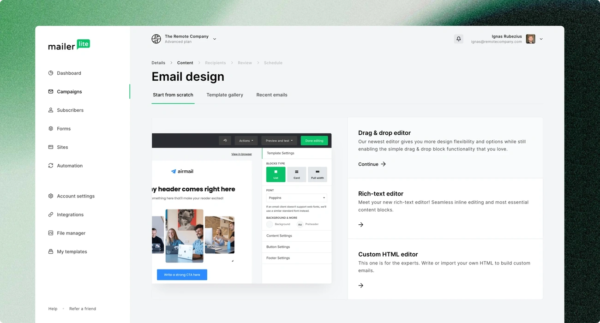
MailerLite is a straightforward email marketing platform built for small businesses, bloggers, and growing companies. This Lithuania-based service, launched in 2010, now helps over 800,000 businesses monthly by combining simplicity with powerful features.
MailerLite key features
The platform packs impressive capabilities that go beyond simple email sending:
- Drag-and-drop email editor with AI-powered assistance
- Unlimited monthly emails on paid plans
- Automation workflows with multiple trigger options
- Landing page and website builder with hosting included
- Pop-up and signup forms for lead generation
- A/B testing for email optimization
- Digital product selling capabilities
- RSS campaign integration for blog content
The platform includes an “auto-resend” feature that targets subscribers who missed your original campaign. This helps boost engagement without extra work.
MailerLite pros and cons
Pros:
- Accessible interface that needs no technical knowledge
- Better pricing than competitors like Mailchimp
- High email deliverability rates
- Round-the-clock support via email and live chat (on paid plans)
- Uninterrupted integrations with platforms like Shopify and WordPress
Cons:
- You need approval before sending your first campaign
- Free plan caps at 12,000 emails monthly
- Not as many integrations as competitors
- HTML editor and advanced features only on paid plans
MailerLite pricing
The platform offers four clear pricing tiers:
Free Plan: £0 for up to 1,000 subscribers, 12,000 monthly emails, one user Growing Business: Starting at £7.15/month (annual billing) for 500 subscribers, unlimited emails, three users Advanced: Starting at £14.29/month (annual billing) for 500 subscribers, unlimited emails, unlimited users Enterprise: Custom pricing for businesses with over 100K subscribers
Paid plans come with a 10% discount for annual billing, and non-profit organizations get a 30% discount.
MailerLite best for
MailerLite works great for:
- Small businesses that need complete features on a budget
- Bloggers and content creators who use automation tools
- Startups and non-profits looking for cost-effective email marketing
- E-commerce stores that use Shopify or WooCommerce
- Teams who want a simple platform to learn quickly
Brevo
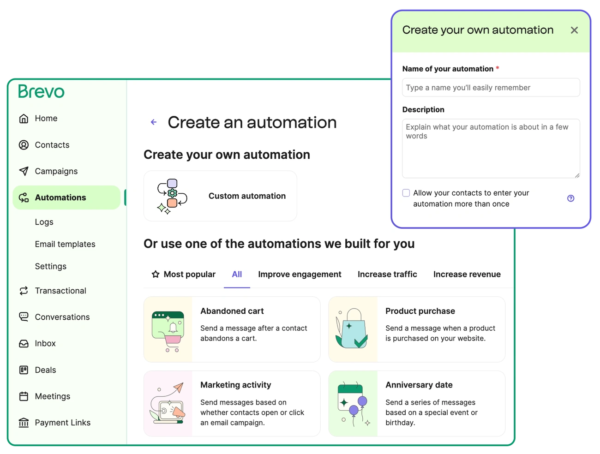
Brevo (formerly Sendinblue) is more than just an email marketing tool. This platform offers reliable multi-channel communication capabilities that make shared customer relationship management simple through channels of all types.
Brevo key features
Brevo stands out with these complete features:
- Email marketing with drag-and-drop editor and AI-generated content
- SMS and WhatsApp campaign capabilities for direct mobile communication
- 99% email deliverability rate for optimal inbox placement
- Marketing automation workflows with trigger-based campaigns
- Landing page builder with customizable templates
- Built-in CRM functionality for contact management
- Transactional email capabilities with rapid delivery
- Integration with 150+ digital tools and platforms
Brevo pros and cons
Pros:
- Easy-to-use interface perfect for beginners
- Marketing capabilities across multiple channels in one platform
- Free plan with unlimited contacts
- Reliable delivery infrastructure
- Complete automation tools
- 24/7 customer support on paid plans
Cons:
- Free plan limits you to 300 emails per day
- Users want more advanced automation features
- Limited integrations compared to competitors
- Small businesses might find advanced features expensive
Brevo pricing
Brevo’s pricing flexibly scales with your email volume:
Free: 300 emails/day, unlimited contacts Starter: From £7.15/month for 5,000 emails Business: From £14.29/month for 5,000 emails with advanced features Enterprise: Custom pricing for large organizations
You get unlimited contacts with all plans, subject to fair usage.
Brevo best for
Brevo works best for:
- Small businesses that need affordable multi-channel marketing tools
- E-commerce stores that send transactional emails and SMS
- Marketing teams looking for combined CRM and marketing features
- Companies that want to add mobile messaging to their strategy
- Businesses that need to streamline their workflow with one platform
Kit
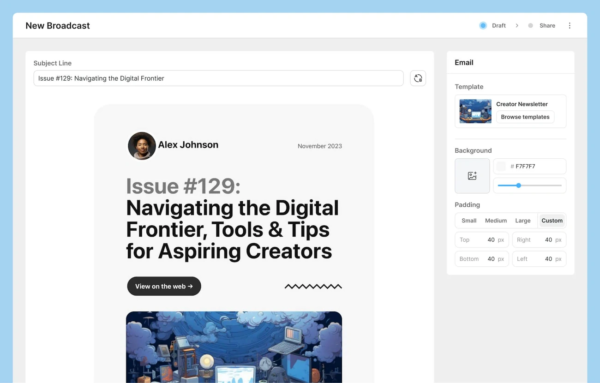
Kit, previously known as ConvertKit, serves as a specialized email marketing platform. The platform caters to content creators, bloggers, and small businesses who want to grow and monetize their audience.
Kit key features
Kit has several creator-focused features:
- Visual automation builder that creates subscriber experiences
- Customizable email templates with advanced formatting options
- Subscriber tagging and segmentation for targeted messaging
- Landing pages and embeddable signup forms
- Built-in monetization tools to sell digital products
- Creator Network that enables cross-promotion opportunities
- Newsletter referral system (on Pro plans)
- Analytics and reporting to optimize campaigns
The platform stands out with its feature that lets you sell digital products and paid newsletter subscriptions directly. The platform charges a 3.5% + £0.24 transaction fee.
Kit pros and cons
Pros:
- Free forever plan that supports up to 10,000 subscribers
- User-friendly interface that needs minimal technical expertise
- Strong automation features for individual-specific campaigns
- Built-in commerce features that remove the need for third-party tools
- This is a big deal as it means that email deliverability rate is 99.8%
Cons:
- Limited design customization compared to competitors
- Higher pricing as subscriber lists grow
- Simple A/B testing (subject lines only)
- No built-in CRM functionality
- No mobile apps available
Kit pricing
Kit has three pricing tiers:
- Newsletter (Free): Up to 10,000 subscribers, 1 simple automation, 1 email sequence, unlimited landing pages and forms
- Creator: Starting at £11.91/month for 300 subscribers, has unlimited automations, 2 users, and integrations
- Creator Pro: Starting at £23.03/month for 300 subscribers, adds unlimited users, advanced reporting, and priority support
Both paid plans come with a 14-day free trial and two months free with annual billing.
Kit best for
Kit works best for:
- Content creators and bloggers who build audience relationships
- Coaches and course creators selling digital products
- Newsletter publishers looking for monetization options
- Small businesses that need straightforward automation
- Freelancers managing client communications
Kit gives creators the tools they need to build profitable, sustainable businesses through email marketing. The platform requires no technical expertise to get started.
Sender
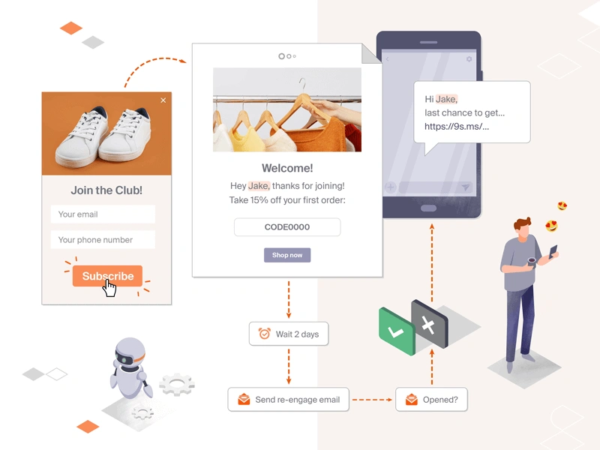
Sender emerges as a budget-friendly and powerful email marketing platform that users praise for its simplicity and value. More than 180,000 businesses worldwide trust this tool, which provides detailed features at a fraction of the cost of enterprise-level solutions.
Sender key features
Sender packs a resilient set of tools for email marketing campaigns:
- Easy-to-use drag-and-drop email builder with responsive design
- HTML editor that creates custom templates
- Free email templates library featuring responsive designs
- Unlimited email automation with premade workflows
- SMS marketing integration that powers multi-channel campaigns
- Audience segmentation tools that deliver targeted messaging
- Popup and form builders to generate leads
- Detailed analytics and reporting dashboard
- Smooth integration with prominent platforms like WordPress, WooCommerce, Shopify, and Magento
Sender pros and cons
Pros:
- A generous free plan that sends up to 15,000 emails monthly
- Simple interface that beginners love
- Unlimited automation available even with free plans
- Customer support team that responds quickly and helps effectively
- Budget-friendly pricing compared to competitors
- Built-in SMS features for omnichannel marketing
Cons:
- Free plan emails show Sender branding
- Higher-tier plans lock some advanced features
- Integration options lag behind bigger competitors
Sender pricing
Sender keeps its pricing simple and clear:
Free Forever: £0 lets you reach 2,500 subscribers and send 15,000 emails monthly Standard: Starts at £8/month for 5,000 subscribers and 60,000 emails Professional: Begins at £17/month for 10,000 subscribers and includes advanced features plus free SMS credits Enterprise: Custom pricing includes unlimited emails, a dedicated success manager, and advanced permissions
Sender best for
Sender works great for:
- Startups and small businesses watching their marketing budget
- Online stores that need automation tools
- Marketers who want email and SMS capabilities
- Companies looking to switch from expensive platforms like Mailchimp
- Businesses that need powerful features without technical hassles
Sender gives businesses an affordable way to start professional email marketing and supports their growth as needs change.
Loops
Loops stands out as a modern email platform with a “design-first approach” that blends product, marketing, and transactional emails into one system. This email marketing tool provides a clean interface that feels like writing in a document, making it easy for teams of all technical backgrounds.
Loops key features
The platform comes packed with these standout features:
- Notion-style email editor with block-based components
- Combined marketing, product, and transactional email functionality
- Smart email queueing system that picks the best delivery times
- Complete DNS handling including DMARC and DKIM
- API integration with Node SDK (30K+ weekly downloads)
- Reusable themes and components to keep branding consistent
- Audience segmentation with dynamic targeting options
- Automatic contact property tracking
Loops pros and cons
Pros:
- Beautiful, accessible interface that needs minimal training
- One platform handles all email types so you won’t need multiple tools
- Strong email deliverability setup
- Free plan with generous sending limits
- Clear API documentation developers love
Cons:
- Plans become much more expensive at higher subscriber levels
- Basic visual workflow builder options
- Some features still feel new to users
- “Powered by Loops” branding shows up on free plan emails
Loops pricing
The platform bases its pricing on subscriber count:
Free: Up to 1,000 contacts, 4,000 emails monthly Starter: £38.91/month for 5,000 subscribers Growing: £78.62/month for 10,000 subscribers Scale: £158.04/month for 25,000 subscribers Enterprise: Custom pricing for over 1,000,000 subscribers
Every plan includes full functionality without feature limits.
Loops best for
The platform works great for:
- SaaS companies that want simplified email operations
- Technical founders who need quick setup without coding
- Teams using both marketing and transactional emails
- Businesses that care about clean, modern email design
- Organizations needing developer-friendly APIs with clear documentation
Loops appeals to companies that want simplicity without losing functionality. Companies needing complex marketing automation might find it basic compared to enterprise-focused options.
EmailOctopus
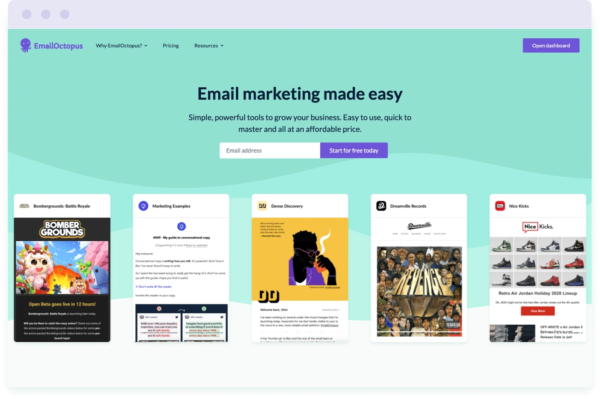
EmailOctopus offers a simple yet powerful email marketing platform that has helped over 50,000 businesses send more than 12 billion emails since 2014. This UK-based email marketing tool makes campaigns available through easy-to-use features and affordable pricing.
EmailOctopus key features
EmailOctopus provides essential tools to make email marketing work:
- Drag-and-drop email editor with customizable templates
- Code-your-own HTML option for advanced users
- Landing page and form builders to generate leads
- Visual automation builder to enhance subscriber experience
- Segmentation tools based on custom fields and campaign activity
- Live analytics to track campaign performance
- Integrations with Shopify, WordPress, Zapier, and more
- GDPR compliance to protect data
EmailOctopus pros and cons
Pros:
- Outstanding value (users save over 60% compared to competitors)
- Easy-to-use interface that takes minutes to learn
- Generous free plan with high sending limits
- Customer support available almost 24/7 even on free plans
- Clean design that makes campaign creation easy
Cons:
- Fewer templates than competitors (34 total templates)
- Simple automation features compared to enterprise solutions
- EmailOctopus branding shows on free plan emails
- Free plan reports last only 30 days
EmailOctopus pricing
Starter: Free for up to 2,500 subscribers and 10,000 monthly emails Pro: Starting at €9/month based on subscriber count Custom: Available to organizations with over 500,000 subscribers
Paid plans come with unlimited landing pages, forms, and automation workflows. Non-profit organizations get a 20% lifetime discount.
Email Octopus
EmailOctopus serves perfectly for:
- Small businesses looking for affordable email marketing
- Bloggers and content creators growing their audience
- Self-published authors connecting with readers
- Online stores needing simple campaign management
- Charities taking advantage of the non-profit discount
Users see their open rates jump from 16% to 34% after switching to this platform. EmailOctopus shows that email marketing tools can be both powerful and affordable.
Audienceful
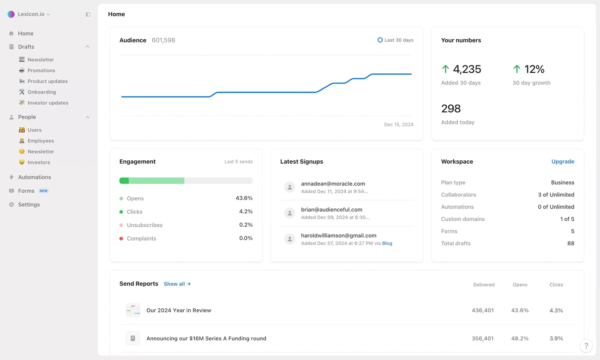
Audienceful brings email marketing into the 2020s. The platform feels just like working in Notion or Google Docs with its multiplayer, lightweight approach. Businesses can create branded emails without struggling with complex builders, thanks to its modern design and practical features.
Audienceful key features
The platform stands out with these capabilities:
- A Notion-inspired editor that makes email creation simple
- Branded emails with one click and automatic mobile and dark mode optimization
- Shared editing that works like Google Docs or Notion
- Tools to automate drip sequences, lead magnets, and email courses
- Smart subscriber grouping with tags and custom fields
- Direct Webflow integration to cross-post content
- Connect with 4000+ tools through Zapier or API
- OpenAI monitors spam to protect your sender reputation
Audienceful pros and cons
Pros:
- An accessible interface that needs minimal training
- Team members can edit together instantly
- A design system that keeps your branding consistent
- Support for multiple workspaces to manage different businesses
- Mailgun handles the deliverability infrastructure
Cons:
- You won’t find pre-made templates
- Few reviews because it’s new to the market
- Free plan emails show the Audienceful logo
Audienceful pricing
The platform comes with four clear pricing tiers:
Free: £0/month for 1,000 contacts, 2 team collaborators, 1 automated sequence Essentials: £23.03/month for 3,000 contacts, 3 team collaborators, 3 sequences Growth: £44.47/month for 3,000 contacts, unlimited collaborators and automations Business: £158.04/month for 10,000 contacts with additional enterprise features
Paid plans give you white-label emails and custom sending domains.
Audienceful best for
The platform shines for:
- Retail businesses like Joe & The Juice that need employee communications
- Finance professionals who publish newsletters
- Entertainment venues that promote events
- Agencies managing client relationships
- Series B startups connecting with developer networks
- Content creators building audiences beyond social platforms
- Non-profits reaching out to communities
Audienceful serves businesses that want a fresh take on email marketing without losing any powerful features.
Omnisend
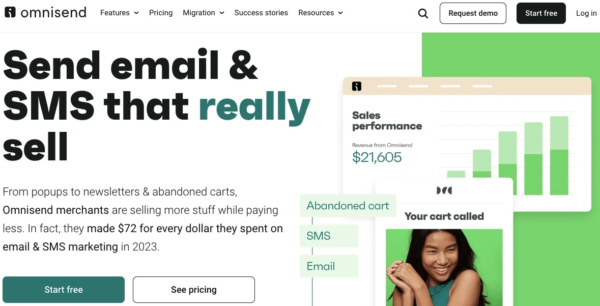
Omnisend is an omnichannel marketing platform that helps online stores boost sales through email and SMS marketing automation. The platform focuses only on ecommerce, and more than 125,000 brands use it to create effective customer communication and drive conversions.
Omnisend key features
Omnisend’s toolkit gives ecommerce marketers everything they need:
- Pre-built automation workflows for welcome series, cart recovery, and customer reactivation
- Drag-and-drop email builder with product picker functionality
- Customer Lifecycle Map for AI-powered subscriber segmentation
- Multi-channel capabilities combining email, SMS, and push notifications
- 250+ responsive email templates designed for ecommerce
- Shopify product reviews integration
- Advanced segmentation based on shopping behavior
- Uninterrupted integration with major ecommerce platforms
Omni Send pros and cons
Pros:
- Free forever plan with all essential features
- 130+ direct integrations with ecommerce platforms
- Award-winning 24/7 customer support that responds in 4 minutes on average
- Reliable email deliverability infrastructure
- Dedicated migration support from other platforms (free for Klaviyo users)
Cons:
- Interface available in English only
- Limited customization options compared to some competitors
- Advanced reporting restricted to Pro plan
- We designed it for ecommerce (not ideal for other industries)
Omnisend pricing
Free: £0 for 250 contacts, 500 emails/month, 60 one-time SMS credits Standard: Starting at £12.71/month for 500 contacts, 6,000 emails/month Pro: Starting at £46.86/month for 2,500 contacts, unlimited emails, bonus SMS credits
All paid plans offer 30% savings with quarterly prepayment.
Omnisend best for
Omnisend works exceptionally well for:
- Shopify store owners who need direct integration
- Ecommerce businesses that want automated customer communication
- Online retailers looking for combined email and SMS capabilities
- Companies that want to recover abandoned carts and drive repeat purchases
- Merchants who manage multiple online stores under one account
Mailtrap
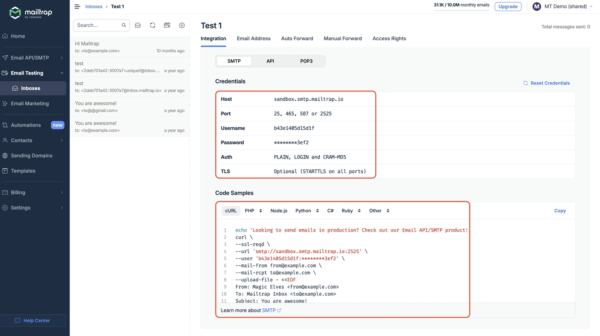
Mailtrap offers a unique email solution that works as both a testing sandbox and delivery platform. The platform stands out from typical email marketing services because we focused on email testing environments. Developers can catch and analyze messages before they reach real recipients.
Mailtrap key features
The platform blends development tools with practical email features:
- Fake SMTP server captures emails in staging environments
- HTML checker analyzes template compatibility across email clients
- Spam score analysis spots deliverability problems
- QA automation with flexible API for test flows
- Team collaboration tools share test results
- Email API/SMTP service handles production sending
- Visual preview shows emails on different devices
- Detailed technical information tracks SMTP transactions
Users can handle both testing and production needs smoothly. The platform makes switching between development and deployment phases easy.
Mailtrap pros and cons
Pros:
- Secure testing environment stops accidental emails to real users
- Quick 5-minute setup gets you started fast
- Team collaboration features enhance group work
- HTML validation spots rendering issues early
- Advanced analytics assess deliverability
Cons:
- Free plan caps at 100 test emails monthly with basic features
- Premium plans start without trial periods
- Template options lag behind marketing platforms
- Delivery statistics sometimes show inaccuracies
- Test email storage comes with limits
Mailtrap pricing
Email Testing Plans:
- Free: £0 forever for personal projects (100 test emails/month)
- Individual: £11.90/month (5,000 test emails/month)
- Team: £27.79/month (15,000 test emails/month, 20 team members)
- Business: £51.61/month (50,000 test emails/month, 40 team members)
- Premium: £103.23/month (100,000 test emails/month, 80 team members)
- Enterprise: £317.66/month (10,000,000 test emails/month, 999 team members)
Email Sending Plans start at £7.94/month and are sold separately.
Mailtrap best for
Mailtrap works best for:
- Development teams that need to test email functionality
- QA environments that need reliable email capture
- Product companies building web apps with email features
- Teams working together on email templates
- Organizations that put email testing first before deployment
Mailtrap shines not as a marketing platform but as a specialized tool. It helps ensure email quality and reliability throughout development.
Zoho Campaigns
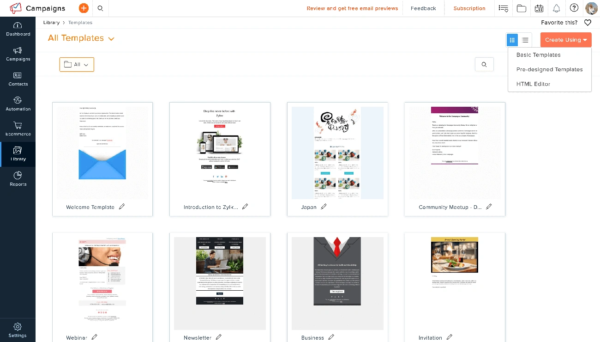
Zoho Campaigns is part of Zoho’s detailed business suite that naturally works with the company’s other applications. This email automation product helps organizations that need economical marketing solutions while keeping all important features.
Zoho Campaigns key features
Zoho Campaigns comes with these practical features:
- Email templates that enhance visual appeal and user experience
- Contact groups based on interests and behavior
- A drag-and-drop email editor with custom layouts
- Automation workflows with “Chain and Child Campaign” for follow-ups
- Live tracking of opens, clicks, bounces, and more
- Communication through email and SMS
- Mobile app to manage campaigns anywhere
- Built-in signup forms and popups to build lists
- A/B testing to improve campaign performance
Zoho Campaigns pros and cons
Pros:
- Great value for money with proven savings (one organization saved £20,000 yearly)
- Natural integration with other Zoho applications
- Powerful automation features
- GDPR-compliant data handling
- Round-the-clock customer support on paid plans
Cons:
- The interface is less accessible than competitors
- Limited integrations outside Zoho ecosystem
- Users sometimes need more advanced features
- Complex admin privileges management
Zoho Campaigns pricing
- Forever Free: £0 for up to 2,000 contacts and 6,000 emails monthly
- Standard: Starting at £3.18/month for 500 contacts with unlimited emails
- Professional: Starting at £4.76/month for 500 contacts with advanced features
- Pay-as-you-go: Available for occasional senders
SMS marketing comes as add-ons with all paid plans. Non-profit organizations get special discounts.
Zoho Campaigns best for
Zoho Campaigns fits perfectly with:
- Small teams up to five users
- Companies that already use other Zoho products
- Organizations that need budget-friendly email marketing
- Businesses that send marketing and transactional emails
- Teams that want to reach audiences without technical complications
HubSpot
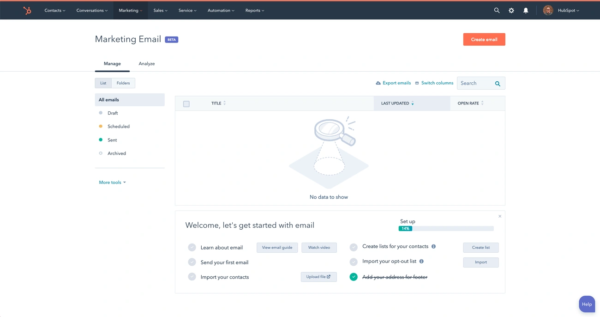
HubSpot stands out as a complete customer platform that merges marketing, sales, and service functions into one system, moving beyond simple email marketing. The platform serves over 205,000 companies worldwide and leads the industry by offering email marketing as part of its broader CRM ecosystem.
HubSpot key features
HubSpot’s email marketing tools pack powerful capabilities:
- AI-generated subject lines and email copy that boost open rates
- Customizable email templates for newsletters, events, and campaigns
- A/B testing options to optimize campaigns (Professional plan and above)
- Automation workflows that handle post-email follow-ups
- Personalization tokens that create recipient-specific content
- Immediate tracking of opens, clicks, bounces, and unsubscribes
- Email health monitoring that suggests improvements
- Integration with HubSpot’s CRM for better contact management
HubSpot pros and cons
Pros:
- All-in-one platform that combines email with marketing, sales, and service tools
- Powerful marketing automation that enhances campaigns
- Complete analytics and reporting tools that track performance
- Uninterrupted connection with hundreds of business apps
- Expandable solutions that adapt to your business growth
Cons:
- Prices run by a lot higher than dedicated email tools
- Basic features in free and lower-tier plans
- Takes time to learn and master
- A/B testing and other key features limited to premium plans
HubSpot pricing
- Free: £0 for 2,000 marketing emails monthly with HubSpot branding
- Starter: Approximately £39.71/month for 1,000 contacts
- Professional: £635.33/month for 2,000 contacts with advanced features
- Enterprise: £2,858.98/month for complete capabilities
Contact volumes affect tiered pricing with higher costs for larger numbers. Professional onboarding costs about £2,382.48.
HubSpot best for
HubSpot’s email marketing tools serve perfectly for:
- Mid-sized to enterprise companies that need integrated marketing solutions
- Businesses looking to combine sales, marketing, and customer service data
- Organizations that want advanced automation and reporting
- Companies ready to invest in reliable marketing systems
- Teams that need shared marketing tools with smooth workflows
Klaviyo

Klaviyo is a specialized B2C CRM and marketing automation platform that serves over 167,000 paying customers worldwide. This complete tool goes beyond simple email marketing and provides integrated customer relationship management functionalities.
Klaviyo key features
Klaviyo offers a resilient suite of marketing capabilities:
- AI-powered analytics for precise segmentation
- Combined email, SMS, and mobile push notifications
- Tailored product recommendations based on customer behavior
- Drag-and-drop automation builder that maps customer trips
- 350+ pre-built integrations with eCommerce platforms
- AI-powered content generation for emails
- Customer profiles with predictive analytics
- Built-in compliance and deliverability tools
The platform distinguishes itself by uniting customer data from various sources. This enables targeted marketing based on immediate actions and detailed customer information.
Klaviyo pros and cons
Pros:
- Smooth integration with eCommerce platforms like Shopify
- Powerful analytics that measure campaign effectiveness
- Easy-to-use interface for beginners
- Advanced automation capabilities for tailored messaging
- High email deliverability infrastructure
Cons:
- Higher pricing than many competitors
- Time needed to master advanced features
- Limited design customization options for some users
- Occasional technical glitches reported
- Pricing structure becomes expensive as contact lists grow
Klaviyo pricing
- Free: £0 for up to 250 active profiles, 500 emails monthly, 150 SMS credits
- Email Plan: Starting at £15.88/month for 251-500 active profiles
- Email and SMS Plan: Starting at £27.80/month for 251-500 active profiles with 1,250 SMS credits
The pricing scales up based on active profile count. Recent pricing changes affect businesses with larger subscriber lists.
Klaviyo best for
Klaviyo shines for:
- eCommerce businesses that need deep platform integration
- Companies wanting combined email and SMS marketing solutions
- Organizations that value advanced customer segmentation
- Businesses looking for detailed marketing analytics
- Brands of all sizes aiming to tailor customer communications
Klaviyo’s powerful segmentation capabilities help businesses create targeted campaigns. These campaigns improve engagement and conversions across multiple channels.
Mailchimp

Mailchimp, a 22-year old company, has grown into one of the most prominent names in email marketing and serves over 14,000 new users daily. The Atlanta-based platform, which Intuit acquired in 2021 for $12 billion, delivers complete marketing automation capabilities beyond simple email services.
Mailchimp key features
The Campaign Builder tool sits at the heart of Mailchimp’s core functionality to create professional business emails. The platform also shines with these features:
- Customizable email design with 260+ responsive templates
- Campaign automations to create customer experiences
- Audience segmentation with behavioral targeting
- Signup forms, landing pages, and website builder
- AI-powered Content Optimizer to improve campaigns
- Appointment scheduling with online payment options
- Integration with over 300 third-party tools and platforms
Mailchimp pros and cons
Pros:
- Complete all-in-one marketing platform
- Easy-to-use email builder without coding requirements
- Large integration ecosystem that enhances functionality
- Built-in survey maker and landing page builder
- Clean interface with powerful editing capabilities
Cons:
- Monthly email sends cap at 150,000 even on top tier
- Higher pricing for larger contact lists
- Customer support lacks speed in responses
- Each list counts contacts separately for billing
- Free plan features have decreased
Mailchimp pricing
- Free: £0 for 500 contacts, 1,000 emails/month, limited features
- Essentials: From £10.32/month for 500 contacts, has automation
- Standard: From £15.88/month for 500 contacts, adds advanced features
- Premium: From £277.96/month for 10,000 contacts, unlimited users
Contact count affects pricing tiers. The free plan now allows 500 contacts, down from 2,000.
Mailchimp best for
Small to medium businesses looking for an all-in-one marketing solution will find Mailchimp most valuable. The platform works best for:
- Beginners who need an easy-to-use platform
- Companies with smaller email lists (under 10,000 contacts)
- Teams that want email, websites, and landing pages in one place
- Organizations that need simple automation capabilities
- Current users who know the platform’s interface well
Campaign Monitor
Campaign Monitor stands out as a professional email marketing solution that helps businesses craft visually striking campaigns. Since 2004, this platform has grown to serve 250,000 businesses worldwide by combining design-focused tools with powerful data analysis capabilities.
Campaign Monitor key features
- Drag-and-drop email builder with customizable templates
- Brand import tool that pulls styling from your website URL
- Link Review system to detect broken or outdated hyperlinks
- Visual designer for automated email sequences
- Branded transactional email options
- Up-to-the-minute data analysis dashboard with location-based insights
- SMS marketing integration capabilities
- Tools for targeted audience messaging
- Custom forms to grow your audience
Campaign Monitor pros and cons
Pros:
- Beautiful, responsive email templates that adapt to any screen
- Easy-to-use platform that needs minimal technical expertise
- Detailed analytics to track your campaign results
- Team access with role-based permissions
- Uninterrupted connections with hundreds of apps including e-commerce platforms
Cons:
- Price points sit nowhere near comparable competitors
- A/B testing limited to 2 variants
- The core team support by phone comes only with the Premier plan
- Basic RSS-to-newsletter features need improvement
- Landing page builder not included
Campaign Monitor pricing
- Lite: Starts at GBP 9.53/month for 500 subscribers with 2,500 monthly email limit
- Essentials: Begins at GBP 23.03/month for 500 subscribers with unlimited emails
- Premier: Opens at GBP 118.33/month for advanced features
- Subscriber count affects all plans, reaching GBP 277.16-793.37/month at 50,000 subscribers
Campaign Monitor best for
Campaign Monitor delivers exceptional value to:
- Small to midsize businesses that need visually impressive emails
- Teams looking for shared email creation tools
- Organizations that value design quality over complex automation
- Companies seeking accessible analytics without technical barriers
- Businesses sending moderate email volumes with high design standards
Comparison Table
| Tool | Free Plan Limits | Starting Price (Paid) | Key Features | Best Suited For | Notable Pros | Notable Cons |
| MailerLite | 1,000 subscribers, 12,000 emails/month | £7.15/month | – Drag-and-drop editor
– Automation workflows – Landing page builder – Digital product selling |
– Small businesses
– Bloggers – Startups |
– Perfect for beginners
– Affordable – High deliverability |
– Approval process required
– Limited free plan |
| Brevo | 300 emails/day, unlimited contacts | £7.15/month | – Email & SMS marketing
– AI-generated content – Built-in CRM – 99% deliverability |
– Small businesses
– E-commerce stores |
– Works across channels
– Free unlimited contacts – 24/7 support |
– Limited free plan
– Higher pricing for advanced features |
| Kit | Up to 10,000 subscribers | £11.91/month | – Visual automation builder
– Newsletter referral system – Built-in monetization |
– Content creators
– Coaches – Newsletter publishers |
– Free forever plan
– Easy-to-use interface – Built-in commerce |
– Limited design customization
– No mobile apps |
| Sender | 2,500 subscribers, 15,000 emails/month | £8/month | – Drag-and-drop builder
– SMS integration – Unlimited automation |
– Startups
– Small businesses – Online stores |
– Generous free plan
– Easy to navigate – Affordable |
– Sender branding on free plan
– Limited integrations |
| Loops | 1,000 contacts, 4,000 emails/month | £38.91/month | – Notion-style editor
– Combined marketing & transactional – API integration |
– SaaS companies
– Technical founders |
– Clean interface
– Strong API documentation – High deliverability |
– Expensive scaling
– Limited workflow builder |
| EmailOctopus | 2,500 subscribers, 10,000 emails/month | €9/month | – Drag-and-drop editor
– Landing page builder – Visual automation |
– Small businesses
– Bloggers – Online stores |
– Great value for money
– Easy to use – 24/7 support |
– Limited templates
– Simple automation – 30-day report limit |
| Audienceful | 1,000 contacts | £23.03/month | – Notion-inspired editor
– Team collaboration – OpenAI spam monitoring |
– Retail businesses
– Finance professionals – Startups |
– Clean interface
– Team features – Built-in design system |
– No pre-made templates
– Limited reviews |
| Omnisend | 250 contacts, 500 emails/month | £12.71/month | – Pre-built automation
– Multi-channel capabilities – Product picker |
– Shopify stores
– E-commerce businesses |
– Free essential features
– 130+ integrations – 24/7 support |
– English-only interface
– Limited customization |
| Mailchimp | 500 contacts, 1,000 emails/month | £10.32/month | – 260+ templates
– Campaign automation – Website builder |
– Small-medium businesses
– Beginners |
– Full-featured platform
– Easy to navigate – Large integration ecosystem |
– Expensive scaling
– Limited email sends – Slow support |
| Campaign Monitor | Not mentioned | £9.53/month | – Visual journey designer
– Link Review tool – Brand import |
– Small-midsize businesses
– Design-focused teams |
– Beautiful templates
– Easy-to-use – Detailed analytics |
– Higher pricing
– Limited A/B testing – No landing page creator |
Conclusion
Your choice of email marketing tool can make or break your digital marketing success. We tested 15 different options that work for various business needs. Email marketing still delivers amazing returns – you get $36 back for every dollar you spend, which adds up to a 3500% ROI.
These platforms offer more than just simple features. MailerLite shines with its easy-to-use interface and detailed features for small businesses. Brevo does great with multi-channel marketing. Kit works best for content creators, and Omnisend focuses only on ecommerce businesses.
A tight budget shouldn’t stop you from running great email campaigns. Most providers give you free plans to build a strong base before you scale up. EmailOctopus and Sender’s free tiers are great options if you’re watching your spending – they let you send lots of emails without paying.
You should look at several key things before picking an email marketing platform. Delivery rates, automation features, template choices, and integration options are vital to finding your perfect match. Your platform should also grow with you as your subscriber count increases and marketing needs change.
AI advances and changing customer needs will reshape email marketing tools. In spite of that, email marketing remains the life-blood of digital marketing because of its unmatched ROI and direct access to customer inboxes. Smart businesses take time to pick the right platform and set themselves up for steady growth and better customer connections.
The right email marketing tool depends on what your business needs, what you can spend, and where you want to go. Take a good look at your needs and match them with each platform’s strengths we’ve covered in this piece. This helps you pick a solution that works now and supports your future marketing goals.