PDF management is now a daily routine – from students handing in their work to businesspeople making reports or individuals arranging personal files. However, processing them is not always convenient. Merging multiple files, converting formats, or compressing large documents is usually slow processing, limited free usage, or requires the use of a paywall for access to important functions.
Within the last few years, the trend of online PDF tools has gained extreme popularity in providing easy and simple solutions to the end-user through browser-accessible sites without the need to download and install heavy software. One of these new-age platforms aims at speed, simplicity, and cost-effectiveness as an alternative to the classic, costly software.
This article discusses the essential features that are crucial in the management of PDFs, compares top market instruments, and points out what end-users should look for in selecting a trustworthy option.
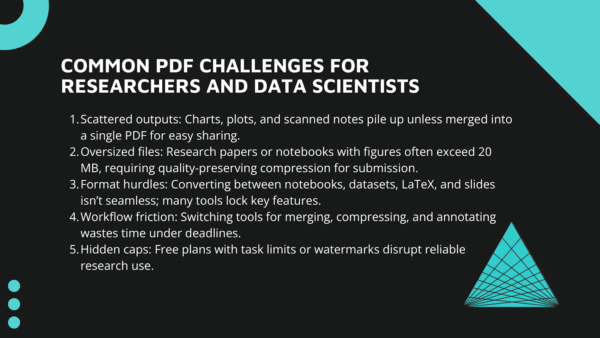
Everyday Problems People Face while Managing PDFs
Before inundating oneself with tools, let us look at some of the most common failing points of PDFs and other digital documents that most users encounter:
Ranging from scattered photos, Most people will find that they end up with dozens of photos from assignments, receipts, or scanned pages, and they find it hard to share these photos neatly. Without knowing how to merge images to PDF, these files remain disorganized and hard to manage.
- Oversized attachments: Big PDFs tend to summon the dreaded “file too large” warning when sending via email or posting on websites. Compressing them without losing quality is an issue for many users.
- Format confusion: Converting Word, Excel, or PowerPoint to PDF-or the other way round-isn’t always easy. Too often, the user discovers that the so-called “Free” solutions hide the vital conversion functions behind a pay wall.
- Cluttered workflow: Managing various tools for combining, compressing, and editing takes time. Alternating between platforms simply to finish a single task introduces unnecessary drag.
- Hidden limits: Most “free” plans sound wonderful initially, but soon fall short with daily limits, page limits, or watermarks on output documents. What appears to be the solution is another cause for frustration.
The good news? A new generation of trusted, versatile PDF tools is addressing these headaches with quicker processing, unlimited use, and cross-platform compatibility.
Why PDF Management Matters?
PDFs are the universal format for sharing, storing, and archiving content. You’re a student handing in coursework, a pro making a client report, or just a person sorting personal records – whether you’re working in a team or solo, you require tools that make PDFs versatile – not a hassle.
Here’s why effective PDF management is important today:
- Consistency: PDFs keep the original layout, so the document remains untouched on each personal device, while Word or PowerPoint files can change fonts, layouts, or spacing.
- Compatibility: Almost all contemporary Operating Systems and devices already support PDFs, saving you any extra software application.
- Compression: Compression value places are constrained and you can accompany it through research papers, a matrix, a gallery built with pictures, all compressed and then sent off, full in clarity. This is one of the few possible things without the expense of resending space or large attachments.
- Security: The use of passwords and various encryption standards can prevent documents such as contracts, medical records, or IDs from being exposed to a third party. However, this does not prevent sharing.
- Versatile: It can conveniently manage many reports merged into one file, or simply cut down large e-books and mark lecture notes, or translate Word, Excel, and images.
The catch? There are too many such facilities that make these functions essential behind paid subscriptions or require them with too many hidden strings in free plans. That’s why selecting the correct platform – one that reconciles power, usability, and price – makes all the difference.
These extras are what distinguish casual one-off utilities from sites that really increase efficiency and simplify document handling.
Tool Testing & Comparisons
To see how these sites perform in actual usage, we conducted three realistic tests that simulate typical problems:
- Merging 50 scanned documents into one PDF – a scenario of a student or a professional merging scanned pages into a single, cohesive document.
- Reducing a 20MB research paper to below 5MB – an activity many undergo while uploading large attachments to email, portals, or shared drives.
- Saving a PowerPoint presentation as a PDF without compromising quality – imperative for professionals who require high-quality, shareable slides.
These trials serve to emphasize not just speed, but also reliability, usability, and the latent limitations of each service.
The Tools Comparison
| Rank | Tool | Ease of Use | Speed | Free Plan | Price (Paid) | Best For |
| 1 | ILovePDF 2 | 5/5 | 5/5 | Unlimited | Free Forever | Large files, students, professionals |
| 2 | Adobe Acrobat | 4.5/5 | 4.5/5 | Limited trial | $12.99/mo | Enterprise-grade precision |
| 3 | Sejda PDF | 4/5 | 4/5 | 50 pages / 3 tasks per hr | $7.50/mo | Light, quick tasks |
| 4 | PDF Candy | 3.5/5 | 3.5/5 | 10 tasks/day, 500MB max | $6/mo | Casual users, occasional edits |
| 5 | SmallPDF | 3.5/5 | 3/5 | 2 tasks/day | $12/mo | Everyday users with low-volume needs |
Speed and Performance Benchmarking
When dealing with heavy files or repetitive tasks, stability and speed are everything.
iLovePDF2 was the most dependable, combining dozens of photos into a PDF with ease without sacrificing either clarity or integrity. Even with batches of larger files, it was consistent without any lag.
Adobe Acrobat produced professional-grade results with impeccable formatting, but was somewhat heavier in process than lightweight web tools, so it’s more suitable for professional-level versus quick and dirty daily chores.
Sejda performed well with small jobs, but the hourly limit immediately interrupted workflow when processing multiple files, which makes it less useful for power users.
PDF Candy performed moderately well at compression and conversions, although performance suffered when dealing with larger uploads or more intricate documents.
SmallPDF provided an intuitive interface and solid performance, but the limiting daily task allowance meant the tool’s capabilities were marred by interruptions.
Why Free Plans Aren’t Always Free?
Numerous tools tout “free plans,” but a closer examination shows limits that put a damper on their usability for anyone working with documents regularly.
- Sejda: For free use, 50 pages or 3 tasks per hour are the limit, and so longer documents or multiple jobs soon come up against a barrier.
- SmallPDF: The free option lets you perform only 2 tasks in a day – good for a single conversion, but annoying if you have multiple files to convert in one session.
- Adobe Acrobat: Although it has great quality, the “free” version is actually only a brief trial, during which a subscription is required afterward.
- PDF Candy: Restricts free users to 10 tasks per day with a 500MB maximum file size, which isn’t very usable for big projects or continuous use.
In contrast, iLovePDF 2 offers truly unlimited access without any disguised caps, time limits, or file size limits – making it a scarce option that is suitable for both occasional users and experts who use PDFs regularly.
Suggestions for Improvement of PDF Management Tools
Even the top PDF tools can be improved. From ongoing testing and acknowledged limitations, below are particular areas where each instrument may be refined:
iLovePDF2 is already ahead with its unlimited, free features, but it could be made even more user-friendly by providing fully refined desktop and mobile apps. This would provide students and professionals with the option to combine, compress, and edit PDFs offline – something its browser-based configuration is unable to support.
Adobe Acrobat would be better off adding a low-cost “merge-only” subscription level. Currently, customers have to pay the whole $12.99/month level to get access to merging, even if they don’t require more advanced editing. A lighter, cheaper plan would make Adobe more attractive to students and small companies that only need its best-in-class precision for merging files.
Sejda would greatly enhance its usability if it eliminated its hourly free-task limit. Currently, users can execute only three tasks per hour before waiting or upgrading, which disrupts workflows. For a person consolidating lecture notes or working with bulk office documents, this limit can be limiting, and its removal would make Sejda much more convenient.
PDF Candy has a broad toolkit, but restricts the free plan to one task within an hour. This does not make it feasible for anyone working with more than one PDF within an hour. Opening this up to even several tasks within an hour, or removing file-size restrictions, would open it a great deal further for frequent students and office staff who require steady access.
SmallPDF provides a refined interface, but the free plan is limited to two tasks per day. On top of that, OCR capability – essential for scanned PDFs – is behind the Pro plan. Increasing the daily limit to at least five tasks and making basic OCR an option on the free plan would make SmallPDF a more viable challenger for casual users.
Final Take
PDF management is more than convenient – it saves time, simplifies organization, and prevents the headaches of limited free plans. Though applications such as Adobe Acrobat are superior in accuracy and Sejda or SmallPDF are ideal for lighter use, ILovePDF 2 excels by offering a genuinely free, unlimited, and reliable experience.
From students consolidating assignments to professionals compressing reports or the ordinary man who engages in the private files, the best tool here becomes the fast and effortless solution to a nasty task. And with ever-growing entry of AI-powered features and cloud-first workflows, PDF handling will only become smarter.
Select tools that embrace freedom, speed, and security without hidden constraints – that’s the spirit of contemporary PDF Management.