
The first AI video test I watched looked convincing for about three seconds. Then the subject lifted a tennis racket, the grip changed between frames, and the racket head briefly bent like rubber. Nobody in the room needed a metric to see the problem. The harder question was how to compare that failure with the next model, prompt or edit.
That question matters because generated video is becoming easier to produce, while evaluation is still often reduced to a quick reaction: good, strange or unusable. A more useful test does not need a research lab. It needs a small, repeatable set of clips, a clear scorecard and enough discipline to change one variable at a time.
Why a polished first frame is not enough
Image-to-video systems have several jobs at once. They must preserve the identity and geometry of the reference image, follow the motion instruction and keep the result coherent over time. The 2026 VGBE image-to-video challenge at CVPR evaluated submissions using both objective metrics and human assessment, with attention to instruction adherence, visual identity, geometric coherence and perceptual quality (Wu et al., 2026).
That multi-part approach is useful outside academia. A clip can be attractive but ignore the prompt. It can preserve the subject’s face but introduce a floating object. It can also pass a frame-by-frame inspection yet feel unnatural when played at normal speed.
NIST’s ongoing Generative AI Evaluation Program makes the same broader point: evaluation should be a structured exercise that probes capabilities and limitations, rather than a single beauty score (NIST, 2026).
Build a six-clip test set
Start with six short cases instead of a large collection. The aim is not to cover every possible prompt. It is to reveal the failure patterns that matter to your own work.
Use two simple shots, such as a person turning toward camera and a product rotating on a table. Add two interaction shots, such as a hand lifting a cup or a person adjusting a jacket. Finish with two harder cases: partial occlusion, fast movement, reflective material or a camera move around the subject.
Keep the reference images clean and well lit. Record the source image, prompt, duration, aspect ratio and quality setting for every run. If those details are missing, an apparent model improvement may simply be a different input.
Run the test one controlled step at a time
- Choose one reference image. Use the same image for every version of a test case. Avoid a busy background during the first round because it creates more places for the motion to fail.
- Write one observable instruction. A useful prompt describes an action that can be checked. For example: “The subject turns slowly to the left, pauses, and looks back at the camera. Keep the face, jacket and background unchanged. Static camera.” This is easier to evaluate than “make it cinematic.”
- Create the first pass. In an image-to-video workflow, add the reference image, decide whether a final frame is necessary, then enter the motion description. Keep duration, resolution and quality fixed across the test set.
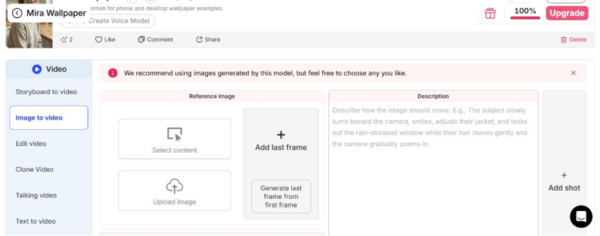
Screenshot 1: APOB image-to-video workspace with reference image, last-frame and prompt controls
- Watch twice. On the first viewing, watch at normal speed and note the moment that breaks believability. On the second, step through the suspicious section and identify what actually changed.
- Score before editing. Give each dimension a score from 1 to 5. Do this before fixing the clip so the generation result and the editing result remain separate measurements.
A scorecard that catches practical failures
Use five dimensions:
- Identity consistency: Does the person, product or character remain recognisable throughout the clip?
- Temporal coherence: Do shapes, textures and lighting remain stable between frames?
- Prompt adherence: Does the requested action happen, in the correct order and without invented actions?
- Physical plausibility: Do hands, clothing, hair and objects move in a believable way?
- Editability: Can a local defect be corrected without rebuilding the whole shot?
Video-Bench, presented at CVPR 2025, similarly argues for human-aligned evaluation across several dimensions, including video quality, motion consistency, temporal consistency and text-video alignment (Han et al., 2025). The exact labels can vary, but collapsing them into one number hides useful information.
For a small internal test, calculate the median rather than the average for each dimension. One spectacular failure can distort the average, while the median gives a better picture of normal performance. Keep the raw notes too. “Face changes at 00:03” is more actionable than “identity: 2.”
Test whether the failure is repairable
Not every flawed generation should be discarded. A local edit may be faster than another full generation, but only if the instruction is narrow.
Open the clip in an AI video editor and describe both the change and the elements that must remain untouched. For example: “Remove only the two red flowers from her hair. Keep the yellow flower, face, hairstyle, dress, movement, sunlight, framing and garden background unchanged.” A vague request such as “fix the hair” gives the editor too much freedom.
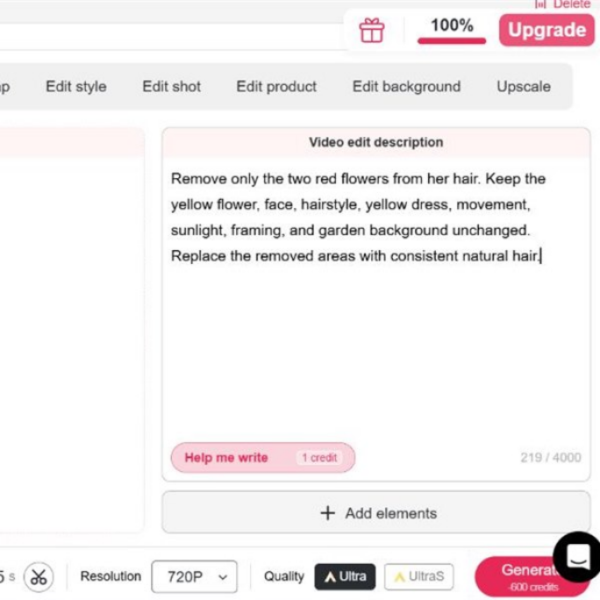
Screenshot 2: APOB video editor with a focused edit instruction and output settings
Score the edited result separately. If the edit removes the flowers but changes facial detail or movement, it has solved the visible defect while reducing identity consistency. That is still a failed edit for most production uses.
Compare versions without fooling yourself
Randomise the playback order and hide the model or settings from the reviewer. Even a simple A/B comparison becomes less reliable when people know which clip used the newer model or more expensive quality setting. If two reviewers disagree by more than two points on a dimension, ask them to name the exact frame or motion that caused the disagreement.
The final decision should be tied to the use case. A social clip viewed on a phone may tolerate a small background shimmer. A product demonstration cannot tolerate a label changing shape. A talking presenter may succeed on prompt adherence but fail if the mouth movement or facial identity drifts.
A six-clip test will not produce a universal leaderboard, and it should not try to. Its value is that it turns a vague impression into a repeatable decision. Once the scorecard shows where a workflow fails, the next prompt, model choice or edit has a clear job to do.