
In today’s fast-paced business world, professionals across various departments face the challenge of creating training programs that are not only efficient but also engaging. With time being a scarce resource, employees need tools that help them create impactful presentations without compromising on quality. Enter AI-powered tools like WorkPPT, which are revolutionizing workplace training by saving time and improving the quality of presentations. In this article, we will explore how WorkPPT can streamline training processes, making them more efficient and impactful for the entire workforce.
The Role of AI in Workplace Training
AI has become a game-changer for many industries, helping professionals streamline operations and improve productivity. In the context of workplace training, AI offers a wide range of capabilities, including automating the creation of presentations.
WorkPPT, an AI PowerPoint Generator, can transform how teams approach training material creation. It allows teams to generate slide decks in just a few clicks, converting raw content—such as text documents, PDFs, and even URLs—into fully designed PowerPoint presentations. The AI behind WorkPPT not only automates slide generation but also ensures that the presentation is cohesive, visually appealing, and ready to deliver.
How WorkPPT Saves Time in Workplace Training
One of the most significant advantages of using WorkPPT is the time it saves. Traditionally, creating a well-designed PowerPoint presentation requires hours of manual work, from formatting and organizing content to choosing appropriate visuals. With WorkPPT, employees can skip these time-consuming steps and focus on what matters most: the content.
Here’s how WorkPPT saves time:
- Automated Slide Generation: Simply upload a document or outline, and WorkPPT generates a full slide deck based on the content. This eliminates the need to manually create each slide, allowing you to focus on other important tasks.
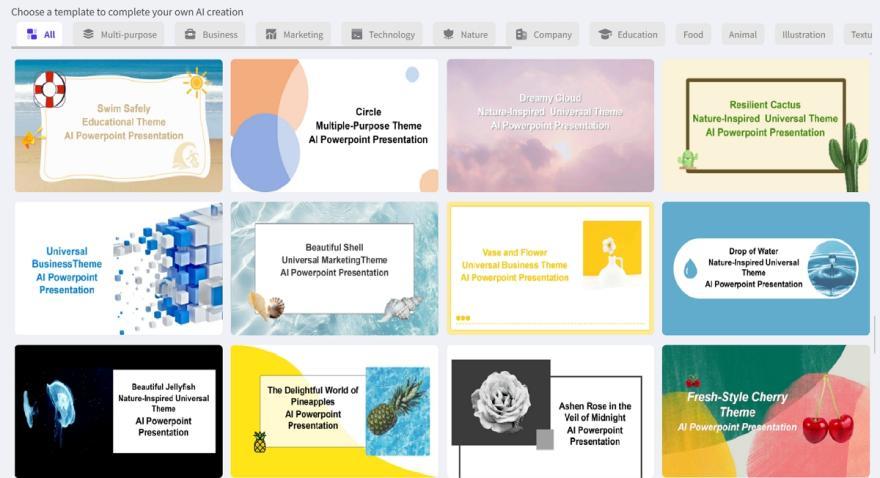
- Pre-designed Templates: WorkPPT comes with a variety of pre-designed templates that are optimized for workplace-related content. These templates help ensure that presentations are professional, consistent, and visually engaging.
- Intelligent Layouts: The AI engine automatically selects the best layouts and designs for each slide, making the presentation look polished without any design expertise. This saves professionals from the tedious task of adjusting slide layouts manually.
-
By reducing the time spent on these tasks, WorkPPT allows teams to create presentations more quickly and efficiently, freeing up time for strategic projects and other important initiatives.
Enhancing the Quality of Workplace Presentations
In any training or workplace presentation, quality is as important as content. A poorly designed slide deck can lead to disengagement, confusion, and missed learning opportunities. WorkPPT AI Presentation Maker not only saves time but also enhances the quality of presentations by making them more visually appealing and easier to follow.
Here’s how WorkPPT improves presentation quality:
- Professional Designs: WorkPPT offers a wide range of visually appealing templates that can be customized to fit the company’s branding. This ensures the training presentations look polished and professional, making a positive impression on employees.
- Visual Aids: The AI automatically suggests relevant images, icons, and charts that enhance the presentation’s visual appeal. This can make complex information easier to understand and more engaging for the audience.
- Consistency in Design: With WorkPPT, you no longer have to worry about slide inconsistencies. The tool ensures that all slides are aligned with the same design principles, creating a cohesive and professional-looking presentation.
By improving the visual quality of training presentations, WorkPPT helps make the training process more engaging and effective for employees.
Customizing Training Content with WorkPPT
While WorkPPT offers a fast and efficient way to create presentations, it also provides ample opportunities for customization. Teams can tailor the generated slide decks to meet specific training objectives, departmental needs, or company branding.
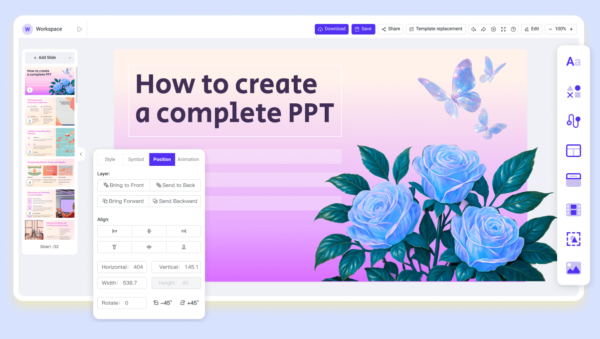
Here’s how customization works:
- Branding Options: Teams can customize the templates to align with their company’s branding guidelines. This includes adding logos, adjusting color schemes, and selecting fonts that reflect the company’s identity.
- Content Adaptation: WorkPPT allows professionals to modify the content generated by the AI, ensuring that the presentation aligns with the specific goals of the training session. Whether it’s compliance training, leadership development, or onboarding, teams can adapt the presentation as needed.
This level of customization ensures the training presentations are not only professional but also relevant and tailored to the specific needs of the employees.
Real-World Applications: Workplace Training Case Studies with WorkPPT
Many organizations have adopted WorkPPT to improve their internal training and presentations. For instance, a tech company used WorkPPT to streamline onboarding, automatically generating slides from policy documents and training guides. This approach made presentations more engaging and reduced preparation time.
Another company used WorkPPT for leadership training programs, generating slides with key concepts, case studies, and visuals. As a result, sessions were more engaging, and employees reported higher satisfaction and understanding.
These examples show that WorkPPT can significantly enhance workplace training by saving time and improving presentation quality.
Conclusion
AI-powered tools like WorkPPT are transforming workplace training and presentations. By saving time, improving visual quality, and allowing customization, WorkPPT helps employees across all departments create more effective and engaging materials.
As organizations continue to evolve, embracing AI tools like WorkPPT will be key to staying competitive and ensuring that training programs meet the needs of today’s workforce. With its time-saving features, professional design options, and customization capabilities, WorkPPT is a powerful tool for delivering high-quality presentations that engage and educate employees across the workplace.