
 After a planning meeting, a project manager has numerous new assignments, a list of decisions, a page of notes, and a few unresolved questions. The remarks must be turned into action items, the project board must be updated, owners must be assigned, deadlines must be revised, a status report must be prepared, and individuals who have not responded must be contacted before the actual project work can begin.
A lot of this job can be aided by AI. However, there is a catch: rather than streamlining the procedure, AI might have added another layer if the project manager still needs to verify every detail, transfer data between tools, fix deceptive summaries, and update the same information in several locations.
This is the problem with treating AI as a collection of productivity features. Generating a meeting summary is useful, but a summary alone does not move a project forward. The real value appears when information is transformed into verified decisions, assigned actions, updated plans, and timely interventions.
The AI workflow every project manager needs is not a chain of prompts. It is a controlled process that connects project information to action, with human judgment at the points where mistakes matter.
Why Project Managers Need a Workflow, Not Just AI Tools
Task scheduling is just one aspect of project management. Managers engage with stakeholders, resolve dependencies, manage personnel, analyze incomplete information, keep an eye on dangers, and determine when a project has to change course.
Administrative work is produced by many of these duties. Notes from meetings need to be turned into tasks. Updates on progress must be turned into reports. It is necessary to evaluate new requests in relation to the current scope. Risks need to be recognized, noted, and reported.
AI can help with various tasks, but applying it to each task separately leads to fragmentation. A report is written by one tool, a meeting is summarized by another, and a timetable is made with the aid of a third. Connecting their outputs is still the project manager’s responsibility.
The distinction matters because AI adoption is growing, but adoption does not automatically mean that work has been redesigned. The OECD reported that 20.2% of firms across OECD countries used AI in 2025, compared with 14.2% in 2024 and 8.7% in 2023. These figures show expanding use, not proof that every adopting company has improved its processes. Source: OECD, 2026.
Microsoft’s 2026 Work Trend Index, based on a survey of 20,000 AI users across 10 markets, found that only 19% of surveyed AI users fell into its category where individual capability and organizational readiness were both high. The research suggests that the conditions surrounding employees—including management support and organizational practices—matter alongside individual AI skills. Its findings are survey-based, so they should not be interpreted as proof that a particular workflow causes better results. Source: Microsoft, 2026.
For project managers, the practical implication is straightforward: introducing AI is only one step. The next step is designing how AI-supported work fits into the project lifecycle.
The Six-Stage AI Workflow for Project Management
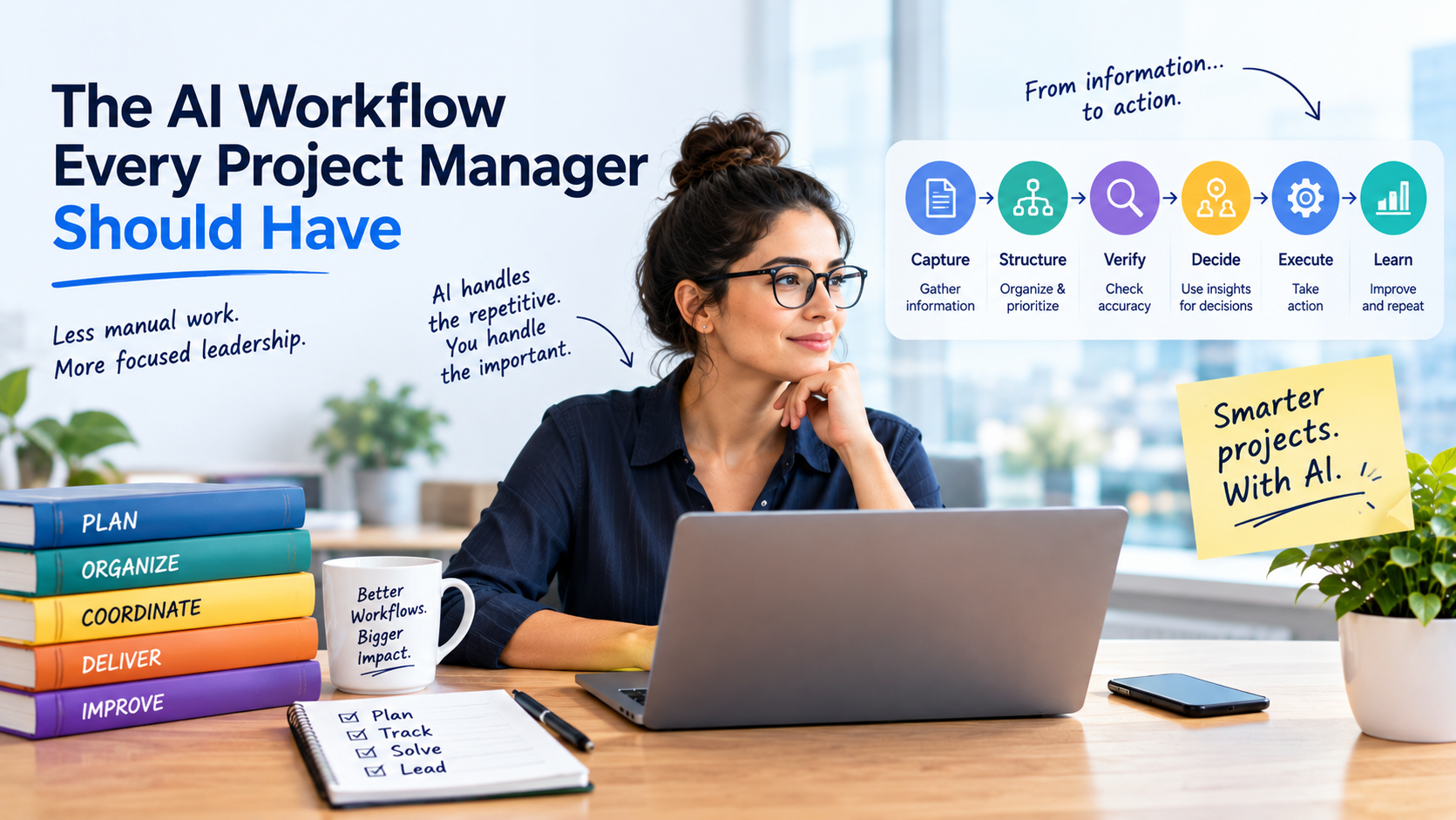
A useful starting point is a workflow that follows the movement of project information rather than the features of a particular AI tool.
<escape>Capture → Structure → Verify → Decide → Execute → Learn</escape>
Each stage has a distinct purpose. AI can assist at several points, but it should not become the unquestioned source of truth for the project.
1. Capture project information at its source
Meetings, emails, stakeholder requests, task comments, papers, issue trackers, and team member chats are all ways that projects produce information.
Finding the sources that hold the data required to run the project is the first stage. A group may use meeting minutes for decision-making, a common document for requirements, and a project management platform for task ownership. For every kind of information, the process should determine which source is authoritative.
AI can be used to organize stakeholder feedback, extract questions from documents, summarize meeting transcripts, and spot changes across plan iterations.
However, the quality of the result depends on the information available to the model. If a meeting transcript is incomplete, an important conversation happened elsewhere, or a stakeholder has not confirmed a requirement, AI cannot reliably reconstruct the missing facts.
Practical rule: Give AI access only to approved, relevant information, and label missing context rather than allowing it to fill gaps with assumptions.
For example, a project manager could ask an AI assistant to identify decisions, proposed actions, unresolved questions, and potential risks from an approved meeting transcript. The output should distinguish confirmed decisions from suggestions and unanswered questions.
This separation reduces the chance that a proposal made during a discussion becomes an official commitment simply because it appears in a polished summary.
2. Convert unstructured information into structured actions
A meeting transcript is not a project plan. To become useful, information must be converted into records that people can act on.
For each potential action item, the AI workflow should identify:
- The action required
- The proposed owner, if stated
- The deadline, if agreed
- Relevant dependencies
- The source of the information
- Any missing details that need confirmation
Consider a meeting in which a developer says, “I should be able to finish the integration after the API documentation is available.”
A weak AI summary might turn this into: “Developer to complete integration by Friday.”
That statement introduces a deadline that may never have been agreed and ignores the dependency on the documentation.
A stronger output would be:
| Field | Extracted information |
| Action | Complete the integration |
| Owner | Developer to be confirmed |
| Deadline | Not confirmed |
| Dependency | API documentation must be available |
| Follow-up | Confirm owner and target date |
The second version is less polished but more useful. It preserves uncertainty rather than converting it into false certainty.
AI can prepare these structured records, but the project manager or responsible team member should confirm ownership, deadlines, and commitments before they become official.
3. Verify the information before it changes the project
The workflow’s most crucial control is this one.
AI-generated output may contain erroneous information, leave out qualifications, misinterpret technical terms, or mistake a recommendation for a conclusion. Inaccurate tasks, deadlines, or status reports may be inadvertently created by a project manager who copies its output straight into the project management system.
Therefore, verification ought to be a systematic process as opposed to a casual last look.
Check at least four things:
Accuracy: Does the output match the original source?
Completeness: Have important dependencies, exceptions, or unresolved questions been omitted?
Authority: Did the person who supposedly made a commitment actually agree to it?
Consistency: Does the proposed action conflict with the current plan, task status, or project constraints?
The repercussions of an error should be reflected in the degree of review. It could be necessary to quickly review a draft internal summary. If a contractual milestone, budget, security requirement, or production release is altered, the applicable owner may need to give their express consent.
Keep track of the source, the suggested modification, the reviewer, and the approval decision for sensitive projects. This facilitates the later investigation of disparities.
AI does not fail at verification. It is a component of a dependable workflow where a model helps process data but does not determine project truth on its own.
4. Use AI to identify problems, not make every decision
Once the project information is structured and verified, AI can help the project manager interpret it.
Useful tasks include:
- Comparing current progress with the approved plan
- Identifying tasks that depend on unfinished work
- Summarizing recurring blockers
- Detecting conflicting status updates
- Grouping risks by theme
- Preparing questions for a stakeholder review
- Exploring possible responses to a schedule delay
Let’s say that three tasks require the same technical approval but are all running behind schedule. The issue can appear to be three distinct delivery failures if each task is examined separately. A potential bottleneck can be found by looking at their shared reliance.
If AI has access to precise task and dependency data, it can assist in identifying this pattern.
The explanation still has to be assessed by the project manager. The significance of a delayed task varies depending on schedule slack, downstream dependencies, viable alternatives, and the project’s delivery commitments; it does not always indicate that a project is at risk.
AI can create a comparison of potential solutions, such as narrowing the scope, reallocating resources, altering the order of tasks, or shifting a milestone. Together with the individuals impacted, the management should evaluate the trade-offs.
The goal is to use AI to improve the quality of decisions, not to transfer accountability for those decisions to a model.
5. Turn approved decisions into controlled actions
A useful analysis has limited value if it never changes what the team does next.
After a decision is approved, the workflow should translate it into an authorized update. Depending on the project, this may involve creating a task, updating a dependency, recording a risk, preparing a stakeholder message, or revising a report.
For example:
- AI identifies that a deliverable depends on an unresolved approval.
- The project manager confirms the dependency and its effect on the schedule.
- The relevant owner agrees on the next action.
- The approved action is recorded in the project system.
- The responsible person receives a notification.
- The project manager checks whether the blocker has been resolved.
Certain routine tasks can be automated when authorized integrations allow it. However, high-impact modifications shouldn’t be implemented just because an AI model suggested them.
Starting with draft-and-review automation is a sensible strategy. The update is prepared by AI, approved by a human, and then implemented by the system. The team can think about automating low-risk, reversible actions after the workflow has been evaluated and its failure modes have been identified.
Additionally, this method facilitates the detection of faults. Instead of going through disjointed communications, the team can trace the change to its source and approval whether a task was assigned mistakenly.
6. Learn from the results and improve the workflow
An AI workflow should not end when a report is sent or a task is created. The final stage is to determine whether the process actually improved.
A project manager should compare the redesigned workflow with the previous process.
Useful measures include:
- Time spent preparing reports and meeting follow-ups
- Time between identifying a blocker and assigning an action
- Percentage of AI-proposed actions that require correction
- Number of duplicate or incorrectly assigned tasks
- Rework caused by missing or inaccurate information
- Time required to resolve common project dependencies
- Stakeholder response time
- Team feedback on whether administrative work has decreased
These metrics aid in differentiating real progress from apparent productivity.
The approach might not have saved time if AI generates a report in two minutes but the manager spends twenty minutes fixing it. Speed and quality are not the same if automated action items are generated rapidly yet frequently allocated to the incorrect individuals.
Regularly review the outcomes. Return to the appropriate step if the workflow produces too many errors: enhance the source data, make the extraction instructions more clear, provide a verification rule, or eliminate pointless automation.
Automating every process is not the goal. The overarching goal is to make the process less taxing and more dependable.
A Practical Example: From Meeting Notes to Project Action
Consider a software project approaching a release deadline. During a status meeting, the team discusses a delayed integration, an incomplete test environment, and a possible change to the launch scope.
A conventional process might require the project manager to write notes, ask participants to confirm actions, update several tasks, prepare a status report, and send follow-up emails.
An AI-supported workflow could handle the process differently.
| Stage | AI’s role | Human control |
| Capture | Summarize the approved transcript and identify relevant project records | Confirm that the correct sources were used |
| Structure | Extract decisions, actions, dependencies, and open questions | Confirm owners and deadlines |
| Verify | Compare proposed updates with source material and current records | Approve or correct the proposed changes |
| Decide | Highlight dependencies and prepare response options | Choose the response and assess its consequences |
| Execute | Draft updates and prepare notifications | Authorize changes that affect commitments |
| Learn | Summarize corrections, delays, and recurring blockers | Decide what to improve in the workflow |
The key difference is that the project manager no longer treats meeting notes, task updates, and status reporting as unrelated activities. They become connected stages of a single process.
That does not mean every stage needs a separate AI product. In many cases, a team’s existing project management platform and an approved AI assistant may be enough. The workflow should determine which capabilities are necessary—not the other way around.
The Hidden Risk: AI Can Add Work to a Project
Project managers should be cautious about assuming that every AI feature creates a productivity gain.
AI can introduce additional tasks, including checking generated content, correcting records, managing permissions, reviewing privacy risks, monitoring integrations, and resolving exceptions. Poorly designed automations can also create duplicate notifications or send misleading updates to stakeholders.
There are three common reasons this happens.
The original process is inefficient. Automating a process with unnecessary approvals, duplicated data entry, and unclear ownership can preserve those problems at greater speed.
The systems are disconnected. AI may generate an accurate summary, but if the task tracker, document repository, and reporting dashboard do not share consistent information, employees still have to reconcile them manually.
No one owns the complete workflow. A person may be responsible for maintaining the AI tool, while another manages project reporting and someone else updates tasks. Without an owner for the end-to-end process, failures can fall between responsibilities.
Before adding automation, map the current process. Identify its trigger, inputs, steps, decisions, handoffs, exceptions, and final outcome. Remove unnecessary steps, clarify ownership, and standardize the information before deciding which parts AI should handle.
This prevents a project team from measuring success by the number of automated tasks while ignoring the extra work those tasks create.
How to Measure the Real Value of an AI Workflow
Project managers should establish a baseline before introducing AI.
For example, record how long it currently takes to prepare a weekly status report, how often the report needs corrections, and how much time is spent collecting information from different team members.
After introducing the workflow, measure the same activities over a comparable period.
A simple calculation is:
Net time saved = Previous process time − New process time − Additional review and maintenance time
Let’s say a reporting procedure used to take ninety minutes every week. AI takes 25 minutes for drafting and data preparation, and an additional 20 minutes for verification and adjustments. The new procedure takes 45 minutes, which results in a weekly net savings of 45 minutes.
This is not a published scientific conclusion; rather, it is an example computation. The project, source data, tool capabilities, and quality standards will determine the actual results.
Time is just one metric. A quicker procedure that results in more errors could not be beneficial. Monitor efficiency, quality, rework, delivery dependability, and the amount of time needed to fix issues.
It is also important to distinguish correlation from causation. If a project improves after AI is introduced, other changes—such as clearer ownership or fewer approval steps—may have contributed. Where practical, record what changed and avoid attributing every improvement to the AI tool alone.
A Checklist for Building Your First AI Project Workflow
Project managers do not need to automate an entire project lifecycle at once. Start with one repetitive, low-risk process that has a clear outcome and enough information to measure performance.
Before launching a pilot, ask:
- Is the process repeated often enough to justify improvement?
- Are its steps and responsibilities documented?
- Are the source records reliable and accessible to the approved tool?
- Can the AI output be checked against an authoritative source?
- Which actions require human approval?
- What happens when information is missing or contradictory?
- Who owns the workflow when something fails?
- Can incorrect changes be reversed?
- How will the team measure time saved, quality, and rework?
- Does the process reduce total work, or merely move work to another person?
Run the pilot with a small group. Review errors and exceptions, gather feedback from the people who use the process, and refine the controls before expanding it.
Do not begin by asking, “What can we automate with AI?” Begin with, “Where does this project lose time, information, or accountability?” That question is more likely to lead to a useful solution.
The Best AI Workflow Keeps the Project Manager in Control
AI can make it easier to process information, prepare documentation, identify patterns, and coordinate routine work. But these capabilities do not remove the need for clear project records, reliable data, accountable decisions, and effective communication.
A dependable workflow connects six stages: capture information, structure it, verify it, use it to inform decisions, execute approved actions, and learn from the results.
The value comes from the connections between these stages—not from any individual prompt or feature.
Project managers should therefore judge AI by what happens to the work after the model produces an answer. Does a blocker get resolved sooner? Does the team spend less time updating records? Are decisions easier to trace? Are errors caught before they affect delivery? Is there more time for planning and problem-solving?
If the answer is yes, AI is contributing to a better project workflow. If not, the next improvement may have less to do with the model and more to do with the process around it.
The best AI workflow does not simply help a project manager work faster. It helps the entire project move from information to accountable action with less unnecessary effort.