

Open source AI gives you full control and lower long-term costs. Proprietary AI gives you speed and simplicity. The right choice depends on your team size, budget, data sensitivity, and how fast you need to move.
Introduction
You are building something with AI. And you have one big question sitting in your head:
Should I use open source AI or pay for a proprietary tool like OpenAI or Google Gemini?
You have probably heard both sides. “Open source is free!” Or “Proprietary tools are faster and better!” But neither answer is fully true. And picking the wrong one will cost you — in money, in time, or in both.
What Is Open Source AI?
Open source AI means you download the model, host it yourself, and run it on your own infrastructure.
Popular open source AI models in 2026:
Meta LLaMA 3 — one of the most powerful open source LLMs available
Mistral 7B / Mixtral — fast, efficient, great for business tasks
Falcon — strong for text generation and summarisation
Stable Diffusion — industry standard for image generation
Whisper — open source speech-to-text by OpenAI
What open source gives you:
- No per-token or per-query fees
- Full control over your data — nothing leaves your servers
- Ability to fine-tune the model on your own data
- No vendor lock-in — you own the model weights
What open source costs you:
- Cloud GPU infrastructure (AWS, GCP, Azure)
- AI engineers to set up, fine-tune, and maintain
- DevOps team to handle scaling, monitoring, and updates
- Weeks or months of setup time before you go live
What Is Proprietary AI?
Proprietary AI means you call an API. The model runs on the vendor’s servers. You pay per use.
Popular proprietary AI tools in 2026:
- OpenAI GPT-4o — most widely used, strong across all tasks
- Anthropic Claude 3.5 — best for long documents and safe outputs
- Google Gemini 1.5 Pro — strong multimodal and search integration
- Amazon Bedrock — enterprise AI with AWS integration
- Cohere — built for enterprise search and RAG use cases
What proprietary AI gives you:
- Go live in hours, not weeks
- No infrastructure to manage
- Enterprise-grade security and uptime built in
- Constant model updates handled by the vendor
- Pay only for what you use
What proprietary AI costs you:
- Per-token or per-call pricing — adds up fast at scale
- Limited ability to customise the model
- Your data passes through a third-party server
- Vendor lock-in — switching is painful later
The Real Cost Comparison — With Numbers
Here is what businesses actually spend:
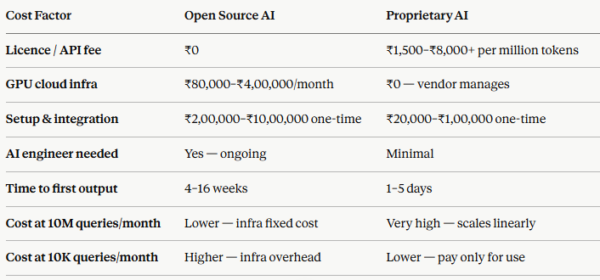
The break-even point: For most businesses, open source becomes cheaper than proprietary when you cross 3–5 million AI queries per month. Below that, proprietary wins on total cost.
When Open Source AI Saves You More Money
Open source is the smarter financial choice when:
Your query volume is very high — millions of requests per month mean API fees become enormous
Your data is sensitive — healthcare records, financial data, or legal documents cannot go to a third-party server
You need deep customisation — fine-tuning on your own data gives far better results than prompt engineering alone
You want to eliminate vendor dependency — owning the model means no pricing changes can hurt you
You are building for the long term — higher setup cost, much lower running cost over 2–3 years
Real scenario: A fintech startup processing 8 million document queries per month was spending ₹32 lakhs per month on GPT-4 API fees. After migrating to a fine-tuned Mistral model on AWS, their monthly AI cost dropped to ₹9 lakhs — a 72% saving. Setup cost: ₹18 lakhs. Break-even: 2 months.
When Proprietary AI Saves You More Money
Proprietary AI is the smarter financial choice when:
You are building an MVP or pilot — you need results in days, not months
Your team has no AI engineers — managing open source infrastructure requires specialist skills
Your query volume is low to medium — under 2–3 million queries/month, API pricing is still manageable
Speed to market matters most — every week of delay costs more than API fees
You want predictable costs — pay-per-use is easy to budget for
Real scenario: A SaaS startup needed an AI-powered customer support tool in 3 weeks. Using Claude 3 API, they launched in 12 days. Their monthly API bill at launch: ₹85,000. At that scale, hiring an AI engineer and building open source infrastructure would have cost ₹4,00,000+ before they even went live.
The Hybrid Approach — What Most Smart Businesses Do
You do not have to choose one side forever. Many businesses use both — and this is often the highest-ROI strategy.
How a hybrid approach works:
Use proprietary AI (GPT-4o or Claude) to validate your product idea fast
Once you know what works, rebuild the high-volume parts with open source AI (LLaMA or Mistral)
Keep proprietary AI for tasks that need the highest quality — complex reasoning, sensitive outputs
Use open source for bulk tasks — classification, summarisation, data extraction
Example hybrid stack:
Everyday queries → Mistral 7B (self-hosted, low cost)
Complex customer escalations → Claude 3.5 (API, high quality)
Image analysis → Stable Diffusion (self-hosted)
Voice transcription → Whisper (self-hosted)
This approach can cut AI running costs by 40–65% compared to running everything on proprietary APIs.
7 Questions to Help You Decide Right Now
Answer these honestly. They will tell you which path fits your business today:
1. How many AI queries will you run per month?
Under 500K → Proprietary wins
Over 3M → Open source wins
Between 500K–3M → Hybrid or evaluate case by case
2. How sensitive is your data?
Public or non-sensitive → Either works
Private, regulated, or confidential → Open source only
3. Do you have AI engineers on your team?
Yes → Open source is viable
No → Proprietary or hire a development partner
4. How fast do you need to launch?
Under 4 weeks → Proprietary
2–4 months is acceptable → Open source possible
5. Are you building an MVP or a scaled product?
MVP → Proprietary to validate fast
Scaled product → Open source or hybrid for cost control
6. Do you need deep model customisation?
Generic tasks → Proprietary is fine
Domain-specific fine-tuning needed → Open source
7. What is your 2-year AI budget?
Limited, needs to stay low → Open source (higher upfront, lower ongoing)
Flexible, prefer simplicity → Proprietary
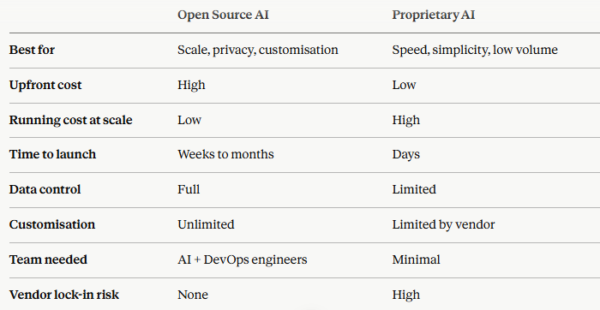
Open Source vs Proprietary AI — Side-by-Side Summary
What About AI Agents — Open Source or Proprietary?
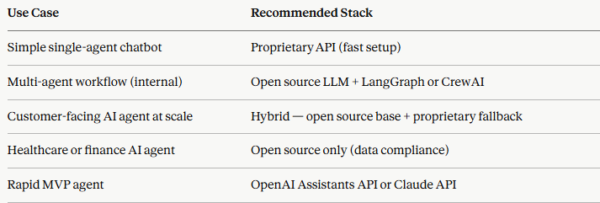
This is where it gets more nuanced. AI agents are not just language models — they use tools, make decisions, and run multi-step workflows.
For AI agent development, the framework matters as much as the model:
At InfiniappsAI, we help businesses make this exact decision — and build the right stack from day one. We have built AI agent systems on both open source and proprietary foundations, and in many cases, a well-designed hybrid stack delivers the best results at the lowest total cost.
Conclusion
There is no universal winner between open source and proprietary AI. There is only the right choice for your business, your team, your data, and your timeline.
If you are just starting out — proprietary AI will get you to market faster and cheaper. If you are scaling — open source will save you significant money over time. If you are smart about it — you will use both.
The biggest mistake is making this decision based on what sounds good rather than what fits your actual situation.Not sure which AI stack is right for your business?
At InfiniAppsAI, we have helped 150+ businesses across 30+ countries make exactly this decision — and build AI solutions that match their goals, their budget, and their timeline.
Whether you need a fast proprietary API integration, a custom open source AI agent, or a hybrid architecture that cuts costs without sacrificing quality — we will give you a clear recommendation in one free session.
✅ Free 30-minute AI strategy call✅ No commitment needed✅ Clear answer on day one — not weeks later
👉 Book Your Free Session at infiniapps.ai/contact-us