
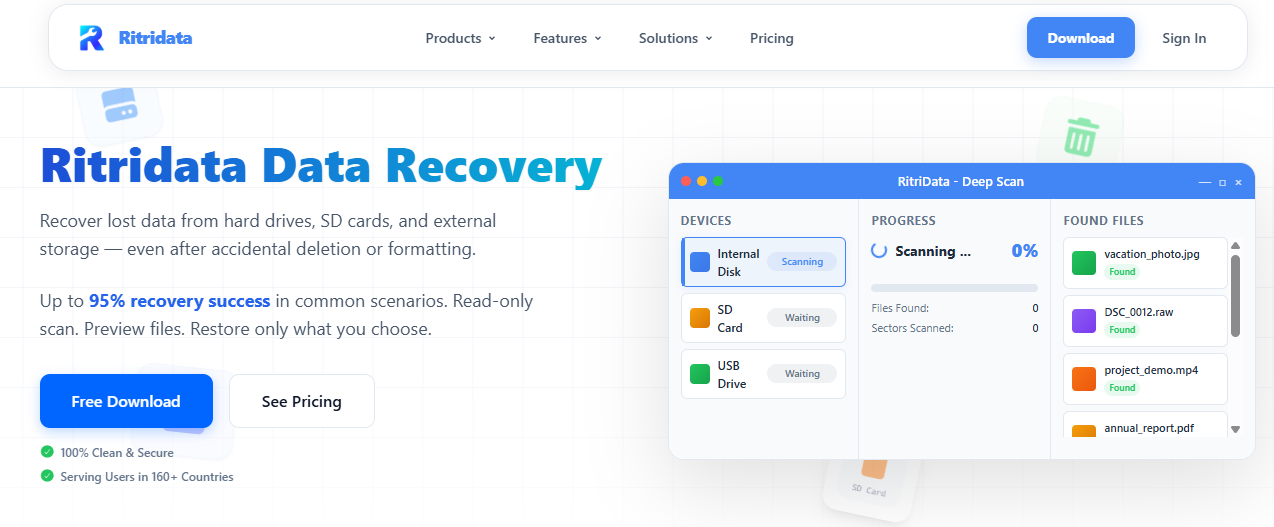
Accidentally deleting important files is a common problem for computer users. A simple mistake, system crash, virus attack, or drive formatting can cause the loss of valuable data such as photos, documents, and videos. In many cases, the deleted files are not available in the Recycle Bin, which makes recovery more difficult.
This is where data recovery software becomes useful. These tools scan storage devices and attempt to restore lost files. One software gaining attention in this category is Ritridata Data Recovery, a software designed to help users recover deleted files from various storage devices. This Ritridata review explores its features, usability, and performance to see whether it can be a reliable option for recovering deleted files.
What Is Ritridata?
Ritridata is a data recovery software that is designed to help users recover lost or deleted files from different storage devices. The tool scans hard drives, external drives, USB flash drives, and memory cards to find files that were deleted accidentally or lost due to formatting.
The software is mainly designed for Windows users who want a simple way to recover important files without complex technical steps. It supports recovery for many common file types, including documents, images, videos, and audio files.
The main purpose of the software is to help users restore files that were removed due to human error, system failure, or unexpected storage problems.
Key Features of Ritridata Data Recovery Software
Deep Scan Technology
One of the most important features of any data recovery software is its scanning ability. Ritridata includes a deep scanning system that searches the storage device for traces of deleted files. Even if files were removed from the Recycle Bin or the drive was formatted, the software can often locate recoverable data.
Support for Multiple File Types
The software supports recovery for a wide range of file formats. Users can recover documents such as Word files, PDFs, and spreadsheets, as well as photos, videos, and audio files. This makes it suitable for both personal and professional use.
Simple User Interface
Many recovery tools can be difficult for beginners. Ritridata focuses on a simple interface that allows users to recover files in just a few steps. The clean layout makes it easy to choose a drive, start a scan, and recover files.
File Preview Before Recovery
Another useful feature is the preview option. Before restoring a file, users can preview images or documents to confirm that the correct file has been found. This helps avoid recovering unnecessary files.
Recovery From Multiple Storage Devices
The software can scan and recover data from different storage devices such as:
- internal hard drives
- external hard drives
- USB flash drives
- memory cards
This flexibility makes it useful for users who work with different types of storage.
How to Recover Deleted Files Using Ritridata
Recovering deleted files with Ritridata is a straightforward process. The software follows a simple step-by-step workflow.
First, install and launch the Ritridata software on your computer. After opening the program, select the drive or storage device where the files were deleted.
Next, start the scanning process. The software will analyze the selected drive and search for deleted or lost files. Depending on the drive size, the scan may take some time.
After the scan is completed, the software will display a list of recoverable files. Users can browse through the results and preview specific files.
Finally, select the files you want to restore and choose a safe location to save them. The recovered files will then be restored to the chosen folder.
This simple process allows even beginner users to recover lost files without advanced technical knowledge.
Ritridata Data Recovery Performance and Results
The performance of data recovery software depends on many factors, such as how the files were deleted and whether new data has overwritten them. In general, Ritridata performs well when recovering recently deleted files.
The scanning process is relatively fast on smaller drives and provides organized results that make it easier to locate specific files. The preview feature also improves the recovery process by helping users identify files before restoring them.
While no data recovery software can guarantee recovery in every situation, tools like Ritridata increase the chances of retrieving important data after accidental deletion or formatting.
Pros and Cons
Like most software tools, Ritridata has both advantages and limitations.
Pros
- Easy and beginner-friendly interface
- Supports recovery of multiple file types such as photos, videos, and documents
- Deep scan feature helps locate deleted or lost files
- Allows preview of files before recovery
- Works with different storage devices, including hard drives, USB drives, and memory cards
- Simple recovery process that requires only a few steps
Cons
- Some advanced recovery features may be limited compared to high-end professional tools
- Recovery success depends on whether the deleted data has been overwritten
- Large drive scans may take more time
- Free version may have certain limitations
Who Should Use Ritridata?
Ritridata can be useful for a wide range of users who experience accidental data loss.
Students who accidentally delete assignments or research files may find the software helpful for recovering important documents. Photographers can use it to recover lost images from memory cards. Office workers can restore deleted reports, spreadsheets, or presentations.
The software is also useful for everyday computer users who want a simple recovery solution without complicated technical steps.
Frequently Asked Questions
1. What is Ritridata used for?
Ritridata is a data recovery software designed to help users recover deleted or lost files from storage devices such as hard drives, USB flash drives, and memory cards. It scans the device and identifies files that can still be restored after accidental deletion or formatting.
2. Can Ritridata recover permanently deleted files?
Yes, Ritridata can often recover permanently deleted files as long as the deleted data has not been overwritten by new files. The software performs a deep scan to locate traces of lost files on the storage device.
3. Is Ritridata safe to use?
Yes, Ritridata is designed to perform non-destructive scans on storage devices. This means the software attempts to recover lost files without modifying the original data on the drive.
4. What types of files can Ritridata recover?
Ritridata supports recovery for many common file types, including documents, photos, videos, audio files, and compressed archives. This makes it useful for recovering both personal and work-related files.
5. Can Ritridata recover data from formatted drives?
Yes, the software can scan formatted drives and attempt to recover files that existed before the formatting process. However, recovery success may depend on whether new data has been written to the drive after formatting.
6. Is there a free version of Ritridata?
Many data recovery tools provide a free version that allows users to scan their drives and preview recoverable files. This helps users determine whether their lost files can be restored before upgrading to the full version.
7. Who should use Ritridata?
Ritridata is suitable for students, office workers, photographers, and general computer users who need a simple solution for recovering deleted or lost files without advanced technical knowledge.
Final Verdict
Losing important files can be frustrating, especially when they appear to be permanently deleted. Data recovery software provides a practical way to recover lost information without expensive professional services.
Based on its features and usability, Ritridata offers a straightforward solution for recovering deleted files from various storage devices. Its simple interface, deep scan capability, and support for multiple file types make it a useful option for users who need an easy file recovery tool.
While recovery success always depends on the specific situation, Ritridata provides a reliable starting point for anyone trying to restore lost data quickly and efficiently.