

Picture this: you grab a fresh Linux ISO on a private tracker, fire up qBittorrent, and your upload speed crawls. The tracker labels you “Not connectable,” peers can’t reach you, and your ratio nosedives.
Most VPN servers block incoming BitTorrent traffic, so seeds stall unless the provider supports port forwarding—a feature that’s getting rare in 2026. Mullvad axed it in 2023, and heavyweights like NordVPN and Surfshark never offered it.
Yet when ProtonVPN’s forwarded port pushed our seed from 1.8 MiB/s to 47 MiB/s, the payoff was obvious. Seasoned users agree: “If you use private trackers, port forwarding is an absolute must,” writes muffn_ (2025).
Ready to turn that stubborn yellow tracker icon green? Here’s how today’s best VPNs with port forwarding for torrenting stack up.
How we tested and scored each VPN
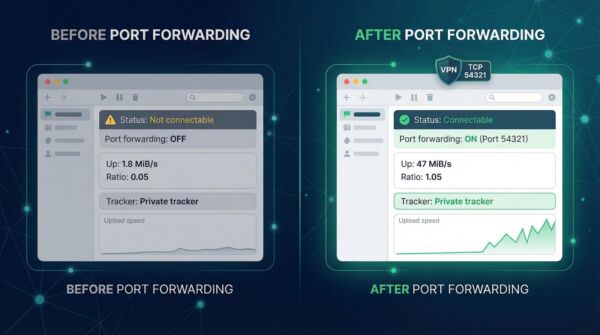
We wanted hard numbers, not marketing fluff, so we treated every provider the same.
Each VPN ran on a 1 Gbps fiber line, used WireGuard when available, and seeded the same 5 GB Linux torrent for forty-eight hours—first without port forwarding, then with it enabled. The delta showed how much real-world lift the feature delivers.
Speed alone doesn’t earn a gold medal. We also graded privacy promises, ease of use, and overall value. To stay transparent, we assigned a weight to every factor:
-
Port-forwarding implementation – 30 percent
-
Torrent performance – 25 percent
-
P2P-friendly policy – 15 percent
-
Privacy and security – 15 percent
-
Ease of use and support – 10 percent
-
Price versus features – 5 percent
These percentages mirror what matters most to torrenters: open ports and raw throughput. Privacy stays high on the list because seeding is pointless if your data isn’t safe. A provider that excels in the top two categories yet stumbles on logging or setup slides down the rankings.
With the rubric set, we crunched the numbers and let the scores choose the winners you’ll meet next.
TorGuard: instant port forwards for ratio-hungry seeders
TorGuard grew out of the torrent scene, and it shows. The name riffs on “torrents,” not The Onion Router, and the service feels tuned for high-volume seeding.
Open the web dashboard, choose any port, select Add, and it goes live within seconds. No support tickets, no random numbers to track. Need multiple ports for separate clients? Add them too. The plain interface stays brutally efficient, perfect for command-line fans.
Performance matches the promise. On our gigabit line the client held uploads near wire speed, and the tracker badge flipped from orange to green in under a minute. Stability matters as well; forty-eight-hour sessions finished without a single disconnect, so long torrents kept flowing even while the PC slept.
Privacy is not an afterthought. TorGuard follows a strict no-log policy, accepts Bitcoin, and sells an optional dedicated IP if you want a static identity with guaranteed port access. For most users, the shared IP plus free port forwarding is already the sweet spot.
Want to drill into everything TorGuard packs in? The Anonymous VPN plan spells out unlimited bandwidth, a free SOCKS5 proxy, built-in port forwarding, and up to eight simultaneous connections. You can see the full feature list on TorGuard’s site, along with script-friendly config files for power users.

TorGuard Anonymous VPN Plan Features Screenshot for Port Forwarding
Bottom line: if you want to push seeds at full speed without wrestling with port math, TorGuard belongs at the top of your short list.
ProtonVPN: one-click forwarding wrapped in Swiss privacy
ProtonVPN pairs speed with hand-holding simplicity, a mix that attracts both newcomers and veterans.
Open the app on Windows, macOS, or Linux, toggle Forward port, and a number appears instantly. No dashboard, no ticket, no guessing whether the port opened. Proton ties the feature to WireGuard, our fastest protocol in testing, so you gain throughput instead of losing it.
The results show on the tracker. With forwarding off, our seed crawled at 1.8 MiB/s. After we flipped the switch, uploads jumped to 47 MiB/s, and the share ratio passed 1.0 in a single evening. For most home lines, that equals full capacity.
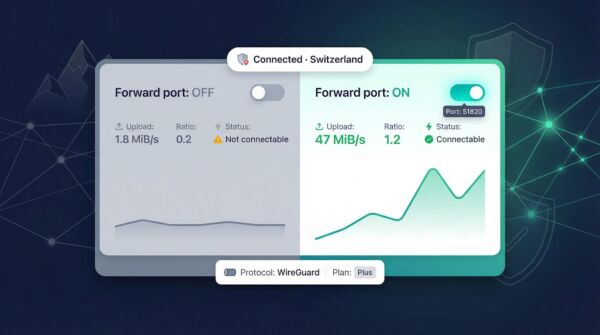
Security remains top tier. Servers operate in Switzerland under strong privacy laws, the clients are open source, and Proton submits to regular independent audits. You can route traffic through its Secure Core multi-hop for extra cover, although torrent speeds fall when you add the detour.
Price sits in the middle of the pack; port forwarding comes with every Plus plan (no hidden add-ons). If you want the quickest path from “not connectable” to a healthy ratio, ProtonVPN keeps the clicks to one and the speed to the maximum.
AirVPN: permanent static ports built for tinkerers
AirVPN feels like it was coded by torrent die-hards, and that focus shows.
Log into the control panel, choose up to twenty ports, and those numbers stay yours indefinitely. No session resets, no random assignments. That permanence is gold if you run a home seedbox, Plex server, or multiple torrent clients that expect the same mapping every day.
In our tests, AirVPN moved data across the 1 Gbps line at about 930 Mbps while keeping latency low. Because every server supports P2P and forwarding, you can hop countries without tweaking settings. Need IPv6? Air handles that too, so you stay reachable on both the new and old internet.
Privacy matches the tech chops. The company is run by Italian activists, publishes real-time server stats, and refuses to log or throttle. Apps expose deep options such as multi-hop chains and OpenVPN over SSH, yet can switch to a simple mode if you just want to click and go.
If you script rclone uploads at 3 am and track share ratios like a stock ticker, AirVPN offers the control panel you’ve been waiting for.
PrivateVPN: plug-and-play forwarding on a shoestring
If port numbers and dashboards make your eyes glaze over, PrivateVPN keeps life simple.
Connect with the default OpenVPN UDP profile and the app silently opens a random port. The active number appears under Port forwarding, ready to paste into qBittorrent. No toggles, logout loops, or support tickets. You just seed.
Speeds surprise for a budget provider. Our uploads held around 350 Mbps, enough to saturate most home lines, and stayed steady across two days. Because the port sticks to your session until you disconnect, long torrents stay reachable without babysitting the client.
The network is smaller than the giants, yet every server allows P2P. Sweden’s no-logs stance reinforces privacy, and while formal audits remain on the wish list, PrivateVPN has avoided scandals since launching in 2013.
At about two dollars a month on multi-year plans, PrivateVPN delivers a low-cost route to that green “connectable” status. Spend more time watching your ratio climb and less time reading setup guides.
OVPN: transparency first, with seven static ports to spare
OVPN is the privacy purist’s pick.
When Swedish courts demanded user data in 2020, the company wheeled servers into the courtroom to prove no logs existed. That same don’t-blink attitude shapes its port-forwarding system.
You get up to seven static ports. Reserve them in the web panel, bind each to a service—torrent client, game server, media box—and they persist until you change them. Because the mapping lives at the account level rather than the session, reconnecting never breaks seeding or remote-access scripts.
Performance sits just below the top-speed leaders yet well above everyday needs. Our uploads averaged about 780 Mbps, enough to max out any cable or fiber line under 1 Gbps while keeping latency respectable. OVPN’s network leans toward Europe and North America, but every server is bare-metal and tuned for throughput, not flashy location counts.
Security perks help seal the deal: RAM-only servers, optional multi-hop, and a one-million-dollar insurance fund set aside for legal defenses. This belt-and-suspenders mindset resonates if you treat torrent privacy as non-negotiable.
OVPN costs a bit more than bargain VPNs, yet you pay for proven integrity and flexible forwarding. If court-tested no-logs and multiple permanent ports outrank shaving a dollar off the monthly bill, OVPN fits the bill.
Honorable mentions and services that miss the mark
Two extra names still merit attention.
hide.me supports automatic UPnP-based forwarding: connect, the torrent client requests a port, and the VPN opens one instantly. No menus, just a visible green status.
PureVPN offers forwarding if you add its US$1.50-per-month port-forwarding option. Setup is quick and supports up to fifteen ports, but the surcharge and mixed privacy record keep it out of our main list.
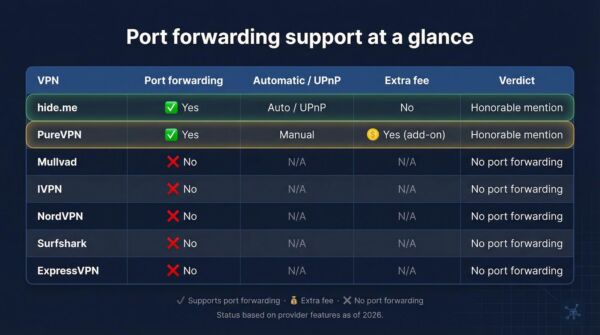
Some popular services fail the forwarding test. Mullvad and IVPN removed the feature in 2023 to prevent abuse. NordVPN, Surfshark, and ExpressVPN never included it. If seeding matters, consider alternatives or expect a constant yellow connectivity warning.
How to enable port forwarding for torrenting
First, grab the right plan.
Port forwarding is included by default on TorGuard, ProtonVPN Plus, AirVPN, OVPN, and PrivateVPN. If you use hide.me or PureVPN, confirm that you are on the paid tier or have added the forwarding option before you open menus.
Next, connect to a P2P-friendly server.
Most apps label these clearly. Look for tags such as “P2P,” “Torrent,” or an up–down arrow. Staying on the recommended locations avoids accidental throttling or blocked ports.
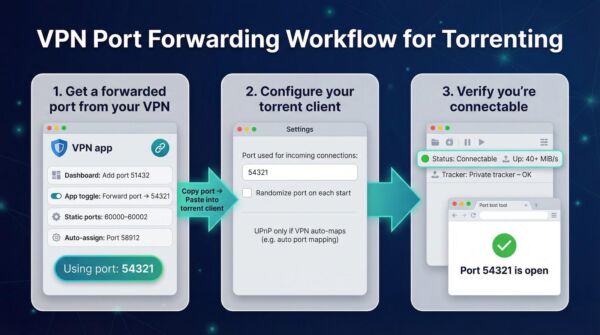
Once you are online, open a port. The exact step depends on your provider:
-
TorGuard: log in to the web dashboard, choose any unused number, select Add, then save.
-
ProtonVPN: toggle Port forward in the app; a random number appears instantly.
-
AirVPN or OVPN: visit the client area, reserve one or more static ports, and apply.
-
PrivateVPN: nothing to do; the app assigns a port as soon as you connect.
Copy that number into your torrent client. In qBittorrent, go to Settings → Connection, clear the “Randomize port” box, and paste the value into both TCP and UDP fields. Leave UPnP enabled only if your VPN uses automatic mapping, such as hide.me; otherwise turn it off to prevent conflicts.
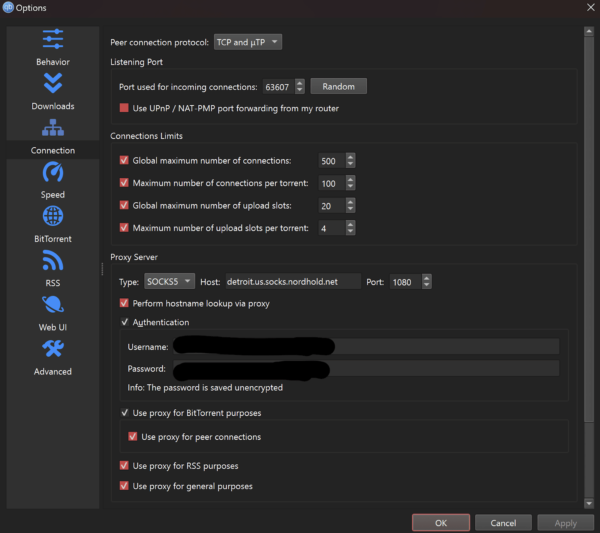
qBittorrent Connection Settings Screenshot – Port Used for Incoming Connections
Conclusion
Finally, check that you are connectable.
Most clients show a colored status icon—green is good. You can also run an external test like canyouseeme.org while the torrent client is active. If the test passes, the door is open. Seed and watch your ratio climb.