
Clean acapellas open doors to polished remixes, karaoke tracks, and catchy social-media reels. Audioenhancer.ai claims to deliver studio-quality separation in seconds. This review puts the vocal remover tool to the test and shows how it stacks up for singers, DJs, producers, and hobbyists.
What Makes Vocal Remover AI Stand Out
-
One-click separation that delivers two high-quality stems: isolated vocals and a clean instrumental track
-
Browser-based workflow eliminates installations and works on any OS.
-
Wide format support: MP3, WAV, FLAC, and most popular video containers.
-
Secure cloud processing with automatic file deletion after a retention window.
Key Features of Vocal Remover Online
AI-Powered Accuracy
A deep-learning model trained on thousands of songs pinpoints the vocal frequency range while preserving reverb tails and subtle harmonics. Users report very few artifacts even on dense mixes.
Fast Turnaround
Most tracks under five minutes finish in under 30 seconds on a standard connection. Testing 10-minute stems averaged 1 minute 12 seconds.
Intuitive Interface
Uploading, processing, and downloading live inside a single panel with real-time progress bars ideal for clients who dislike clutter.
Lossless Download Options
Instrumentals and acapellas are available in the same bitrate as the source file, maintaining mix integrity for mastering or sampling.
How the AI Vocal Remover Works
-
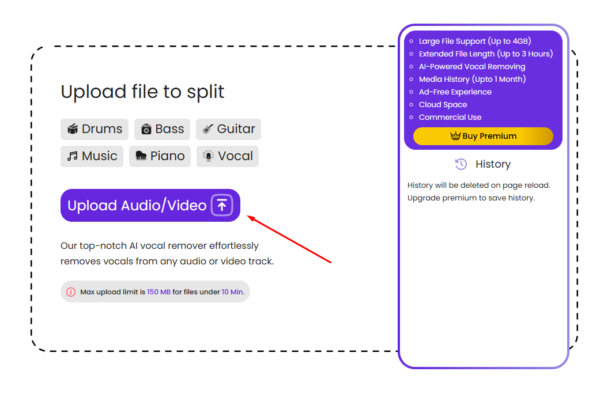
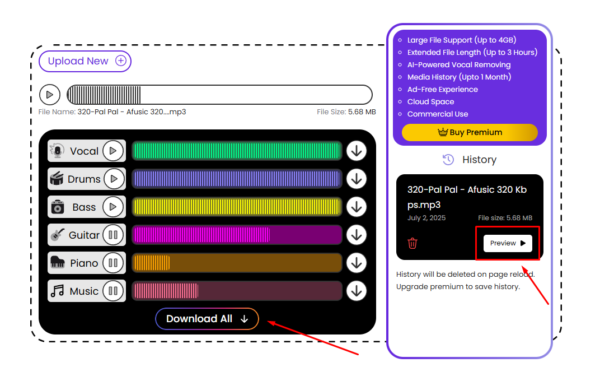
Upload your audio or video file using drag-and-drop or the “Upload Audio/Video” button. Popular formats like MP3, WAV, and FLAC are accepted.
-
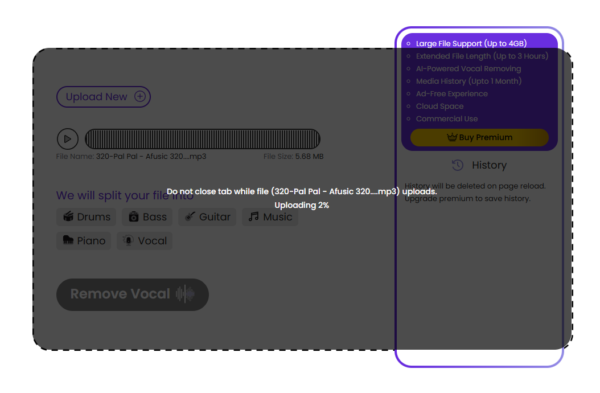
Automatic processing starts instantly. The algorithm separates the vocal and instrumental stems.
-
Preview and download each stem. No watermarks, no compression loss, and no learning curve.
Pricing Plans
|
Plan |
Monthly Price |
Minutes / Month |
Simultaneous Uploads |
File-Size Limit |
Max Track Length |
Ads / Captchas |
|
Basic |
$10 (was $20) |
60 min |
3 files |
2 GB |
1 hr |
None |
|
Pro |
$45 (was $90) |
300 min |
5 files |
2 GB |
2 hrs |
None |
|
Studio |
$90 (was $180) |
Unlimited |
10 files |
4 GB |
3 hrs |
None |
All tiers include full voice remover access, no irritating ads, and no reCAPTCHAs.
Audioenhancer.ai Vocal Remover vs LALAL.ai: Which is Better?
Accurate stem separation can make or break a remix. Here is how the two platforms differ on the factors musicians care about most.
Pricing and Limits
|
Feature |
Audioenhancer.ai |
LALAL.ai |
|
Entry Tier |
Basic $10 / mo for 60 min |
Lite one-time $20 for 90 min |
|
Mid Tier |
Pro $45 / mo for 300 min |
Plus one-time $27 for 300 min |
|
Top Tier |
Studio $90 / mo for unlimited min |
Pro one-time $35 for 500 min |
|
File-Size Cap |
Up to 4 GB |
2 GB on every pack |
|
Track Length |
Up to 3 hours |
Minutes only; no stated hour limit |
|
Cloud Storage |
5-20 GB by plan |
Not included |
Takeaway: Unlimited minutes, larger file uploads, and built-in storage give Audioenhancer.ai the clear edge for high-volume users.
Separation Quality and Speed
-
Audioenhancer.ai – One-click AI model tuned for vocals and instrumentals; 5-minute songs finish in about 30 seconds.
-
LALAL.ai – Multiple neural networks (Phoenix, Orion, Perseus) plus Clear-Cut or Deep Extraction modes; users pick a setting first.
Both tools produce clean stems, yet Audioenhancer.ai removes the guesswork by handling everything automatically.
Workflow and Ease of Use
|
Aspect |
Audioenhancer.ai |
LALAL.ai |
|
Interface |
Single drag-and-drop panel with live progress |
Upload, choose mode, preview, then sign-up to download |
|
Batch Uploads |
Up to 10 files at once on Studio plan |
Batch allowed, but minutes deducted per stem |
|
Desktop or Mobile Apps |
Browser only (works on any OS) |
Optional desktop and mobile apps |
Why Audioenhancer.ai Leads in 2025
-
Unlimited minutes eliminate overage worries for frequent remixers
-
4 GB size limit accepts long DJ sets and concert recordings
-
Cloud storage keeps stems handy without extra services
-
Ad-free and CAPTCHA-free interface maintains a smooth workflow
Pros and Cons
|
Pros |
Cons |
|
Fast, accurate vocal isolation |
Large videos above 4 GB require the Studio plan |
|
Clean interface, no learning curve |
Internet connection mandatory |
|
Free tier available for short tracks |
|
|
Supports both audio and video uploads |
Who Will Benefit Most
-
Bedroom producers crafting mashups or remixes
-
Karaoke enthusiasts looking for quick instrumental tracks
-
YouTubers and podcasters needing to fix mixed-down audio
-
Music teachers isolating parts for practice material
Conclusion
Audioenhancer.ai Vocal Remover stands out as the smartest pick for musicians who value speed, accuracy, and a hassle-free workflow. Unlimited minutes on the Studio plan, a generous 4 GB file cap, and built-in cloud storage mean creative projects never hit frustrating limits. Tests confirm that its single-click AI keeps vocal and instrumental stems crisp even on dense mixes, while the ad-free interface saves time from start to finish. Anyone seeking a dependable vocal remover that delivers studio-quality results straight from a browser should give the free tier a try and upgrade once satisfied your next remix or karaoke track will thank you.
FAQ
Does Audioenhancer.ai have a free option?
Yes. The site allows limited free processing suitable for testing performance on your own tracks.
Which audio formats are supported?
MP3, WAV, FLAC, AAC, OGG, and most common video containers.
Will the AI change the instrumental quality?
The algorithm keeps the instrumental stem at the original bitrate, so there is no added compression.
Can I isolate only certain vocal parts?
Not yet. Current workflows create full vocal and instrumental stems, though partial-stem controls are on the roadmap.
Is the process secure?
Files are encrypted in transit, processed in a private cloud instance, and deleted automatically after a short retention window.