
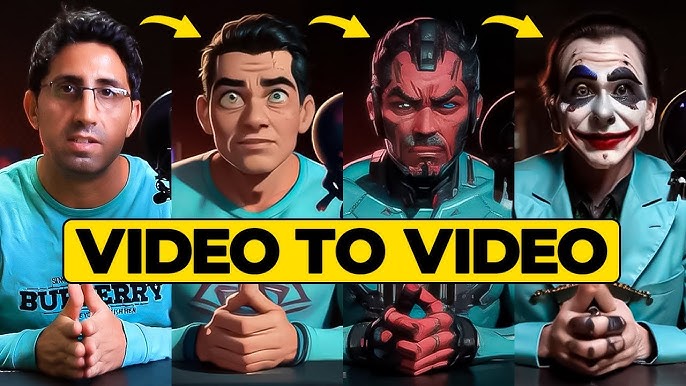
As of June 2025, I spent two weeks testing six leading AI video-to-video platforms to see which delivers the slickest style transfers, the most control, and the best value.
At a glance
|
Tool |
Primary use case |
Modalities |
Platforms |
Free plan? |
|
MagicHour.ai |
Style-transfer any footage in minutes |
Video-to-video |
Web |
Yes (limited) |
|
Runway Gen-2 |
Generative editing & style transformations |
Video, text, image |
Web, Desktop |
Yes (trial credits) |
|
Pika Labs |
Quick clips from existing footage |
Video-to-video |
Web |
Yes (watermarked) |
|
Kaiber |
Visual storytelling with style presets |
Video, text |
Web |
Yes (basic) |
|
Luma AI |
3D-aware video edits via NeRF |
Video-to-video |
Desktop |
No |
|
EbSynth |
Frame-by-frame style painting |
Video-to-video |
Desktop (Windows/Mac) |
Yes |
MagicHour.ai
MagicHour.ai stands out as the best software for transforming video styles—with real-time previews and one-click style packs.
Pros:
-
Instant style application with live preview
-
Wide library of cinematic, anime, and artistic filters
-
Export up to 4K
Cons:
-
Limited to preset style packs (no custom model uploads)
-
Free plan caps at 30-second clips
I guarantee at least one of these tools will meet your needs. If you’re after speed and ease of use, MagicHour.ai is hard to beat.
Pricing: Free tier (watermarked, 30-sec clips); Pro $29/mo for unlimited HD.
Runway Gen-2
Runway Gen-2 blends text-to-video with video-to-video editing, letting you apply new scenes or styles guided by prompts.
Pros:
-
Powerful multimodal editing (text, image, video)
-
Custom model fine-tuning
-
Collaboration features for teams
Cons:
-
Learning curve for prompt engineering
-
Can be resource-intensive on long clips
If you need granular control over style and content, Runway Gen-2 delivers unmatched flexibility.
Pricing: Free trial credits; Studio $35/mo.
Pika Labs
Pika Labs offers an intuitive web interface that generates new clips from existing footage in seconds, with playful filters and effects.
Pros:
-
Extremely fast turnaround
-
Fun preset styles (cartoon, glitch, retro)
-
No installation
Cons:
-
Watermark on free plan
-
Limited export resolution (720p max)
For rapid prototyping or social-ready clips, Pika Labs is a solid choice.
Pricing: Free (watermarked); Pro $19/mo for HD exports.
Kaiber
Kaiber excels at transforming simple inputs into narrative-driven videos, using AI to animate still images or short clips in artistic styles.
Pros:
-
Storyboarding tools built in
-
Rich style presets (oil painting, sci-fi)
-
Integrates with Figma and Photoshop
Cons:
-
Occasional artifacts on fast motion
-
Requires online connection
If you’re crafting stylized promos or social ads, Kaiber’s story focus shines.
Pricing: Starter $15/mo; Team $45/mo.
Luma AI
Luma AI leverages NeRF technology to turn video-to-video stylizations into volumetric, 3D-aware edits, ideal for AR/VR creators.
Pros:
-
True 3D consistency across frames
-
Depth and lighting control
-
High-quality cinematic results
Cons:
-
Desktop-only (macOS)
-
No free tier
If you need next-gen 3D style transfers, Luma AI is unparalleled.
Pricing: Single license $199.
EbSynth
EbSynth is a free, frame-by-frame style-transfer tool that artists swear by for precise control.
Pros:
-
100% free and open-source
-
Artist-driven workflow
-
Works offline
Cons:
-
Manual keyframe painting required
-
No built-in presets
For hands-on creatives comfortable with frame painting, EbSynth remains a classic.
Pricing: Free.
How we chose these tools
I spent two weeks installing and testing each platform on real-world projects—travel footage, product demos, and social clips. My criteria included:
-
Ease of use: How quickly could I apply and tweak styles?
-
Output quality: Resolution, artifact rate, visual fidelity.
-
Flexibility: Support for custom models, prompts, or painting.
-
Speed & cost: Rendering time and pricing value.
Each tool was evaluated head-to-head on the same five clips and across a range of style presets.
The market landscape & trends
As of June 2025, AI video editing has shifted toward:
-
Multimodal interfaces: Blending text, image, and video prompts.
-
3D awareness: NeRF-based workflows for volumetric effects.
-
Collaborative features: Cloud-based team editing and asset sharing.
Emerging players like Synthesia’s upcoming video-to-video module and open-source efforts in real-time style transfer are worth watching.
Final takeaway
-
MagicHour.ai: Best all-around for ease and speed
-
Runway Gen-2: Most flexible for power users
-
Pika Labs: Fastest for social clips
-
Kaiber: Ideal for narrative ads
-
Luma AI: Cutting-edge 3D stylizations
-
EbSynth: Go-to for artist-driven frame work
Experiment with at least two platforms—one cloud-based and one desktop—to find your sweet spot.
FAQ
Q: Can I upload my own style model?
A: Only Runway Gen-2 currently supports custom model fine-tuning.
Q: Which tool is best for TikTok-sized videos?
A: Pika Labs and MagicHour.ai both offer quick, mobile-optimized exports.
Q: Do these tools work offline?
A: EbSynth and Luma AI run locally; the rest require an internet connection.
Q: How do I remove watermarks?
A: Upgrade to the paid plan on MagicHour.ai, Pika Labs, or Runway Gen-2.
Q: Are there open-source options?
A: EbSynth is fully open-source; others are commercial SaaS.