

AI face swapping tools have transformed how users create content, from viral TikToks to professional video campaigns. With just a few clicks, you can now replace faces in videos online, no special editing skills needed. But not all face swap apps are created equal.
This article compares six popular video face swap tools, ranked based on output quality, ease of use, and user feedback. Whether you’re a creator or just experimenting, this list helps you choose the best tool for your needs.
1. DeepSwapper – Best Overall Video Face Swap Tool
Website: www.deepswapper.com
This face swapping web tool stands out as the top-rated video face swap tool thanks to its unlimited swaps, no sign-up requirement, and impressive results. It works directly in your browser and supports both photo and video swaps with high realism.
Key Features
- Swap faces in videos and images
- No login or software download required
- Fast processing (under a minute)
- Premium output without watermark
- Mobile and desktop browser compatible
Pros
- Unlimited free swaps available
- Easy drag-and-drop interface
- Supports long videos and HD resolution
- No technical knowledge needed
Cons
- Premium output needed for watermark-free results
- Lacks deeper customization options
2. FaceSwapper.ai – Best for Images and GIFs
Website: www.faceswapper.ai
FaceSwapper.ai provides high-quality swaps for both images and short videos. It’s widely used for personal portraits, headshots, and GIFs. Its strength lies in its realistic lighting, texture blending, and ease of access.
Key Features
- Swap faces in photos, videos, and GIFs
- AI-powered headshot generator
- One-click interface, no login required
- Supports formats like MP4, MOV, WEBP
Pros
- Excellent photo realism and detail
- Supports multiple file formats
- Great for professionals and freelancers
Cons
- Video results depend heavily on input quality
- Fewer advanced editing tools
3. Remaker AI – Feature-Rich but Mixed Feedback
Website: www.remaker.ai
Remaker AI offers a wide range of features beyond face swapping, such as avatar creation, video dubbing, and voice cloning. However, user reviews often mention inconsistent video output and slower rendering times.
Key Features
- Face swapping with lip-sync AI
- Talking avatars and voiceover tools
- AI ad generator
Pros
- Strong feature set for commercial use
- Multi-language voice dubbing
Cons
- Video quality may vary
- Several users report bugs and delays
4. MaxStudio AI Face Swap – Simple and Fast for Casual Use
Website: www.maxstudio.ai
MaxStudio is a browser-based face swap tool aimed at beginners. It offers quick video face swaps with minimal setup. Its clean interface and drag-and-drop workflow make it ideal for non-tech users.
 Key Features
- Video face swapping with instant preview
- Social sharing options
- Basic enhancement tools
Pros
- Easy to use for first-time users
- No software download required
- Clean and responsive interface
Cons
- Lower resolution output for free users
- Limited features for pro-level editing
5. Ai Ease – Creative Filters, But Some User Complaints
Ai Ease blends fun features like cartoon filters with face-swapping tools. However, it has received mixed feedback due to limited realism in video results and a less intuitive interface.
Key Features
- Face swapping in videos and photos
- Cartoon effects and fun templates
- Creative video editing tools
Pros
- Good for casual and social content
- Simple to use
Cons
- Some quality issues in final videos
- Interface can be confusing
- Not suited for professional projects
6. Faceswaponline.io – Basic Face Swaps for Short Clips
Website: www.faceswaponline.io
Faceswaponline.io is a lightweight tool for users who want quick results without complicated features. It’s best for small, humorous clips or avatar content.
Key Features
- Instant video face swaps
- Supports short video uploads
- No login required
Pros
- Simple and fast for casual use
- No app or registration needed
Cons
- Limited output quality
- Few customization or control options
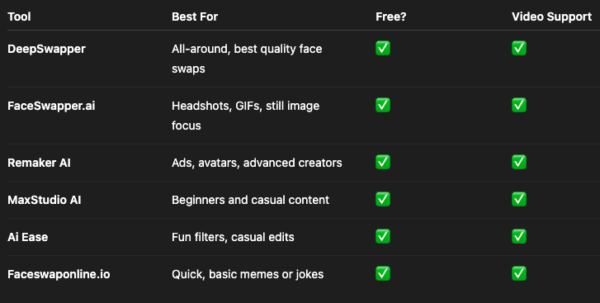
Which Video Face Swap App Should You Choose?
Final Verdict
If you’re looking for the best combination of realism, speed, and ease of use, DeepSwapper is the clear winner. It’s accessible, efficient, and produces top-tier results without needing any signup or software.
FaceSwapper.ai is an excellent choice for freelancers or creators focused on still image realism and headshots. Tools like Remaker AI and Ai Ease offer more features but come with trade-offs in stability and output consistency.
Start experimenting with the free versions to see which one fits your content style and workflow best.